What should you look for when buying?
For long writing sessions, the main things to consider are the desk space available, the hand position you prefer, and a connection and layout that work with your computer.
| Buying priority |
What to look for |
Who is this especially important for? |
| Hand and arm position |
Compare fixed-split designs with separate halves, and try the position at your own desk. The Federal Institute for Occupational Safety and Health recommends being able to arrange your keyboard, mouse and hand and arm support flexibly. |
When I write for long periods, I want to find a hand position that works with my whole workstation. Hand and arm position is likely to be the top buying priority for around 29% of consumers. |
| Desk space |
Measure the keyboard’s width and depth, including any wrist rest, and leave room for your mouse, book and notes. |
I need space for my mouse and papers as well as my keyboard, and don’t want to underestimate how much room I have. Around 29% of consumers are likely to prioritise having enough desk space. |
| Typing noise |
If possible, try the specific model; the switch type or design alone won’t give you a reliable idea of how noisy it is to type on. |
If other people are studying or sleeping in the room, I mainly want to know what the specific model sounds like when I type. Typing noise is likely to be the top priority for around 21% of consumers. |
| Connection and layout |
Check that your chosen version has a German keyboard layout and supports your operating system. Also make sure its USB-A, Bluetooth or USB receiver connection works with your computer. |
I want to be sure the keyboard will connect to my device and has the layout I need. Connection and layout are likely to be the deciding buying priorities for around 21% of consumers. |
Keyboards for your desk
This selection includes wired and wireless keyboards for desks with different space requirements. For each model, check the keyboard layout and connection in particular.
 No image available
104-key USB keyboard
A wired keyboard for a fixed desk set-up. The product is described as a 104-key USB keyboard.
View at Joybuy
 No image available
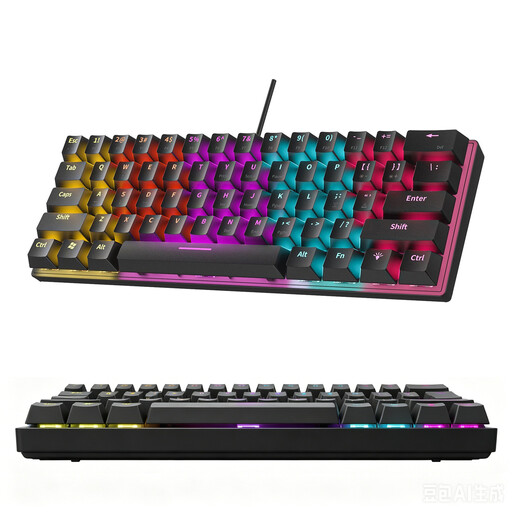
KINSI 60% gaming keyboard, 61 keys
Its compact size may suit a desk with limited space. The product details list 61 keys and RGB lighting; according to the product information, it isn’t available with a German layout.
View at Joybuy
 No image available
MageGee TS91, wired 60% keyboard
This compact wired model is an option for desks with limited space. According to the product details, it has 61 keys and a US QWERTY layout, which may not suit you if you need a German keyboard layout.
View at Joybuy
 No image available
Wireless keyboard and mouse set with QWERTZ layout
This set may suit you if you’re looking for a German keyboard layout and a mouse for the same desk. The product details list a detachable wrist rest, a 2.4 GHz connection and a full-size keyboard with a number pad; make sure you have enough desk space for it.
View at Joybuy
 No image available
Logitech ERGO K860, QWERTZ
A fixed-split keyboard for anyone who wants to try this design at their own desk. The product details list Bluetooth, a USB receiver and a padded wrist rest. Its full-size design needs room for the keyboard, mouse and papers.
View at Joybuy
Frequently asked questions
Is an ergonomic keyboard enough to create a good desk set-up?
No. Also check that your desk, chair, mouse and papers are arranged so you can maintain a suitable hand and arm position. The Federal Institute for Occupational Safety and Health recommends having enough space to arrange your equipment flexibly; this doesn’t guarantee that you’ll avoid discomfort.
How can I check whether a keyboard is compatible with my laptop?
Compare the connection and operating system information for the specific version with your device. CHERRY lists USB-A and Windows compatibility for the KC 4500 ERGO; Perixx lists Bluetooth 4.2 or a 2.4 GHz receiver with a USB-A connection for the PERIBOARD-612 W. Also check that the layout meets your needs.
How do I clean a Logitech keyboard?
Logitech recommends unplugging a wired keyboard before cleaning it and, for wireless models, removing any removable batteries where applicable. Also follow the instructions for your specific model.
What are my rights in Germany if I don’t like how a keyboard feels to type on?
When you buy goods online from a business, you generally have 14 days from delivery to exercise your right to cancel; you must notify the seller that you’re cancelling. Your Europe, the European Union’s consumer portal, notes that exceptions and return costs may apply. The right to cancel is separate from claims relating to faulty goods and from any voluntary guarantee.
Do I need special approval for a keyboard in a private student room?
The ASR A6 workplace rule doesn’t apply to private use outside a home-working set-up. The Federal Institute for Occupational Safety and Health explicitly excludes the use of display screen equipment in private settings outside home-working workplaces from its scope. Ergonomic advice can still help you arrange your desk.


