What to look for when buying
The Federal Institute for Occupational Safety and Health recommends considering your keyboard, mouse and arm support together when planning the space available on your desk.
| Buying priority |
What to check |
Who it matters most to |
| Hand and arm position |
Try out your hand position and mouse reach at your own desk; compare wave-shaped designs, fixed split layouts and separable modules. |
When I write longer essays, I want to position my hands, keyboard and mouse in a way that works for me. Around 31% of consumers prioritise hand and arm position. |
| Layout and typing flow |
Check the DE-QWERTZ layout, special characters and the position of frequently used arrow and function keys on the specific variant. |
When drafting and editing, I want to use keys that feel familiar. Around 31% of consumers prioritise layout and typing flow. |
| Desk space |
Compare the keyboard’s width and depth, including any support, with the space available for your mouse and documents. |
If my desk needs to accommodate my mouse and documents as well as my screens, every bit of space counts. Around 23% of consumers prioritise available space. |
| Connection and switching between devices |
Check how many computers you’ll actually use and whether USB, Bluetooth or a receiver is right for the connection you need. |
If I really do switch between several devices, I want the right connection for the job. Around 15% of consumers prioritise connection or switching between devices. |
Joybuy products
The Joybuy products featured here range from wired models to the split Logitech ERGO K860, and also include a keyboard and mouse set. Pay particular attention to the layout, connection and footprint when comparing them.
 Image unavailable
104-key USB keyboard
A wired option for longer typing sessions if you’re looking for a 104-key layout.
USB plug-and-play; dimensions: 445 × 145 × 20 mm. The description calls it an ergonomic design.
View at Joybuy
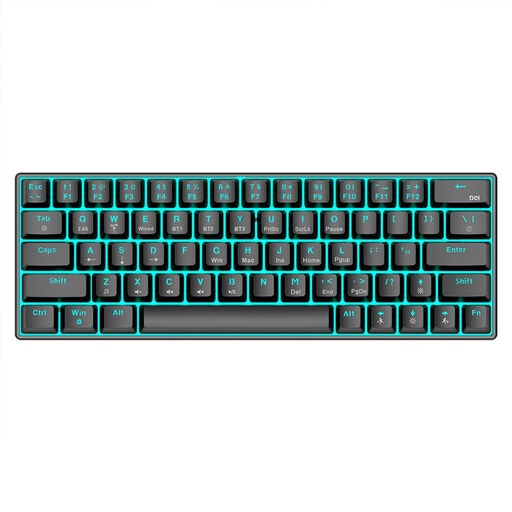 Image unavailable
KINSI compact 63-key mechanical keyboard
The compact layout may suit you if you want to leave more room on your desk to move your mouse.
63 keys; Bluetooth 5.0, 2.4 GHz wireless or USB cable. The description lists a stepped layout.
View at Joybuy
 Image unavailable
Wireless keyboard and mouse set with QWERTZ layout
An option to consider if you’re looking for a keyboard and mouse together and would like to use a palm rest.
QWERTZ layout, number pad and detachable palm rest; connects via a 2.4 GHz USB receiver. Listed as compatible with Windows and Mac.
View at Joybuy
 Image unavailable
Logitech ERGO K860, QWERTZ, graphite
The fixed, curved split design is one option to consider if you’d like to try this key layout.
Integrated palm rest; Bluetooth or USB receiver; three tilt options. Overall dimensions: 456 × 233 mm.
View at Joybuy
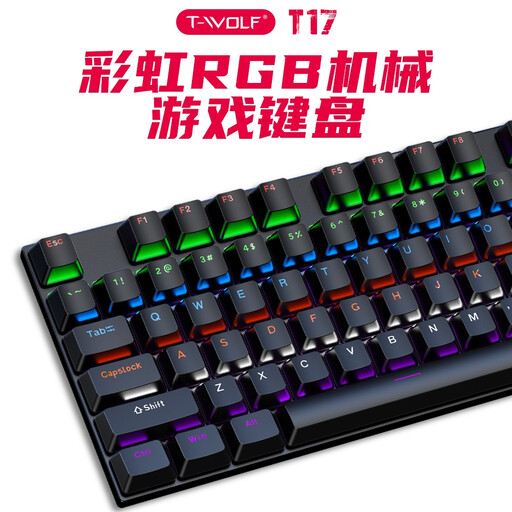 Image unavailable
Rexsun T17, wired 104-key keyboard
Consider this model if you’re looking for a wired keyboard and the US key layout suits the way you type.
USB cable, 104 keys and RGB lighting; US QWERTY rather than DE-QWERTZ. Listed as compatible with Windows and Mac.
View at Joybuy
Frequently asked questions
Do I need a keyboard with device switching because I use two screens?
Only if you actually switch between several compatible computers or mobile devices. The German Social Accident Insurance covers the arrangement of multiple screens; Logitech, by contrast, describes Easy-Switch as a feature for switching between devices.
How should I position my keyboard when writing?
Leave room on your desk for your mouse and arm support, and try a position that feels practical for your hands. The Federal Institute for Occupational Safety and Health considers the positioning of input devices part of the overall workstation; choosing a particular keyboard design doesn’t replace this planning.
How can I tell whether a similarly named keyboard variant is right for me?
Compare the model number, key layout, operating system, connection and what’s included with the specific version. Variants with similar names may differ; the Logitech Wave Keys 920-012404 is listed as optimised for Apple systems.
Does a CE marking prove that a keyboard has ergonomic benefits?
No. A CE marking doesn’t prove that a keyboard will have individual ergonomic benefits. The EU’s guidance on the marking explains that the manufacturer uses it to declare conformity with the relevant product requirements; it is not a central EU approval.
What rights apply when buying online for personal use in Germany?
When you buy online from a retailer, you generally have a 14-day right to cancel; when the period starts and any exceptions depend on the circumstances of the purchase. Your statutory rights against the seller are separate from any voluntary manufacturer’s warranty.


