What should you look for when buying?
First, compare the design and the space it requires with your desk. Then check that the layout and connection suit your device, and that the typing feel works for you.
Full-size fixed split keyboard
A good fit if: you usually write in the same place and have enough desk space for the keyboard.
Things to consider: The split layout may take some getting used to; according to Perixx, the PERIBOARD-512 B measures 485 × 236 × 44 mm.
Compact wave-shaped keyboard
A good fit if: you want to save desk space and prefer a less pronounced split layout.
Things to consider: Unlike two independently positioned keyboard halves, a wave-shaped design cannot be adjusted in the same way.
Compact split mechanical keyboard
A good fit if: you’re looking for a smaller split design with a choice of typing feedback.
Things to consider: The choice of switch does not tell you how loud the keyboard will be compared with another model; according to Perixx, the key-mapping software for the PERIBOARD-335 is for Windows only.
Fully split keyboard
A good fit if: you want to position the two halves independently.
Things to consider: Check the German key layout and what’s included with the specific configuration; additional customisation options can make choosing more involved.
| Buying priority |
What to look for |
Who it matters most to |
| Hand and arm position |
Consider the split, tilt and position of the keyboard and mouse together; don’t take marketing claims as a guaranteed benefit. |
If I write at the same desk for long periods, I want to find a hand position that suits me without assuming it will have a particular effect. Around 29% of consumers put this priority first. |
| Desk space |
Compare the width and depth of your chosen model with the space available, and allow room for your mouse and notes. |
If my desk is small, I still need room beside the keyboard for my mouse and writing materials. Around 23% of consumers prioritise the space available. |
| Typing noise and feedback |
If possible, try the specific switch type; don’t treat descriptions such as “quiet” as comparable measurements. |
If I share a room, I want to disturb others as little as possible while writing, without compromising on a typing feel that suits me. Around 18% of consumers put consideration for others first. |
| Cost and getting used to the keyboard |
Check the configuration and accessories needed for your preferred layout, and allow time to get used to it. |
If I’m a student weighing up the cost, I want to know which configuration and accessories I’ll actually need before choosing. Around 18% of consumers prioritise cost. |
| Connection and German layout |
Check for a DE-QWERTZ version and a connection your device supports, such as USB-A or compatible Bluetooth. |
If I want to type umlauts and special characters reliably, the layout and connection need to work with my device. Around 12% of consumers put this compatibility first. |
Keyboards for everyday writing on Joybuy
The Joybuy options below include compact, wired and split keyboards, as well as a keyboard and mouse set. For each one, check that the layout and connection suit your device and that the size works with your desk.
 No image available
Inateck KB01003G Bluetooth keyboard, QWERTZ
A compact option if you’re looking for a wireless keyboard with a German layout.
The product name lists Bluetooth, QWERTZ and larger keycaps.
View on Joybuy
 No image available
Wired USB keyboard, 104 keys
An option for desk-based writing if you’re looking for a full-size wired keyboard.
The product name lists 104 keys and a USB connection.
View on Joybuy
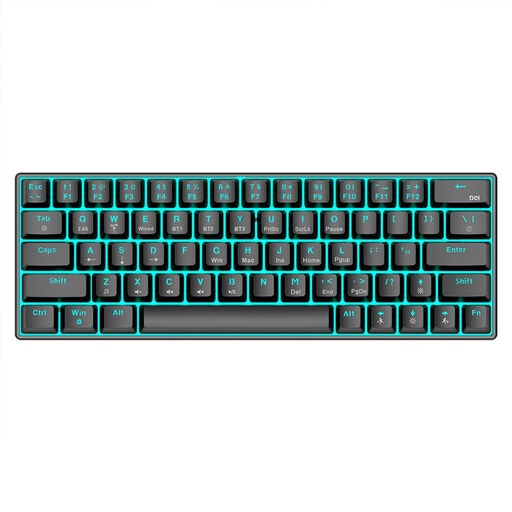 No image available
KINSI mechanical keyboard, 63 keys
A compact option if you need less desk space and want to choose between wired and wireless connections.
The product name lists Bluetooth 5.0, 2.4 GHz and a USB cable.
View on Joybuy
 No image available
Wireless keyboard and mouse set, QWERTZ, with number pad
This set could suit you if you’re looking for a keyboard and mouse together and want a QWERTZ layout.
The product name lists a number pad, quiet keys and a removable wrist rest; assess the noise level of the specific version for yourself.
View on Joybuy
 No image available
Logitech ERGO K860, wireless, QWERTZ
A full-size fixed split keyboard for longer writing sessions at a permanent workstation, provided you have enough desk space and are happy to get used to the layout.
This version is available with a QWERTZ layout. Before buying, check that the connection works with your device.
View on Joybuy
Frequently asked questions
Does a keyboard in a private student room have to meet the ASR A6 requirements?
No, not simply because you’re writing in a private student room. The Federal Institute for Occupational Safety and Health explains that ASR A6 applies to workplaces and teleworking, and excludes use in private spaces outside these work settings. Its ergonomic guidance can still be helpful when setting up your space.
How should you set up an external keyboard for longer writing sessions?
Allow enough space to position your keyboard and mouse flexibly, and avoid staying in the same rigid position for long periods. The Federal Institute for Occupational Safety and Health gives this advice on setting up a workstation; it does not prescribe a particular keyboard design.
Which connection should you check before buying?
Check the connection on the specific keyboard and what your device supports. According to Perixx, the PERIBOARD-512 B uses a USB-A cable; Logitech lists Bluetooth or a Logi Bolt receiver for the Wave Keys. If your device doesn’t have a suitable port or support the wireless connection, you’ll need another way to connect it.
What rights apply when buying online in Germany?
When buying remotely from a business seller, you generally have a 14-day right to cancel; for goods, the period usually starts when they’re delivered. If goods are faulty, you’re also entitled to a statutory guarantee from the seller for at least two years. This is separate from any voluntary manufacturer’s warranty; possible exceptions may apply in individual cases.
What product safety checks should you make when buying a Bluetooth keyboard?
For electronic products, including Bluetooth devices, the Federal Network Agency lists several checks as part of its market surveillance. These include the CE marking, product and manufacturer identification, instructions in German and a declaration of conformity. Use these as a guide and check them against the specific product.


