Frequent typists at a shared desk
If you write and edit longer profile pieces, consider whether the key shape and typing feel suit you. A split key layout may take some getting used to; Perixx explicitly notes this for the PERIBOARD-512 B.


For writing long-form interview profiles, a split or curved keyboard could be a good fit if you’re comfortable with the key layout and have enough desk space for the keyboard, mouse and wrist rest. If desk space and frequent rearranging are more important, a more compact wave-shaped design is another option. The German Federal Institute for Occupational Safety and Health (BAuA) emphasises that your workstation layout matters too: an ergonomic keyboard is no substitute for a properly arranged workspace.
If you write and edit longer profile pieces, consider whether the key shape and typing feel suit you. A split key layout may take some getting used to; Perixx explicitly notes this for the PERIBOARD-512 B.
If the desk is regularly cleared or you switch between work devices, the keyboard’s dimensions and the connections it actually supports are key considerations. The BAuA recommends allowing space for the keyboard, mouse and somewhere to rest your hands and arms.
If other people are working within earshot or the keyboard is shared, noise information and easy-to-reach surfaces matter. Check these features for the specific model and follow its care instructions.
| What matters | What to check before buying | Who will find this particularly important |
|---|---|---|
| Hand position and typing feel | Consider the key layout, height and tilt, as well as the space available for your hands and forearms at your particular workstation. | If you write long profile pieces, the key shape should feel practical for you. Around 36% of consumers put typing comfort and hand position first. |
| Desk space and switching between devices | Check the keyboard’s dimensions, including any wrist rest, against the keys you need and the Bluetooth or USB connections that suit your setup. | If you often clear your desk or switch between work devices, the right size and connection matter. Around 29% of consumers prioritise space and switching between devices. |
| Noise and cleaning | Check the model’s specific noise information, whether the gaps between keys are easy to reach and what the care instructions say. | If you write in a shared room, being considerate of others and being able to clean the keyboard easily are important. Around 21% of consumers put these considerations first. |
| Connection and ongoing costs | Check whether USB-A is available and how the cable is routed, or, for wireless models, check the battery type and what’s included. | If an easy connection and ongoing costs matter to you, compare wired and wireless options. Around 14% of consumers prioritise connectivity and running costs. |
The shape alone won’t tell you whether the keyboard will fit on a shared desk or whether you’ll get used to the key layout. The BAuA also highlights the importance of setting up your workstation as a whole.
Check the keyboard’s dimensions and key layout alongside your desk, mouse and writing materials.
Wave Keys and the ERGO K860 have different key shapes; a compact wave-shaped design is not the same as a permanently split layout.
First decide which key layout you’d like to use, then check that it fits the space available.
For the Logitech ERGO K860, F.A.Z. Kaufkompass notes that a gap is difficult to clean. This finding applies to this specific model and shouldn’t be taken to apply to all ergonomic keyboards.
Compare how easy the surfaces are to reach and follow the care instructions for the model you choose. Bitkom advises against using harsh cleaning products or allowing liquid to get inside the device.
The ERGO K860 has a permanently split key layout, while Wave Keys uses a more compact wave-shaped design.
The PERIBOARD-512 B is a wired keyboard with a split layout; a German QWERTZ version is available to select.
The KC 4500 ERGO is a curved, wired alternative; the German version has the model designation JK-4500DE-2.
The Pro Fit Ergo KB675 EQ TKL is a more compact wireless option; the larger Pro Fit Ergo keyboard has a split layout.
This selection includes a compact wave-shaped keyboard, a split keyboard, and compact and wired models. For the specific version you’re considering, check the key layout, connection and fit for your workspace.
 No image available
The wave-shaped design and wrist rest may suit you if you’re looking for a contoured key layout for a shared workspace.
German QWERTZ layout, Bluetooth, quiet membrane keys and multi-device connectivity. According to the product name, this version is optimised for macOS, iPadOS and iOS; check compatibility with your work device.
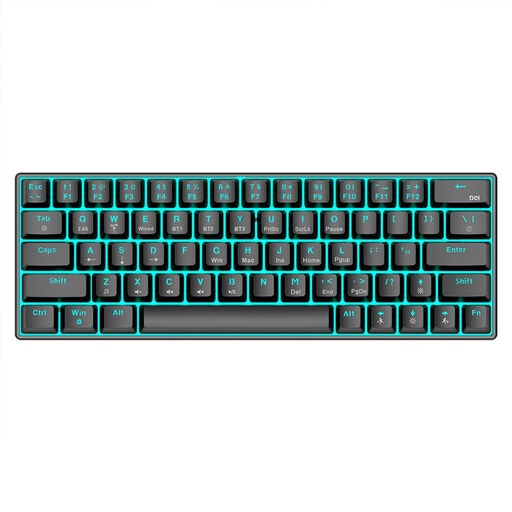 No image available
The compact 63-key format may be worth considering if desk space is limited. Check that the specific key layout meets your writing needs.
Mechanical keys; Bluetooth 5.0, 2.4 GHz or USB cable connection options. The product name also specifies RGB lighting and a 1,450 mAh battery.
 No image available
The split key layout and wrist rest may suit you if you’d like to try this shape for longer writing sessions.
QWERTZ layout; Bluetooth and USB receiver connection options. F.A.Z. Kaufkompass notes that this model has a gap that’s difficult to clean and no backlighting; the review also says it can’t be used with a cable.
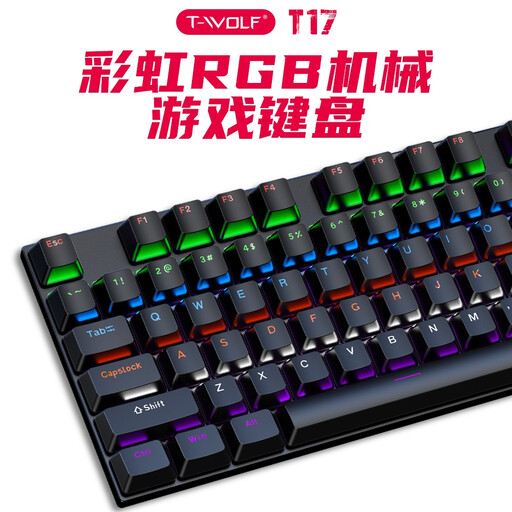 No image available
This model is described as ergonomically designed and is wired. The US QWERTY layout specified in the product name differs from a German layout, so check this before buying.
Mechanical keyboard with 104 keys and a USB cable; the product name also specifies RGB lighting and compatibility with Windows and Mac.
Allow space for your keyboard, mouse and documents, as well as somewhere to rest your hands and arms. The BAuA recommends adjusting the desk and chair to suit the individual and avoiding a consistently fixed, awkward posture; no particular keyboard model can replace a properly arranged workspace.
Follow the care instructions for the specific model and make sure no liquid gets inside the device. Bitkom advises against using harsh cleaning products. For the Logitech ERGO K860, F.A.Z. Kaufkompass notes that a gap is difficult to reach.
When you buy online as a consumer, you generally have a 14-day right to cancel; you must notify the retailer that you wish to cancel. The Verbraucherzentrale distinguishes the statutory consumer rights you have against the seller from a voluntary guarantee. For your specific purchase, check whether it qualifies as a consumer purchase and what guarantee terms apply.
The BAuA guidance on screen-based work does not create a general requirement to buy a split keyboard. For workplace screen equipment covered by the Workplace Ordinance, the BAuA describes separating the keyboard from the screen as a requirement; ASR A6 sets out more detailed requirements within its scope. Whether a particular shared desk is covered depends on how it is used as a workstation.