What to look for when buying
Start by comparing the total space required at your workstation, then decide whether a fixed, curved shape or separate halves better suit the hand position you want.
| Priority |
What to check before buying |
Who should pay particular attention |
| Space for your writing setup |
Overall dimensions, including the wrist rest; allow room for your mouse and text as well. |
If I need a mouse and my text alongside the keyboard, I need to consider the space required by the whole setup. This is the top priority for around 36% of consumers who value desk space most. |
| Hand position while typing |
Fixed, curved shape or two separate halves; check that your preferred layout will fit on your desk. |
If I want to position my hands differently during longer typing sessions, it’s important that the chosen shape suits my workstation. Around 29% of consumers put hand position first. |
| Layout and connection |
Check the DE-QWERTZ layout of the specific version; make sure USB-A or the stated Bluetooth method is compatible with your device. |
If I write German museum texts, I need a layout I can type on reliably and a compatible connection. This is the priority for around 21% of consumers. |
| Typing noise and cleaning |
Check the switch type offered and how easy it is to clean the wrist rest and spaces between the keys. |
If I work at a shared desk, typing noise and how easy the keyboard is to clean may be deciding factors. Around 14% of consumers give these considerations the greatest weight. |
Relevant brands at a glance
The notes below refer to specific product lines and versions as described; they are not a general assessment of the brands or their availability.
Logitech
Wave Keys for Business is a more compact curved option; ERGO K860 is a split keyboard in a standard size.
- For the DE-QWERTZ version of Wave Keys for Business, Logitech lists a width of 376 mm and Bluetooth Low Energy or Logi Bolt as connection options.
- For the ERGO K860 for Business, Logitech lists a width of 456 mm and a number pad. Dimensions and connectivity may vary by version.
R-Go Tools
Compact Break has a compact layout; the two halves of the Split Break Version 2 can be positioned separately.
- The manufacturer offers DE-QWERTZ versions and describes a software-controlled break indicator.
- The break indicator is a manufacturer feature, not a measure of health benefits. Each separate half needs space in the position you want to use.
Perixx
The PERIBOARD-335 is a compact, fixed-split mechanical keyboard with a choice of switch types.
- Perixx lists dimensions of 398 × 202 × 44 mm, a USB-A cable, a choice of DE-QWERTZ layout, and quiet or clicky switch options.
- According to the manufacturer, the programming software is only available for Windows. Check the layout and switch type you want before ordering.
CHERRY
The KC 4500 ERGO is a wired, standard-size alternative with a curved key layout.
- For the German version, JK-4500DE-2, CHERRY lists dimensions of 456 × 217 × 35 mm, USB-A and an integrated wrist rest.
- Claims that it can reduce discomfort are made by the manufacturer and don’t guarantee an individual result.
Related products at Joybuy
This selection includes keyboards for German-language writing, as well as models where the layout, noise level or space required should be checked particularly carefully.
 No image available
Logitech MX Mechanical, Tactile Quiet, German QWERTZ
The explicitly stated German QWERTZ version is relevant for German-language text; check whether the keyboard will fit on your desk alongside your mouse and text.
The product title specifies Tactile Quiet switches, as well as Bluetooth and Logi Bolt.
Joybuy
 No image available
Logitech ERGO K860, wireless ergonomic keyboard, QWERTZ
The curved, split layout with an integrated wrist rest may suit you if you prefer a fixed hand position; on a small desk, consider its width alongside your mouse and text.
The QWERTZ version is described as wireless in the product title. For the ERGO K860 for Business, Logitech lists a width of 456 mm and Bluetooth Low Energy or a Logi Bolt receiver; check the connection on the specific version.
Joybuy
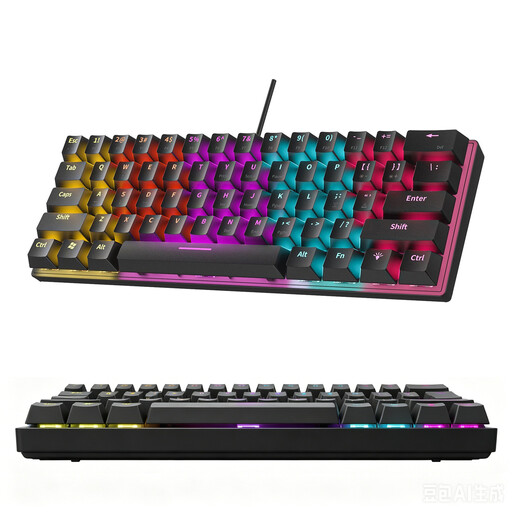 No image available
KINSI 60% mechanical keyboard, 61 keys
The compact design may suit a small desk, but the product description specifically says that it doesn’t have a German layout. For German-language text, choose it only if the layout offered works for you.
The product title specifies 60% and 61 keys. The description mentions a stepped key layout.
Joybuy
 No image available
Ticktype DP104, full-size with 108 keys, US layout
This version is suitable for German-language museum texts only if the US layout works for you; the full-size format also needs room on your desk.
The product title specifies 108 keys, tri-mode wireless connections and Silent Tactile Switches.
Joybuy
Frequently asked questions
Should I choose a fully split keyboard for a very small desk?
Only if both halves, along with your mouse and text, will fit in the positions you want. If you’d prefer less adjustment, start by comparing the dimensions of a compact curved keyboard; ‘split’ doesn’t automatically mean it needs less desk space.
What should I check when connecting and positioning the keyboard?
Make sure USB-A or the specific Bluetooth method stated is compatible with your device. Arrange the keyboard, mouse and text so there’s enough room for suitable hand and arm support and flexible positioning; workstation ergonomics depend on more than the keyboard shape alone.
How should I take typing noise and cleaning into account?
Check the specific switch type, as well as how easy it is to clean the wrist rest and spaces between the keys. Perixx offers quiet and clicky switch options for the PERIBOARD-335, among others; this doesn’t tell you a specific decibel level.
Does German law require a particular keyboard model for my museum desk?
The workplace rules reviewed don’t establish a general requirement to buy a particular keyboard model for private use. For covered workplace display-screen and teleworking setups, the Federal Institute for Occupational Safety and Health’s ASR A6, dated July 2024, sets out requirements under the Workplace Ordinance; whether a particular workstation is covered needs to be assessed in the relevant employment context.
Who should I contact if the keyboard develops a fault after purchase?
For a consumer purchase, the seller is generally responsible for statutory rights relating to faulty goods; these are separate from any additional manufacturer’s guarantee. The German Consumer Advice Centre states that new goods generally have a two-year period from the date of delivery.


