Who should think carefully about their keyboard choice?

Writers who spend hours at the keyboard

If you write longer passages, the shape of the keys and the typing feel should suit the way you position your hands. The models’ features are described, but that does not prove they are particularly suitable for novelists.

Writers using two screens

When switching between drafting and research, you need to make space for your keyboard, mouse and notes on your desk. The German Social Accident Insurance’s Institute for Occupational Safety and Health discusses recommendations for office work using two screens; its study did not focus specifically on creative writing.

Writers in a quiet workspace

If noise and key feel matter to you, check the specific switch type rather than relying on the model name alone. Mechanical keyboards in particular can sound different depending on the switches you choose.

What should you look for when buying?

Keyboard with independently positionable halves

A good fit if: You want to position the two halves to suit the way you hold your hands and adjust them as you write.

The trade-off: You’ll need room for both halves, your mouse and your notes, and it may take time to get used to the setup.

Fixed-shape ergonomic keyboard

A good fit if: You prefer a single-piece design with a curved or fixed split-key layout.

The trade-off: You can’t position the key areas independently; the connection options and layout depend on the model.

Fixed-split mechanical keyboard

A good fit if: You value the feel of mechanical switches and want to choose a specific switch type.

The trade-off: The two key areas on the PERIBOARD-535II can’t be positioned separately; a clicky switch version may be distracting in a quiet workspace.

What matters What to check before buying Who will find it especially important
Hand position and typing comfort Check whether the halves can genuinely be positioned separately and whether the keyboard feels comfortable to use in your writing position. When I write for a long time, I want to find a key layout that suits the way I position my hands. Around 33% of consumers prioritise an adjustable hand position.
Desk space and layout Measure the available space and allow room for notes as well as your keyboard and mouse; with split models, the position of both halves matters too. When I switch between drafting and research, I want my mouse and notes to stay within reach. Around 27% of consumers prioritise a desk layout that works for them.
Typing noise and key feel Check the exact switch type; on mechanical models, the sound can vary depending on the version. When I write in a quiet workspace, I want to choose keys with a sound that suits me. Around 20% of consumers prioritise typing noise and key feel.
Layout and connection Check that the German layout, operating system, connection and any accessories you need are compatible with your setup. When I want to type using German key labels and my usual device without having to relearn the layout, the layout and connection need to be right. Around 20% of consumers put this compatibility first.

Avoid common buying mistakes

  • Assuming ‘split’ means two freely movable halves

    A keyboard can have a split key layout while still having a single-piece casing. That doesn’t necessarily mean the two key areas can be positioned independently.

    Check whether the specific model consists of two separately positionable pieces or has a fixed design.

  • Ordering based on the model name alone

    The PERIBOARD-535II is available with different language layouts and mechanical switches. The model name alone doesn’t tell you which combination is selected in the listing.

    Before buying, confirm both the German layout and your preferred switch type.

  • Choosing a keyboard without leaving room for your mouse and notes

    With two screens, you may also need extra space for research materials. The further apart the halves are, the more desk space that particular setup may require.

    Measure the available space and check the keyboard in the arrangement you plan to use, rather than relying on a product photo alone.

Brands and models to consider

Logitech

The ERGO K860 is a wireless, fixed-shape keyboard for writers who prefer a single-piece design.

  • Logitech highlights its curved keys and cushioned wrist rest. F.A.Z. Kaufkompass gave the typing feel a positive review.
  • F.A.Z. Kaufkompass noted that it has no key backlighting and can’t be used with a cable. The manufacturer’s claims about reducing strain don’t prove that it will have this effect for everyone.

R-Go Tools

The Split Break Version 2 is a split keyboard available in a German QWERTZ layout.

  • R-Go Tools says the two halves can be positioned separately and joined magnetically; the break indicator is controlled by software.
  • The layout and connection depend on the specific version. The manufacturer’s claims about health benefits are not independently verified findings.

CHERRY

The KC 4500 ERGO is a fixed-shape, wired keyboard; CHERRY’s German version is the JK-4500DE-2.

  • CHERRY specifies a cushioned wrist rest, adjustable feet and a 1,8 m cable.
  • According to the manufacturer, this model requires Windows and USB-A and has no key backlighting. These features don’t prove that it will relieve discomfort.

Perixx

The PERIBOARD-535II is a fixed-split mechanical keyboard for writers who want to compare different switches and layouts.

  • Perixx Europe offers a choice of layouts and switches.
  • One blue-switch version is described as clicky. Before ordering, confirm that you’ve selected the German key labels and the switch type you want; the halves can’t be positioned separately.

Kinesis

The Freestyle2 International offers another approach, with separately positionable halves and country-specific European keyboard versions.

  • Kinesis describes adjustable spacing between the halves and membrane switches.
  • The manufacturer’s shop we viewed is for US customers only and doesn’t confirm a specific German retailer or German version.

Joybuy products for longer writing sessions

The Joybuy products below include wired and wireless keyboards, as well as a keyboard and mouse set. For each model, compare its design and specific layout with your desk and setup.

Wired USB keyboard with 104 keys

Ergonomic USB keyboard with 104 keys

Could be an option for a wired writing setup; the product name describes it as ergonomic.

The product name specifies 104 keys and a USB cable connection.

View at Joybuy

Wireless QWERTZ keyboard and mouse set with detachable wrist rest

Wireless QWERTZ keyboard and mouse set with wrist rest

This set could suit you if you want to choose your keyboard and mouse together and would find a detachable wrist rest useful.

The product name specifies QWERTZ, a full-size layout with a number pad, quiet keys and a mouse with three DPI settings. It is listed as compatible with Windows and Mac.

View at Joybuy

Logitech ERGO K860 with split key layout

Logitech ERGO K860

This fixed-shape, wireless keyboard could suit you if you prefer a single-piece design with a split key layout.

The product name specifies QWERTZ, Bluetooth and a USB receiver. Logitech describes the keys as curved and the wrist rest as cushioned.

View at Joybuy
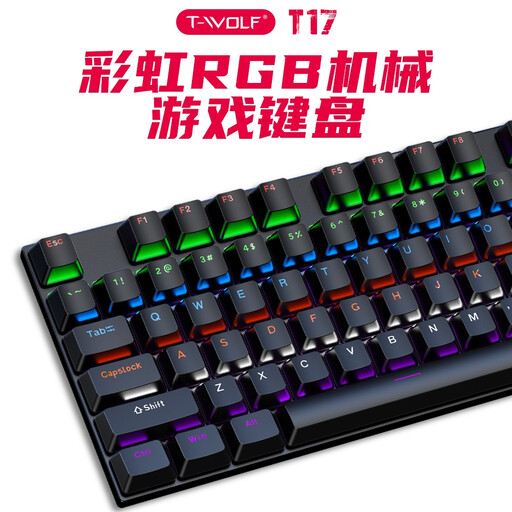
Rexsun T17 wired mechanical keyboard with US QWERTY layout

Rexsun T17, 100% keyboard with US QWERTY

This model is only worth considering if the US QWERTY layout suits the way you type; it doesn’t have a German QWERTZ layout.

The product name specifies a wired mechanical keyboard with 104 keys and RGB lighting.

View at Joybuy

Siukie CR108 wired mechanical keyboard with US layout

Siukie CR108, mechanical keyboard with US layout

This model may be worth considering for longer writing sessions if a US layout suits you; it isn’t listed as German QWERTZ.

The product name specifies a wired mechanical keyboard with 108 keys.

View at Joybuy

Frequently asked questions

Do I need a special keyboard because I use two screens?

Not just because of the number of screens. The German Social Accident Insurance’s Institute for Occupational Safety and Health considers its recommendations for office work to be largely applicable when using two screens; the study did not cover creative writing or a specific keyboard model. Arrange your input devices and notes to suit the way you actually work and the space available on your desk.

How should I position a split keyboard?

Start with a position that suits your hands and the space available, then adjust it as you type. R-Go Tools and Kinesis describe halves that can be positioned independently; how far apart they can be depends on the specific model. Remember to leave room for your mouse and notes too.

What should I check about the connection and care?

For the CHERRY KC 4500 ERGO, the manufacturer specifies Windows, USB-A and a 1,8 m cable. For the wireless Logitech ERGO K860, check the connection type on the specific version. Logitech says the ERGO K860’s wrist rest is easy to clean; this shouldn’t be taken as general care advice for other models.

Can I return a keyboard bought online if I don’t like how it feels to type on?

In Germany, consumers generally have a right to cancel when buying at a distance. Under §§ 312g and 355 BGB, the usual period is 14 days; for goods ordered, it generally begins when you receive them. Check the statutory exceptions, and distinguish the right to cancel from a retailer’s voluntary returns policy.

Does German law require a particular keyboard model for writing a novel at home?

ASR A6 does not require you to buy a specific keyboard model for writing at home. The regulation, issued by the Federal Institute for Occupational Safety and Health, sets out requirements for workplaces and applies to employers in this context. If your desk is also set up as a work station, the relevant occupational health and safety requirements need to be considered separately.