
Lieferung heute & morgen

Qualitätsgarantie

Willkommens-Angebote freischalten: KOSTENLOSE Lieferung | Bis zu 80 % RABATT | Kostenlose 30-Tage-JoyPlus-Testphase
App herunterladen
Long workdays at a desk lead to tension and wrist discomfort for many people. An ergonomic mouse is often touted as the solution, but the market is cluttered and full of marketing promises. Before you make a decision that will significantly impact your workplace comfort, it's crucial to understand the common pitfalls.
Many buyers invest in a model that looks promising at first glance, only to find after a few weeks that it doesn't improve the situation or even makes it worse. This is often due to three common misconceptions and design flaws:
To make an informed choice, you should focus on objective criteria that directly influence user comfort. Three parameters are decisive here.
The core concept of many ergonomic mice, especially the vertical mouse, is the so-called "handshake" position. Instead of placing the hand flat on the mouse, which leads to twisting of the forearm (pronation), the hand is positioned in a more natural, upright posture.
A modern wireless ergonomic mouse should offer flexibility. The ability to seamlessly switch between multiple devices is a critical factor for many professionals.
For a productive office mouse, it's not the maximum DPI number but the quality of the sensor that is crucial.
Based on the criteria above, we have identified several models suitable for different requirements and user profiles.

Why This Fits Their Persona: This model is designed for users who want to make a long-term investment in their workplace health. The upright posture is ideal for individuals already experiencing early signs of strain, such as Repetitive Strain Injury (RSI).
It bypasses the "one-size-fits-all" myth with a specific design based on the handshake position. The 57° angle isn't an arbitrary shape but aims for a demonstrable reduction in muscle strain.
Advantage: The vertical design promotes a neutral wrist and forearm posture. Pros: Multi-device connectivity for up to 3 devices and a precise 4000 DPI sensor.
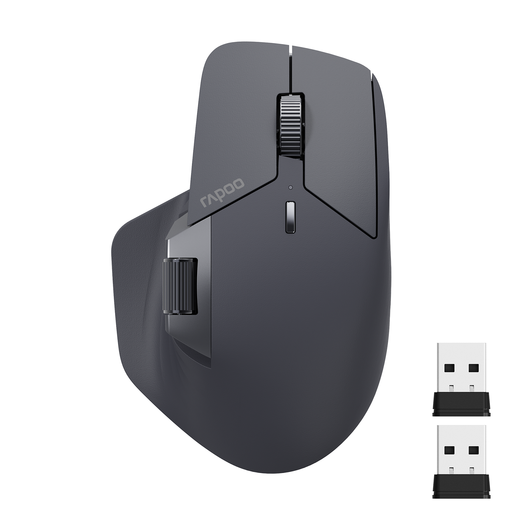
Why This Fits Their Persona: Ideal for users who work on multiple devices simultaneously and need a mouse that is not only ergonomic but also optimises their workflow through smart connectivity and customisation.
This model solves the inadequate connectivity trap. With support for up to 4 devices (via Bluetooth 5.0, 2.4G, and cable) and M+ Cross-Computer Technology, it's designed for complex setups.
Advantage: Comprehensive connectivity and multi-computer control. Pros: 11 programmable buttons, a side scroll wheel for horizontal scrolling, and a long battery life.
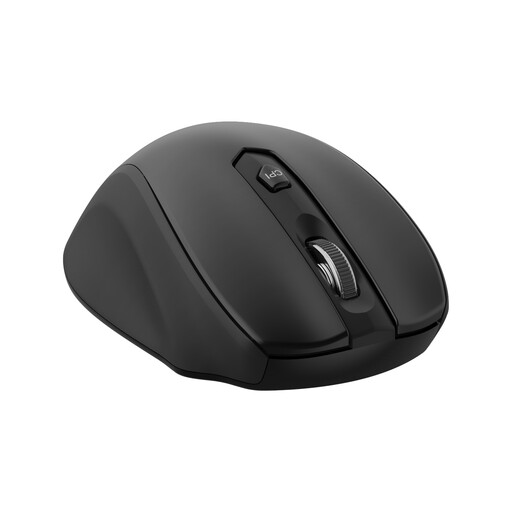
Why This Fits Their Persona: Perfect for home office users or students who want to improve on the comfort of a standard mouse without investing in a high-priced specialty model. It offers a noticeable improvement without a long adjustment period.
This model focuses on the fundamentals. It avoids the DPI hype, offering practical sensitivity with 5 adjustable levels (up to 2400 DPI). The shape is designed for comfort, not extreme aesthetics.
Advantage: Excellent value for money, delivering a noticeable comfort upgrade. Pros: Reliable 2.4GHz connection, a thumb rest, and forward/back buttons for improved productivity.
We have compiled a complete, up-to-date list of products that fully meet these strict selection criteria and German safety regulations.
The adjustment period is individual, but it typically takes between a few days and two weeks. Initially, the control may feel unusual as different muscle groups are engaged. It is advisable to use the mouse for shorter periods at first and gradually increase the duration of use.
The basic functions of most ergonomic mice work via plug-and-play without additional software. However, to assign programmable buttons, adjust DPI levels, or manage multi-device functions, manufacturers like Logitech or Rapoo usually provide optional software that can be downloaded from their websites.
An ergonomic mouse is designed to promote a more natural hand and arm posture, which can reduce strain on muscles and tendons. However, it is not a medical device. For persistent or severe pain, such as Repetitive Strain Injury (RSI), it is essential to consult a doctor or physical therapist to get a correct diagnosis and treatment recommendation. An ergonomic mouse can be part of a comprehensive strategy to improve workplace ergonomics.