
Lieferung heute & morgen

Qualitätsgarantie

Willkommens-Angebote freischalten: KOSTENLOSE Lieferung | Bis zu 80 % RABATT | Kostenlose 30-Tage-JoyPlus-Testphase
App herunterladen
By Joybuy Product Recommendation Officer, 28 July 2026
Anyone who spends hours at a computer every day knows the feeling: a nagging pull in the wrist, tension in the arm, or even pain that radiates up to the shoulder. A conventional computer mouse forces an unnatural posture for the hand and forearm, which can lead to discomfort over time. An ergonomic mouse is designed to promote a more natural position and reduce strain. But the market is crowded and full of marketing promises. This guide will help you identify the crucial features and sidestep common purchasing traps.
Before you make a decision, you should be aware of the most common marketing traps that often lead to a poor purchase.
To make an informed decision, you should focus on objective, technical parameters that make a real difference to comfort and productivity.
The most important aspect is the shape. There are two fundamental approaches here:
A wireless ergonomic mouse is standard today for a clutter-free workspace. However, pay attention to the connection options. A multi-device Bluetooth mouse is particularly useful if you want to seamlessly switch between a laptop, tablet, and desktop PC. Models that offer both Bluetooth and a dedicated USB receiver (dongle) ensure maximum flexibility and a stable connection, even on devices without integrated Bluetooth.
For office work, a gaming sensor with extremely high DPI values is not necessary. More important is a precise sensor that works reliably on various surfaces and adjustable DPI sensitivity. A range of 400 to 4000 DPI is more than sufficient for most use cases. The ability to change the DPI at the touch of a button allows for quick adjustment of the cursor speed for different tasks—for example, a lower DPI for precise graphics work and a higher one for fast navigation.
We have selected models from our range that, based on their objective features, are suited to different user profiles.
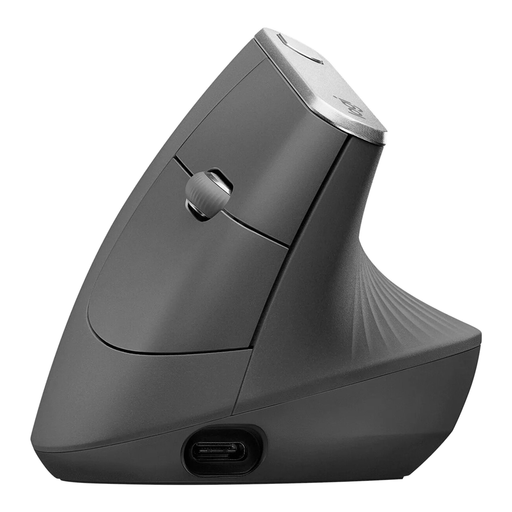
Why This Fits Their Persona: Ideal for users who spend many hours at their desk daily and want to proactively prevent postural strain or issues like wrist pain. The mouse is designed for continuous use and supports workflows across multiple devices.
Instead of a vague 'one-size-fits-all' promise, this model offers a specific, study-based 57° vertical angle that places the hand in a natural handshake position, designed to reduce muscle strain.
Multi-device connectivity for up to 3 devices (Bluetooth/USB receiver). A customisable 4000 DPI sensor provides precise control without excessive hand movements.
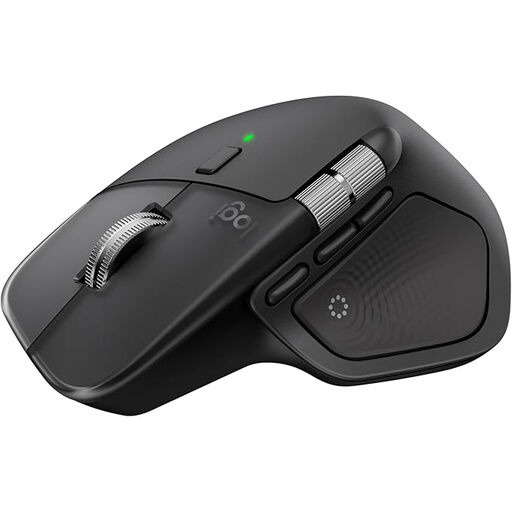
Why This Fits Their Persona: Perfect for developers, designers, and managers who prioritise efficiency. This mouse combines a highly contoured, comfortable shape with features that are customisable and accelerate workflows.
This model avoids the 'overloaded features' trap. Features like the MagSpeed scroll wheel and the thumb wheel are not gimmicks; they offer real, tangible value when navigating through code, timelines, or long documents.
High-precision 8K DPI sensor that works even on glass. Quiet clicks for focused work and multi-device capability for seamless switching.
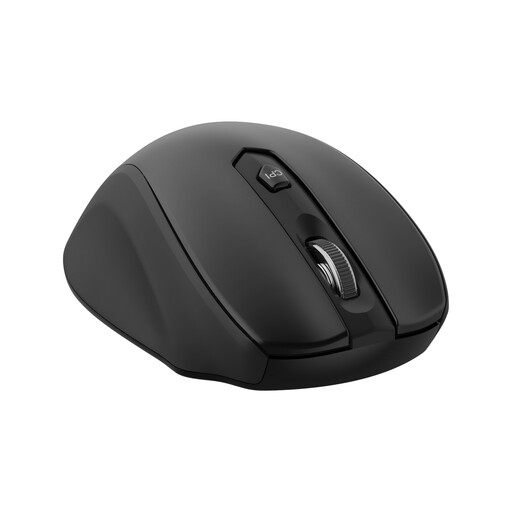
Why This Fits Their Persona: A great choice for users looking to improve on the comfort of a standard mouse without investing in a premium model. It's well-suited for a home office or as an upgrade for a workplace setup.
This model sidesteps the 'DPI myth' by focusing on what's essential: 5 adjustable DPI levels (up to 2400 DPI) offer practical customisation for office work, rather than advertising inflated numbers.
Offers fundamental ergonomic features like a streamlined shape and a thumb rest at an attractive price point. Connection is straightforward via a 2.4 GHz USB receiver.
We've compiled a complete, real-time updated list of products that fully meet these strict selection criteria.
An ergonomic mouse is designed to keep your hand and forearm in a more natural position. A vertical mouse, in particular, reduces forearm rotation. According to manufacturers like Logitech, this can decrease muscle activity compared to a conventional mouse. While an ergonomic mouse can provide relief, it is not a medical treatment. For persistent or severe pain, you should always consult a doctor.
The adjustment period varies from person to person, but it typically takes a few days to a week. At first, control might feel awkward or less precise as different muscle groups are engaged. It's a good idea to start by using the mouse for less demanding tasks and gradually increase your usage time. Adjusting the cursor speed in your system settings can also ease the transition.
The basic functions (clicking, scrolling, cursor movement) on most ergonomic mice work out of the box via plug-and-play, with no extra software needed. However, to use advanced features like remapping buttons, creating macros, or fine-tuning DPI levels, you will need to install the manufacturer's software (e.g., Logi Options+). This allows for complete customisation of the mouse to fit your personal workflow.