
Lieferung heute & morgen

Qualitätsgarantie
App herunterladen
For many professionals, using a computer mouse for hours every day is standard practice. This repetitive strain can lead to tension in the hand, wrist, and arm. An ergonomic mouse is specifically designed with a contoured shape to promote a more natural hand posture, helping to prevent potential discomfort or alleviate existing issues. Choosing the right model depends on your individual needs regarding form, function, and connectivity.
The decision for a specific model should be based on an analysis of technical specifications and personal workflows. The following criteria are of key importance.
The most fundamental distinction lies in the mouse's orientation.
The connection type affects your flexibility at the workspace.
The DPI number indicates the sensitivity of the mouse sensor. A higher DPI value means the cursor travels a greater distance on the screen with the same physical movement. An adjustable DPI function is useful for many users to adapt the sensitivity based on the task—lower DPI for precise design work, higher DPI for fast navigation.
For power users and in a professional office mouse setting, other features are relevant:
Based on an analysis of technical specifications and practical benefits, we present two models that cater to different user profiles.
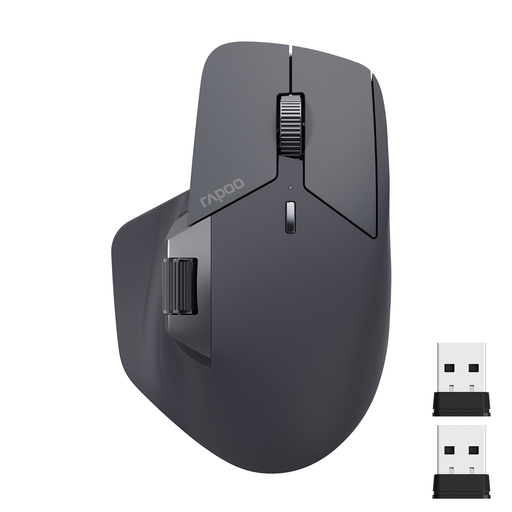
Why We Recommend It
The RAPOO MT760L is designed for efficiency and flexibility. Its ability to connect to up to four devices simultaneously (via Bluetooth 5.0, 2.4G, and cable) and switch between them seamlessly makes it a powerful tool for complex work environments. The M+ Cross-Computer Technology even allows you to control multiple computers by moving the cursor across the edge of the screen. Eleven programmable buttons and an additional side scroll wheel offer a high degree of customisation.
Pros
Who It's For
This model is aimed at power users, developers, and creative professionals who work across multiple devices (PC, laptop, tablet) and require maximum control and efficiency through programmable buttons and multi-device features.
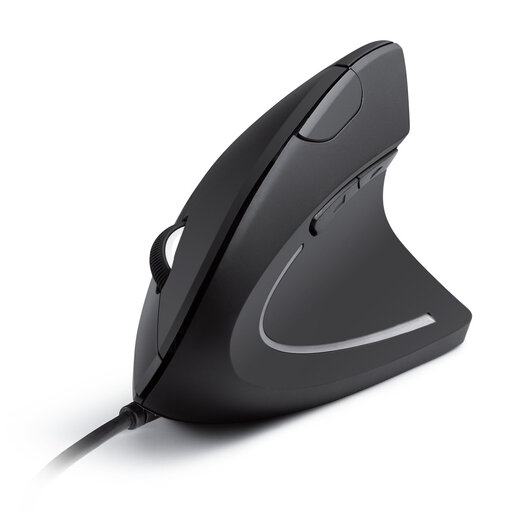
Why We Recommend It
The Anker CE100 focuses on one core function: ergonomic wrist relief. Its vertical mouse design positions the arm in a natural "handshake" posture, which reduces forearm twisting. As a wired device, it offers a straightforward plug-and-play solution with no need to change batteries or recharge. The additional forward and back buttons simplify web navigation.
Pros
Who It's For
This model is a great choice for office workers and users who spend many hours on standard computer tasks and are looking for a direct, effective solution to prevent or alleviate wrist discomfort. It is ideal for those who prefer a reliable, wired mouse without complex additional features.
The models featured here cover specific use cases. If your requirements differ or you are looking for other peripherals, you can find a wider selection of input devices and accessories in our main category.
Discover more products in the category: Technology Computer Accessories
1. What is the primary advantage of a vertical mouse? The main advantage of a vertical mouse is that it promotes a neutral "handshake" position. This posture reduces forearm pronation (the inward twisting of the forearm), which can decrease strain on muscles and tendons, thereby helping to prevent conditions like RSI (Repetitive Strain Injury).
2. How long does it take to get used to an ergonomic mouse? The adjustment period varies from person to person. With a vertical mouse, it can take a few days to a week for the new hand posture and movement to feel natural. For a horizontal-ergonomic mouse, the transition is usually shorter, as the basic operating concept remains the same.
3. Can an ergonomic mouse be used with a Mac? Yes, most modern ergonomic mice are compatible with macOS. However, for models with programmable buttons or special software, you should check the product page or the manufacturer's website to see if dedicated software is available for macOS to unlock the full range of features. Basic functions like pointing, clicking, and scrolling typically work out of the box via plug-and-play.