
Lieferung heute & morgen

Qualitätsgarantie

Willkommens-Angebote freischalten: KOSTENLOSE Lieferung | Bis zu 80 % RABATT | Kostenlose 30-Tage-JoyPlus-Testphase
App herunterladen
Working at a computer for hours can lead to tension in your hand, wrist, and arm. A conventional computer mouse often forces an unnatural posture that can cause discomfort over time. An ergonomic mouse is designed to support a more natural hand position, reducing strain and increasing comfort during daily work.
This article serves as a guide. It presents objective criteria for selecting a suitable ergonomic mouse and showcases a selection of models with different features for various user profiles.
The decision for a specific model depends on individual requirements for comfort, functionality, and work environment. The following points will help guide your choice.
The shape is the most crucial feature of an ergonomic mouse.
A wireless mouse provides a clutter-free workspace without tangled cables. There are two common technologies here:
Beyond the basic functions, other features can enhance productivity and comfort.
Here is a selection of three models that offer different ergonomic approaches and features for various user groups.
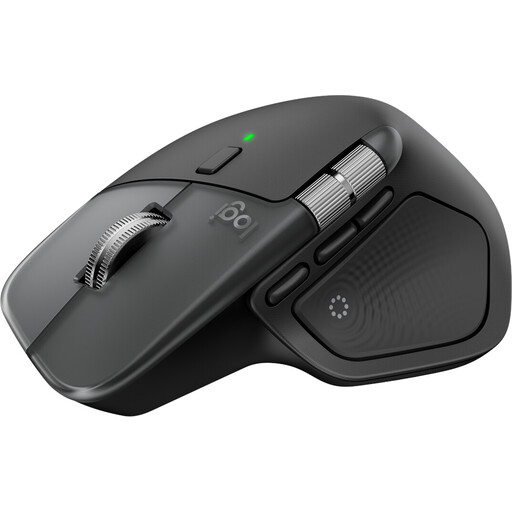
Why It Stands Out: The MX Master 4 for Mac is engineered for maximum productivity and precision. It combines a classic ergonomic shape with advanced features like haptic feedback and the Actions Ring, which displays contextual shortcuts directly at the cursor. The MagSpeed scroll wheel allows for ultra-fast or line-by-line scrolling.
Pros:
Who It's For? This model is aimed at power users, creative professionals, and developers who primarily work within the Apple ecosystem (macOS, iPadOS) and are looking for a highly customisable mouse for Mac with maximum efficiency.
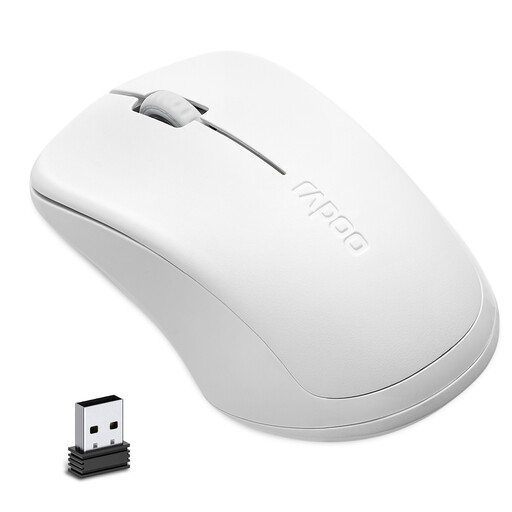
Why It Stands Out: The RAPOO 1680 focuses on the essentials: silent operation and reliability. Its symmetrical design makes it equally suitable for both left- and right-handed users. The click sounds are heavily dampened, making it an ideal silent mouse for quiet environments.
Pros:
Who It's For? Ideal for students, office workers, and home office users looking for a hassle-free, quiet, and budget-friendly wireless mouse for a laptop or PC. Its ambidextrous shape makes it a flexible choice for multiple users.
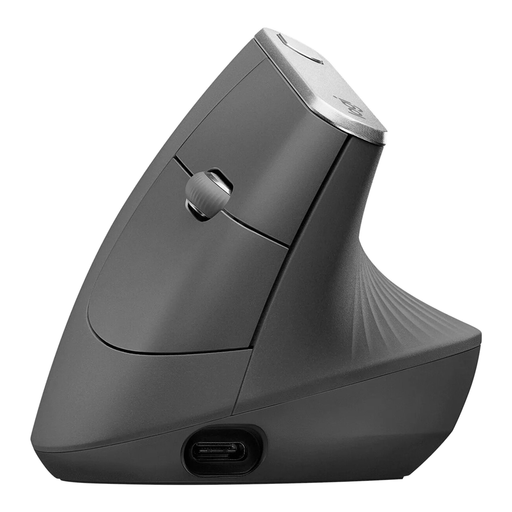
Why It Stands Out: The Logitech MX Vertical is one of the most well-known vertical mice on the market. Its unique 57-degree angle is designed to keep the hand in a natural handshake position. This is intended to reduce pressure on the wrist and decrease muscle activity in the forearm.
Pros:
Who It's For? This vertical mouse is an excellent choice for users who spend many hours at their desk and want to proactively prevent hand and arm strain, or for those who are already experiencing early signs of discomfort.
The models presented cover common requirements. However, if you need a mouse with a larger number of programmable side buttons for gaming or special software, you may find the right model in our broader selection.
? Discover our selection of computer mice with maximum side buttons
1. What makes a mouse ergonomic? A mouse is considered ergonomic if its design supports the natural posture and movement of the hand, wrist, and arm. This is achieved through special shapes (e.g., contoured or vertical), thumb rests, and thoughtful button placement. The goal is to minimise muscle strain and unnatural joint positions.
2. How long does it take to get used to a vertical mouse? The adjustment period is individual but typically ranges from a few days to a week. During this time, your muscles adapt to the new posture. It is advisable to use the mouse for shorter periods at first and gradually increase the duration of use.
3. Can an ergonomic mouse help with tendonitis? Ergonomic mice are designed to reduce the strain on muscles and tendons in the forearm and wrist that can occur when using conventional mice. Less strain can help alleviate discomfort. However, for existing medical diagnoses like tendonitis, a doctor or physical therapist should always be consulted to discuss an appropriate treatment strategy.
By the Joybuy Product Recommendation Officer