
Lieferung heute & morgen

Qualitätsgarantie

Willkommens-Angebote freischalten: KOSTENLOSE Lieferung | Bis zu 80 % RABATT | Kostenlose 30-Tage-JoyPlus-Testphase
App herunterladen
By Joybuy Product Recommendation Officer, July 28, 2026
Long days at the desk often lead to hand and wrist fatigue and discomfort. An ergonomic mouse is presented as the solution, but the market is flooded with models whose promises don't hold up in practice. Many users invest in a supposedly premium product, only to find it doesn't solve their problems or even creates new ones.
Before you make a purchasing decision, it's crucial to understand the most common pitfalls that lead to frustration and wasted money:
To avoid a bad purchase, you should focus on objective, technical parameters that directly impact your daily work.
The ergonomics of a mouse are subjective and must suit your hand. Most mice are optimized for right-handed users. Left-handed users should specifically look for left-handed models or ambidextrous mice. Pay attention to the dimensions (length × width × height) and compare them to your current mouse. A mouse that completely fills your palm and allows for a natural posture without bending your wrist is a good choice.
An ergonomic wireless mouse offers freedom of movement, but the type of connection is critical.
These components determine your productivity in daily use.
Here are some models that are well-suited for different professional needs based on objective criteria.
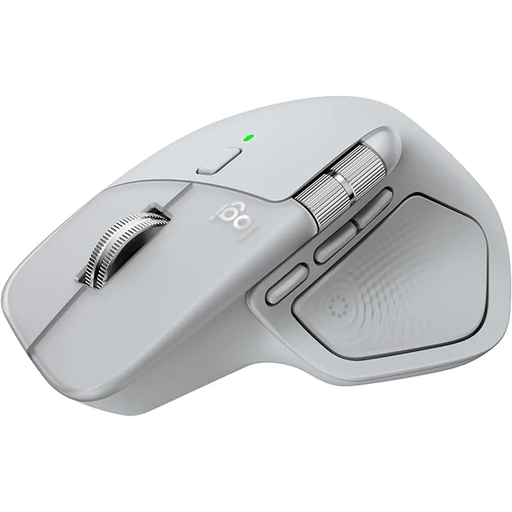
Why This Fits Their Persona: Designed for professional users like developers and designers who switch between multiple systems (e.g., a Windows PC and a MacBook). The mouse offers a combination of precision, customisation, and workflow optimisation.
It solves the problem of unstable connections with the Logi Bolt USB receiver, which ensures a robust connection. Switching between up to three devices is fast and reliable with the press of a button.
MagSpeed scroll wheel for fast and precise scrolling; 8K DPI sensor that also works on glass; thumb wheel for horizontal scrolling and customisable buttons.
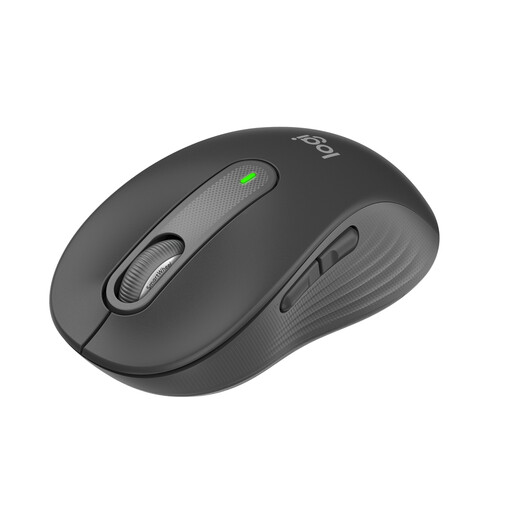
Why This Fits Their Persona: Ideal for users in open-plan offices or home offices who value a quiet work environment and all-day comfort. This model is specifically designed for small to medium-sized hands.
This model bypasses the "one-size-fits-all" trap by being available in different sizes (including the M650 L for large hands). Its SilentTouch technology reduces click noise by 90%, according to Logitech.
Quiet-click mouse thanks to SilentTouch technology; SmartWheel scrolling adapts automatically; long battery life of up to 24 months; dual connectivity (Bluetooth/Logi Bolt).
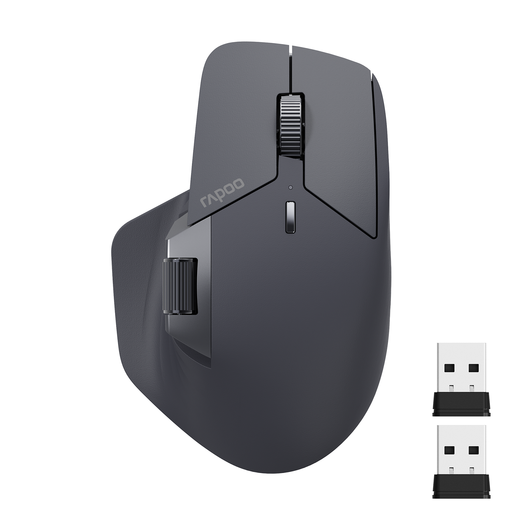
Why This Fits Their Persona: For users who need professional features like multi-device connectivity and customisable buttons but don't want to pay the premium price for flagship models.
This model offers multi-mode connection for up to four devices (Bluetooth/2.4G), avoiding the trap of overpriced basic features. It delivers a solid feature set at an accessible price point.
Connects with up to 4 devices; 11 programmable buttons; rechargeable battery with up to 90 days of life; horizontal scroll wheel.
We have compiled a complete, up-to-date list of products that fully meet these strict selection criteria and safety standards.
The choice depends on your workspace. Bluetooth is ideal for mobile users with devices like MacBooks that have few USB-A ports. A 2.4 GHz dongle typically offers a more stable, lower-latency connection, which is advantageous in offices with a lot of wireless interference or for tasks requiring maximum precision. Models with both options provide the most flexibility.
Yes, for power users, they are a significant productivity boost. Instead of performing repetitive actions via keyboard shortcuts or menus (e.g., copy/paste, browser navigation, muting in a meeting), you can assign them to a mouse button. This reduces movement and speeds up your workflow, especially in programs like Excel, Photoshop, or development environments.
Don't be dazzled by high DPI numbers. For standard office work on a Full HD or 4K monitor, an adjustable range of 800 to 4,000 DPI is more than sufficient. A value around 1,600 DPI is often a good starting point. More important than the maximum value is the ability to adjust the sensitivity on-the-fly to suit the task at hand—lower DPI for precise graphics work, higher DPI for quickly navigating large screens.