
Lieferung heute & morgen

Qualitätsgarantie

Willkommens-Angebote freischalten: KOSTENLOSE Lieferung | Bis zu 80 % RABATT | Kostenlose 30-Tage-JoyPlus-Testphase
App herunterladen
Long hours at the computer are a daily reality for many. This can lead to strain and discomfort in the hand, wrist, and forearm. An ergonomic mouse is designed to promote a more natural hand posture, thereby reducing strain. This article serves as a guide, introducing various models to simplify your choice and enhance comfort at your workspace.
The decision for a specific model depends on individual needs and work habits. You should consider three key aspects in your selection.
The most striking feature of many ergonomic mice is their design. A vertical mouse is constructed to let the hand rest in a "handshake" position. This posture avoids the forearm twisting (pronation) common with traditional mice and can thus reduce muscle activity. This is a crucial factor for individuals looking for a mouse for tendonitis or a mouse for wrist pain. Classic ergonomic mice maintain a flatter shape but are contoured to optimally support the palm and keep the fingers in a relaxed position.
The choice between a wired and a wireless mouse affects your flexibility at the workspace. A wireless ergonomic mouse offers maximum freedom of movement and ensures a tidy desk without cable clutter. Models with Bluetooth or a USB receiver can often be paired with multiple devices, simplifying the switch between a laptop, tablet, and desktop PC. Wired mice, on the other hand, require no batteries and provide a consistently stable connection, making them a reliable option for a stationary office mouse setup.
DPI (Dots Per Inch) indicates how sensitive a mouse is to movement. A higher DPI number means the cursor travels a greater distance on the screen while your hand makes only a small movement. Many ergonomic mice offer adjustable DPI, allowing you to tailor the sensitivity to your preferences and the task at hand. Programmable buttons are another useful feature, enabling you to assign frequently used commands or shortcuts directly to the mouse, which can speed up your workflows.
Based on the criteria mentioned, we have compiled a selection of models that cover different requirements and use cases.
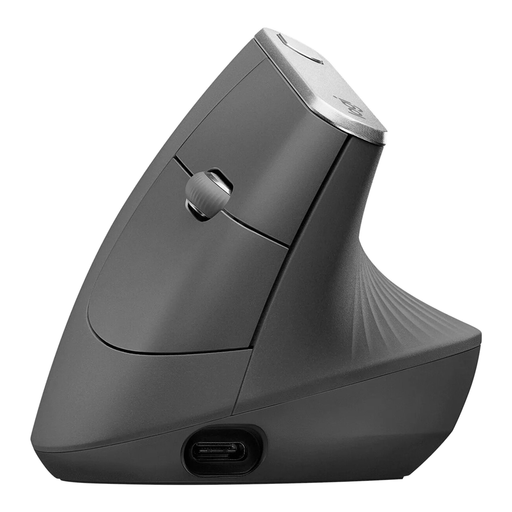
Why It Stands Out The Logitech MX Vertical is distinguished by its unique 57° vertical angle, which mimics the natural handshake position. According to Logitech, this design reduces muscle strain compared to a traditional mouse. The high-precision 4000 DPI sensor allows for accurate control with reduced hand movement.
Pros
Who It's For This model is ideal for users who spend many hours at the computer and want to actively reduce strain on their wrist and forearm. Its multi-device capability makes it especially practical for users who work across multiple devices simultaneously.
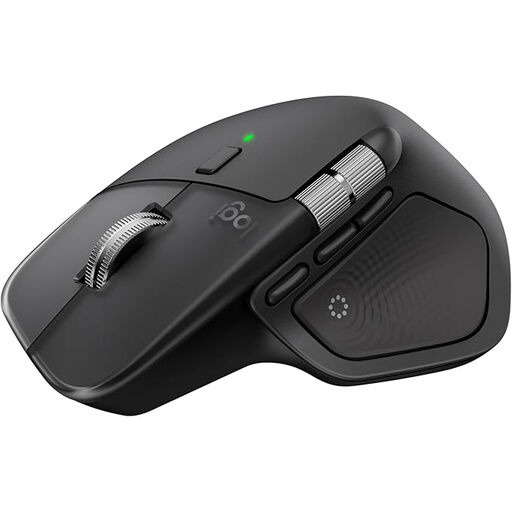
Why It Stands Out The Logitech MX Master 4 is a classically shaped yet highly advanced Logitech ergonomic mouse designed for maximum productivity. It features an electromagnetic MagSpeed scroll wheel that allows for extremely fast and precise scrolling. The 8K DPI sensor works even on glass surfaces. Haptic feedback and a customisable "Actions Ring" offer advanced control options.
Pros
Who It's For The MX Master 4 is aimed at power users, developers, and creative professionals who need a mouse with maximum functionality and customisation. It's a great choice for anyone who prefers an ergonomic shape but doesn't want to switch to a vertical design.
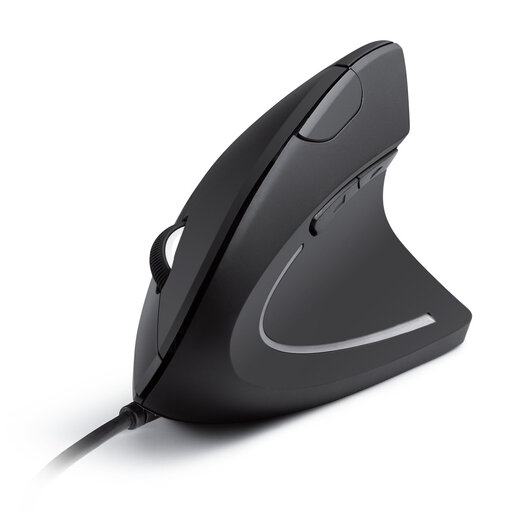
Why It Stands Out The Anker CE100 offers the fundamental benefits of a vertical mouse in a simple and accessible package. It also promotes the "handshake" position and is equipped with forward and back buttons for easy navigation. As a wired model, it's a straightforward plug-and-play solution.
Pros
Who It's For This model is an excellent choice for users who want to try the benefits of a vertical mouse without making a significant investment. It is well-suited for stationary use in the office or home office, where a reliable, wired connection is sufficient.
If these recommendations don't include the right model for you, you might find a suitable alternative in our broader selection of computer mice. Discover more options in our USB Mouse category.
An ergonomic mouse is designed to keep your hand, wrist, and arm in a more neutral, natural position. This can reduce muscle tension and pressure on nerves, such as the median nerve in the carpal tunnel. The goal is to increase comfort during long hours of computer use and to prevent the development of strain-related injuries.
The adjustment period is individual, but most users get accustomed to the new hand posture within a few days to a week. Initially, control might feel unfamiliar as different muscle groups are engaged. It's advisable to start by using the mouse for shorter periods and gradually increase the duration of use.
No, an ergonomic mouse isn't just for alleviating existing discomfort. It's also a preventive tool. Anyone who works many hours at a computer daily can proactively reduce the risk of developing Repetitive Strain Injury (RSI) symptoms, tendonitis, or wrist pain by using an ergonomic mouse.