
Lieferung heute & morgen

Qualitätsgarantie

Willkommens-Angebote freischalten: KOSTENLOSE Lieferung | Bis zu 80 % RABATT | Kostenlose 30-Tage-JoyPlus-Testphase
App herunterladen
For many professionals, long days at the computer are a daily reality. This often leads to discomfort such as tension in the neck and shoulders, and particularly, pain in the wrist. Holding a conventional mouse in an unnatural posture can cause long-term strain. An ergonomic mouse is specifically designed to hold your hand, wrist, and forearm in a more natural position, increasing comfort and reducing physical stress.
This article serves as a comprehensive guide. We will explore different designs and present a selection of models suited for various needs and work styles.
Selecting the right model depends on your individual needs. Three key aspects will help guide your decision.
The most striking feature of many ergonomic mice is their shape. While traditional mice require a flat, horizontal hand position, a vertical mouse promotes a natural "handshake" posture. This reduces forearm twisting, which can decrease muscle activity. For those seeking a mouse for wrist pain, vertical models often provide noticeable relief. However, there are also ergonomically shaped, flatter mice whose contours provide better hand support than standard models.
An office mouse should be both ergonomic and practical. Wireless mice offer maximum flexibility and a clutter-free desk. They typically connect via Bluetooth or a small USB receiver. Pay attention to battery life and charging options. Wired models, on the other hand, require no batteries and provide a consistently stable connection, making them a reliable and often more cost-effective alternative.
A mouse that is too small or too large for your hand can also lead to cramping. Some manufacturers offer their models in different sizes. A mouse's precision is measured in DPI (Dots Per Inch). A higher DPI value means the cursor travels a greater distance on the screen with the same hand movement. Many ergonomic mice offer adjustable DPI, allowing you to tailor the sensitivity to your task—lower values for precise graphics work, higher values for fast navigation.
Based on functionality and design features, we have curated a selection of top models.
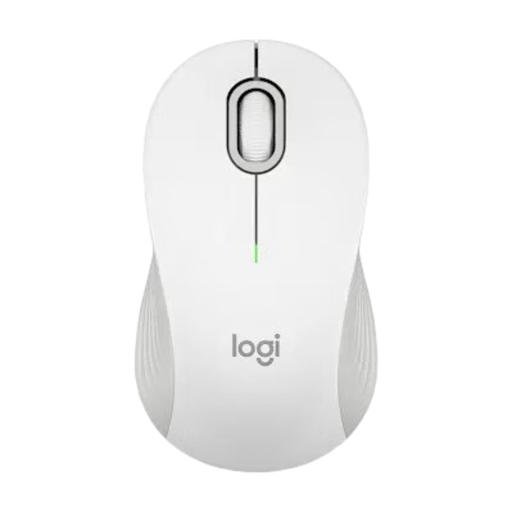
Why it stands out The Logitech M550 is a classically shaped yet ergonomically optimised mouse. Its key feature is the SmartWheel, which automatically switches between line-by-line precision scrolling and hyper-fast scrolling for long documents. Its availability in two sizes (Standard and L) allows for a customised fit for different hand sizes.
Pros
Who it's for Office or home office users looking for a comfortable, straightforward, and versatile mouse for everyday tasks who prefer a traditional mouse design.
View Details for the Logitech M550
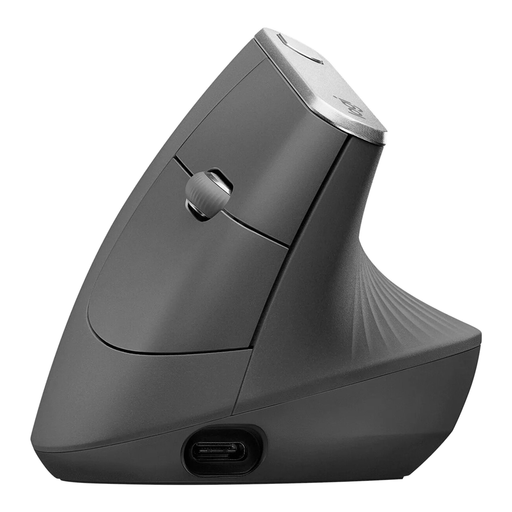
Why it stands out The Logitech MX Vertical is an advanced vertical mouse engineered to reduce muscle strain. Its vertical 57-degree angle promotes a natural handshake posture. Designed for productivity, it features a high-precision 4000 DPI sensor and the ability to seamlessly switch between up to three devices.
Pros
Who it's for Heavy users and power users actively seeking a solution for wrist strain who frequently switch between multiple computers or tablets. A great choice for individuals considering a mouse for tendonitis or similar repetitive strain injuries.
View Details for the Logitech MX Vertical
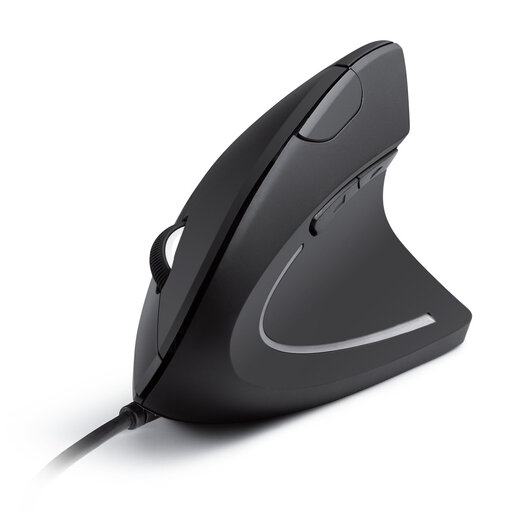
Why it stands out The Anker CE100 is an accessible model that delivers the core benefits of a vertical mouse in a simple, wired package. It focuses on the essential function: relieving wrist and arm strain through its ergonomic handshake position. Additional forward and back buttons facilitate web navigation.
Pros
Who it's for Users who want to try the benefits of a vertical mouse without a significant investment. Ideal for a stationary workstation where a reliable, wired connection is preferred.
View Details for the Anker CE100
The models featured here cover a range of needs. If you haven't found the perfect fit yet, or if you'd like to compare more wireless models, you can find a broader selection in our category.
Explore Our Selection of Wireless Computer Mice
A vertical mouse is designed to keep your hand in a more neutral "handshake" position. This reduces the forearm twisting (pronation) that occurs when using a conventional mouse. The goal is to decrease the strain on the muscles and tendons in the wrist and forearm.
An ergonomic mouse can help reduce the strain that may contribute to the development or aggravation of conditions like tendonitis. By promoting a more natural hand and arm posture, it minimises pressure on sensitive areas. However, it is important to stress that a mouse is a tool for prevention and comfort enhancement, not a substitute for medical treatment. If you experience persistent pain, you should consult a doctor.
The right size is crucial for comfort. A mouse that is too small forces your fingers into a cramped position, while one that is too large can be difficult to control. Some manufacturers provide recommendations based on hand length (measured from the wrist to the tip of the middle finger). When possible, look for product descriptions that mention different size options like S, M, or L, or compare the mouse's dimensions with your hand.