
Lieferung heute & morgen

Qualitätsgarantie

Willkommens-Angebote freischalten: KOSTENLOSE Lieferung | Bis zu 80 % RABATT | Kostenlose 30-Tage-JoyPlus-Testphase
App herunterladen
Long hours of sitting have become a daily reality for many of us, whether in the home office, at the corporate office, or while studying. However, an unsuitable chair can quickly lead to tension and back problems. The market for ergonomic office chairs is vast, but not every model advertised as "ergonomic" lives up to its promise. Many buyers invest in chairs that lose their comfort and functionality after just a few months.
As your Joybuy Product Recommendation Officer, I'm here to help you navigate the marketing jungle. We'll focus on the facts and uncover the most common pitfalls, so you can make an informed decision that benefits both your health and your budget.
Before we look at the essential features, let's identify the typical mistakes that often lead to a poor purchase.
To avoid these pitfalls, you should look for a few non-negotiable criteria when making your selection. These objective parameters separate a truly useful ergonomic office chair from a mere marketing promise.
Lumbar support is perhaps the most critical ergonomic feature. It supports the natural S-curve of your lumbar spine, preventing slouching and lower back pain. Good support is more than just a curve in the backrest. Look for the following adjustment options:
A swivel chair with lumbar support that cannot be adjusted often misses the point, as every back is shaped differently.
A good desk chair should adapt to you, not the other way around. Look for models that offer at least the following adjustments:
These features are especially important for a home office chair, where work hours are often more flexible and longer.
Here are some recommendations tailored to different user profiles and requirements. Each model has been selected based on its objective features and its ability to avoid the pitfalls mentioned above.
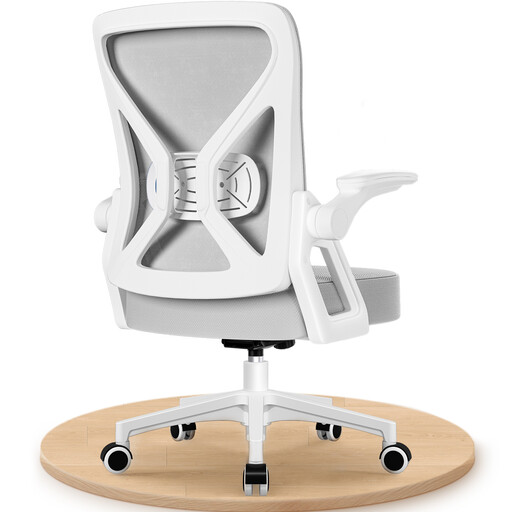
Why This Fits Their Persona: Ideal for users looking for a solid entry into the world of ergonomics without breaking the bank. It offers the essential features for healthy sitting in a home office or study environment.
This chair bypasses the "one-size-fits-all" trap with its adjustable lumbar support and seat height adjustment. It focuses on functional customisation rather than superfluous padding.
Offers a tilt function up to 125° for relaxation breaks and flip-up armrests to slide the chair under the desk for space-saving storage. The breathable mesh back prevents sweating.
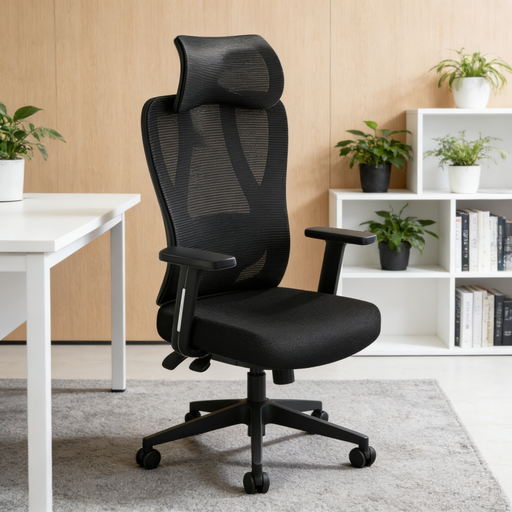
Why This Fits Their Persona: Designed for individuals who spend many hours sitting each day, whether for work or gaming. This chair offers advanced adjustment options and high-quality materials for maximum comfort and durability.
Instead of simple padding, this model features a pressure-relieving seat cushion and a breathable 2-layer mesh cover. The 4D pivoting lumbar support provides a highly personalised adjustment that goes far beyond standard models.
The fully adjustable 4D lumbar support promotes a healthy spinal posture. The large recline angle of up to 140° and the adjustable headrest make it both a functional work tool and a relaxing executive chair.
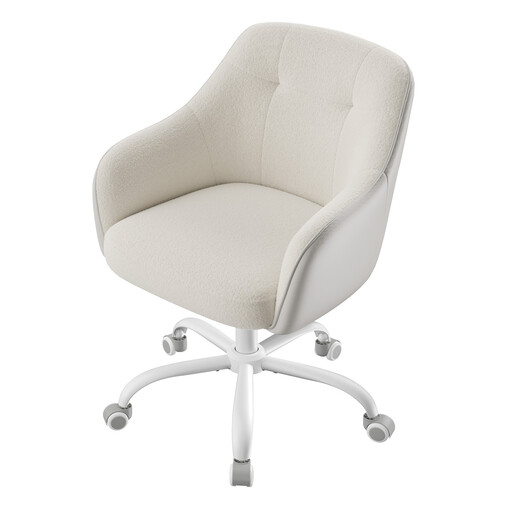
Why This Fits Their Persona: Perfect for anyone seeking a chair that is not only functional but also aesthetically pleasing in a living space. It combines modern style with essential seating comfort for a study or bedroom.
This model avoids the trap of being a purely decorative object by offering tangible comfort features like a 7 cm thick seat cushion and a curved backrest. It's more than just looks.
The Sherpa fabric cover provides a pleasant and cosy feel. Its clean lines and minimalist design blend elegantly into various interior styles, while the height adjustment ensures basic ergonomics.
We have compiled a complete, up-to-date list of products that fully meet these strict selection criteria and relevant safety standards.
1. How long does a good ergonomic office chair last? The lifespan of an office chair depends heavily on the quality of its components. A high-quality model with robust mechanics and durable materials can easily last 5 to 10 years with daily use. Look for certifications like BIFMA or SGS, as these indicate that components such as the gas lift and base have been tested for load capacity and durability.
2. Is a gaming chair also a good office chair for the home office? A gaming chair can be a good option, as many models are designed for long periods of sitting and often feature a high backrest, neck pillow, and lumbar cushion. However, their design with pronounced side bolsters may not be ideal for every body type or work style. The important thing is that a gaming chair also offers the basic ergonomic adjustment options (seat height, armrests, backrest) that are crucial for an ergonomic office chair.
3. How do I correctly adjust my ergonomic office chair? A correct initial setup is crucial for comfort. Follow these steps: