
Lieferung heute & morgen

Qualitätsgarantie

Willkommens-Angebote freischalten: KOSTENLOSE Lieferung | Bis zu 80 % RABATT | Kostenlose 30-Tage-JoyPlus-Testphase
App herunterladen
By Joybuy Product Recommendation Officer, August 28, 2026
An ergonomic office chair is an investment in your health, especially if you spend hours at a desk every day. However, the market is flooded with models whose names promise more than their designs deliver. Many buyers invest in a supposedly high-end chair, only to find after a few months that the back support is inadequate or the material causes discomfort. This guide highlights the crucial features that define a truly functional chair and helps you sidestep common purchasing traps.
Before we dive into the important features, it's crucial to understand the common issues that can lead to a poor investment.
To avoid the pitfalls mentioned above, you should focus on three core technical aspects when making your selection. These define whether a desk chair is ergonomic and suitable for continuous use.
The mechanism is the heart of any office chair. Inexpensive models often feature only a simple tilt mechanism, where the seat and backrest are rigidly connected. For dynamic, active sitting, a synchronous mechanism is essential. With this, the backrest reclines at a greater angle than the seat (e.g., at a 2:1 or 3:1 ratio). This promotes blood circulation, relieves pressure on the spinal discs, and prevents a static posture.
A good home office chair must be precisely adaptable to your body measurements. Look for the following adjustment options:
The material significantly influences comfort and longevity. A breathable office chair is best achieved with high-quality mesh fabric. It ensures constant air circulation and flexibly conforms to the body's contours.
Also, pay attention to the certification of the gas lift. A spring tested according to BIFMA (Business and Institutional Furniture Manufacturer's Association) or SGS standards is an indicator of safety and durability. Also, check the chair's maximum load capacity to ensure it matches your body weight. A sturdy base made of steel or aluminum is preferable to one made of pure plastic.
Based on the criteria above, we have identified a few models suitable for different needs and budgets.
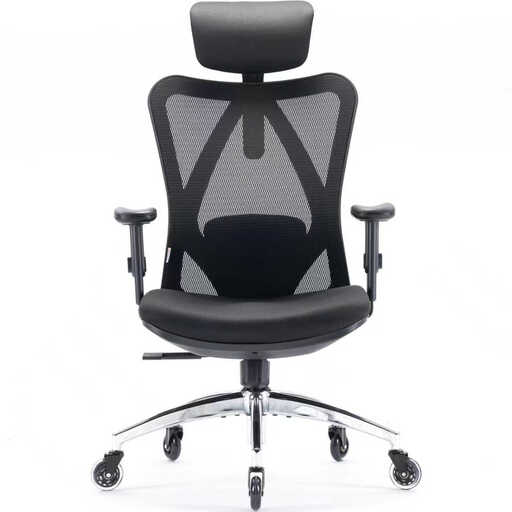
Why This Fits Their Persona: Ideal for home office users or students looking for a solid entry into ergonomics without breaking the bank. It offers the essential basic adjustments for a healthy posture.
The chair features an adjustable headrest and lumbar support, thus avoiding the trap of being merely a marketing buzzword. The breathable mesh back prevents heat buildup.
Offers five adjustment points, including the backrest and headrest. The gas lift is BIFMA and SGS certified and designed for a load capacity of up to 150 kg.
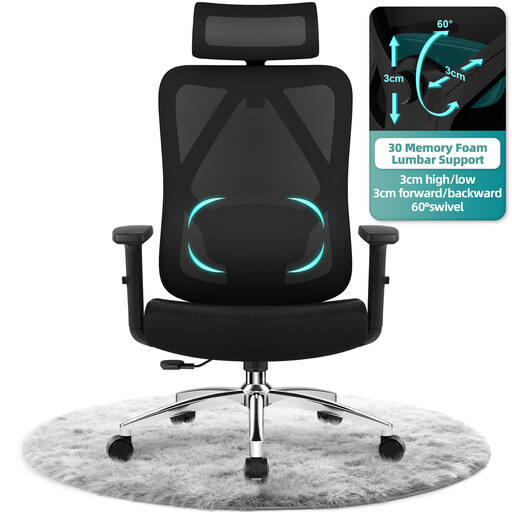
Why This Fits Their Persona: Perfect for professionals who sit for over eight hours a day, as well as for heavier individuals. The high load capacity and advanced lumbar support provide maximum support and durability.
The 3D-adjustable lumbar support made of memory foam is a direct answer to the trap of rigid, ill-fitting supports. It adapts dynamically and provides genuine support.
Very high load capacity of up to 200 kg thanks to an aluminum alloy base. The backrest can be locked at three angles (90°, 115°, 135°), making the chair highly versatile.
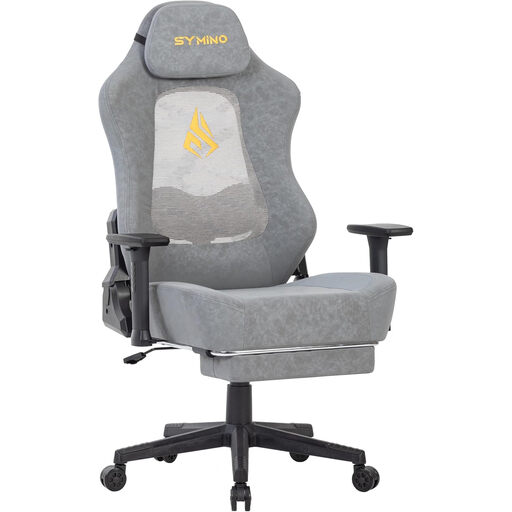
Why This Fits Their Persona: Designed for long gaming sessions or for users who prefer a flexible seating position with a deep recline for breaks or relaxation. The combination of gaming aesthetics and ergonomic functions is key here.
This chair combines PU leather with a special mesh insert in the back. This open design solves the heat buildup problem common in many pure synthetic leather chairs.
Wide backrest recline angle from 90° to 155° plus a 12° rocking function. The 3D elastic lumbar system adapts to the body's natural curve.
We have compiled a complete, up-to-date list of products that fully meet these strict selection criteria and German safety regulations.
1. How long does a good ergonomic office chair last? The lifespan heavily depends on the quality of the components and usage. A chair with a steel or aluminum base and a BIFMA-certified gas lift can last 7 to 10 years with normal use. Regular maintenance, such as tightening screws and cleaning materials according to the manufacturer's instructions, can extend its life.
2. What does a BIFMA certification mean for an office chair? BIFMA stands for the "Business and Institutional Furniture Manufacturer's Association." A BIFMA certification means that the chair or its components (like the gas lift or casters) have passed a series of rigorous tests for safety, durability, and structural integrity. These include load tests, drop tests, and cycle tests that simulate intensive use. It is a reliable mark of quality.
3. How do I correctly adjust my ergonomic office chair? A basic setup can be done in a few steps: