
Lieferung heute & morgen

Qualitätsgarantie

Willkommens-Angebote freischalten: KOSTENLOSE Lieferung | Bis zu 80 % RABATT | Kostenlose 30-Tage-JoyPlus-Testphase
App herunterladen
By a Joybuy Product Recommendation Officer, July 09, 2026
Long hours at a desk are a daily reality for many, whether for working from home, gaming, or studying. The wrong chair can quickly lead to discomfort. With a vast selection of chairs available, making a decision can be difficult. This guide provides objective criteria to help you find the perfect ergonomic office chair for your needs. We will highlight key features and present a curated selection of different models.
The right choice depends on your individual needs. However, you should always consider three key aspects to make an informed decision.
An ergonomic office chair should adapt to the user, not the other way around. Look for the following adjustment features:
The material affects the chair's comfort, durability, and maintenance.
Depending on the intended use, certain extras can significantly enhance comfort. For example, a chair with a footrest allows you to elevate your legs during breaks to improve circulation. An adjustable lumbar support is another crucial feature for specifically supporting the lower back and promoting a healthy posture.
Based on the criteria mentioned, we have compiled a selection of chairs that cater to different needs and style preferences.
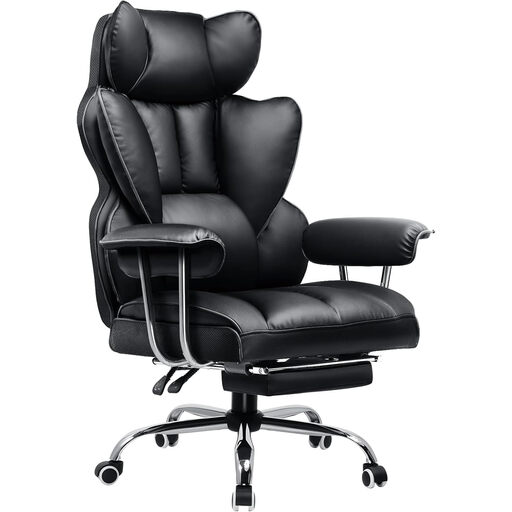
Why It Stands Out This model combines the classic aesthetic of a gaming chair with features that are also useful in a professional setting. The high backrest with side shoulder wings offers comprehensive support for the upper body. A standout feature is the integrated, retractable footrest, which transforms the PC chair into a relaxation lounger.
Pros
Who It's For This chair is aimed at users looking for a multifunctional chair for gaming, work, and relaxation. Anyone who spends a lot of time at the computer and appreciates the ability to put their feet up will find this to be an ideal solution.
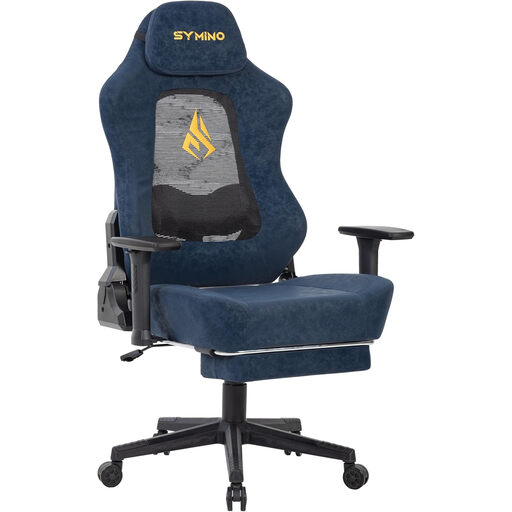
Why It Stands Out The SYMINO chair features an innovative design with a cut-out backrest fitted with a special mesh fabric. This ensures improved air circulation. The wingless design of the backrest offers greater freedom of movement. The 3D elastic lumbar support dynamically adapts to your posture.
Pros
Who It's For Ideal for gamers and professionals in a home office who prioritise maximum breathability during long sessions. Its modern design and flexible adjustment options make it a versatile computer chair.
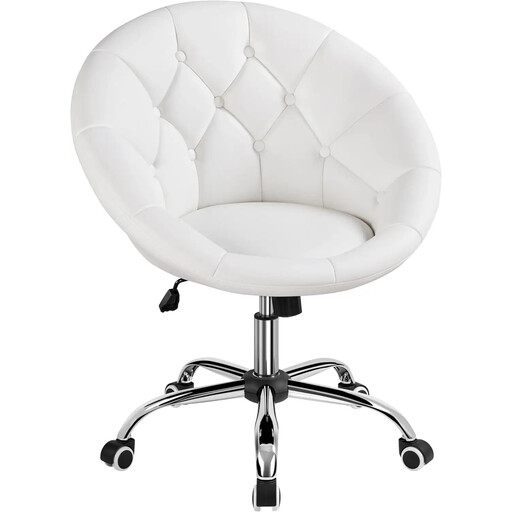
Why It Stands Out This office chair in white captivates with its elegant and minimalist design. With its tufted seat and compact shell shape, it blends seamlessly into modern living and working environments. It's suitable not only for the home office but also as a stylish vanity chair. The reliability of the gas lift is confirmed by tests, according to the manufacturer Yaheetech (SGS Report No. SDHL241202405001FT).
Pros
Who It's For This chair is the right choice for users who value aesthetics as much as functionality. It is perfect for style-conscious individuals seeking a compact yet comfortable desk chair with casters for the home office or other areas of the home.
The choice of material is often a matter of personal taste and specific requirements for care and appearance. If you prefer the durable and easy-to-clean properties of faux leather, there is a wide variety of other models to discover.
Browse our collection of PU Leather Chairs to find more designs and functional variations that suit your style.
A chair is considered ergonomic if it has multiple adjustment options to adapt to the user's body dimensions and needs. These include an adjustable seat height, a reclining backrest, customisable armrests, and targeted lumbar support. The goal is to promote a healthy posture and relieve strain on the body during long periods of sitting.
A basic setup can be done in a few simple steps:
Yes, many gaming chair models are an excellent choice for a home office chair. They often offer more extensive ergonomic features than traditional office chairs, such as high backrests to support the entire back, neck and lumbar pillows, and wide-ranging backrest adjustments. The decision ultimately depends on personal preference regarding design and required features.