
Lieferung heute & morgen

Qualitätsgarantie

Willkommens-Angebote freischalten: KOSTENLOSE Lieferung | Bis zu 80 % RABATT | Kostenlose 30-Tage-JoyPlus-Testphase
App herunterladen
An ergonomic office chair is more than just a place to sit; it's a tool for focus and well-being at work. However, the market is flooded with models whose promises often outweigh their actual performance. Many chairs are labelled "ergonomic" without offering the necessary adjustment features, leading to tension and discomfort. This guide will help you identify the crucial features and make an informed choice for long, healthy sitting.
Before we dive into the essential features, let's highlight three common marketing traps that often lead to disappointment.
To avoid the pitfalls mentioned above, you should look for three indispensable technical features. These define whether a chair is genuinely suitable for prolonged sitting.
The heart of any good office chair is its ability to adapt to your body—not the other way around.
The mechanism determines how the seat and backrest move. It promotes "dynamic sitting," which is the continuous changing of your sitting position.
The materials influence not only the chair's durability but also your comfort throughout the day.
Based on the criteria above, we have identified several models suited for different needs and work styles.

Why This Fits Their Persona: Ideal for students or a first home office. It provides essential ergonomic features like adjustable lumbar and head support, plus a tilt function, without breaking the bank. The flip-up armrests are especially practical for small spaces, allowing the chair to be pushed neatly under the desk.
Instead of a fixed support, this model offers adjustable lumbar support and a customisable headrest, which is not a given in this price range and avoids the "one-size-fits-all" mistake.
Good foundational features with adjustable support elements. The flip-up armrests are a clear plus for flexible space management.
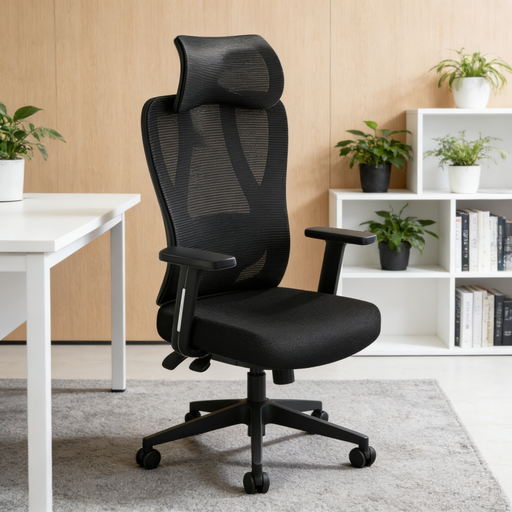
Why This Fits Their Persona: For professionals who spend eight hours or more at their desk daily. This chair focuses on maximum adjustability and durable materials to ensure lasting comfort and healthy posture, even with intensive use.
It counters the inferior material trap with a breathable 2-layer mesh fabric for both support and airflow. The 4D pivoting lumbar support offers precise, multi-dimensional adjustment that goes far beyond rigid solutions.
The fully adjustable 4D lumbar support is the standout feature. The pressure-relieving seat cushion, at 10.5 cm thick, ensures comfort during long sitting periods.
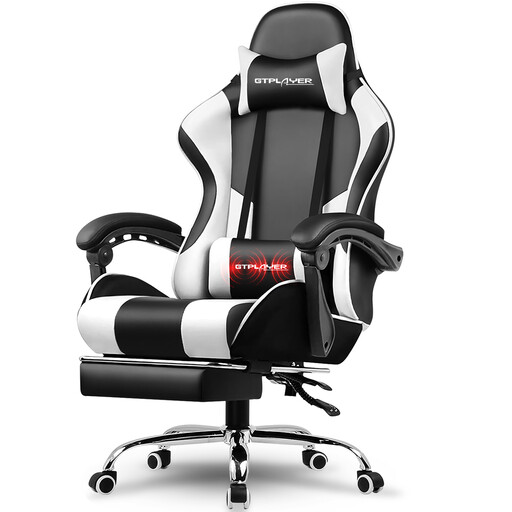
Why This Fits Their Persona: This chair combines the aesthetics of a gaming chair with features useful for both work and leisure. The deep recline function (up to 135 degrees) and retractable footrest are ideal for relaxed gaming sessions or breaks, while the ergonomic base shape also supports focused work.
It avoids the "style over substance" trap by integrating functional elements like a vibrating lumbar massage cushion and adjustable height alongside the typical gaming chair design, making it a versatile desk chair.
The combination of a retractable footrest and a deep recline function offers a high degree of relaxation. The robust metal construction ensures stability.
We have compiled a complete, up-to-date list of products that fully meet these strict selection criteria and German safety regulations.
The lifespan of an office chair depends heavily on material quality, the mechanism, and usage. A high-quality chair with a metal base, a robust synchronous mechanism, and durable upholstery or mesh can last 7 to 10 years with daily use. Cheaper models with plastic components and simple tilt mechanisms often show significant wear and tear after just 1 to 3 years.
That depends on the focus. Gaming chairs are often inspired by racing seats and prioritise a bucket-seat shape, deep recline, and striking aesthetics. A classic ergonomic office chair, on the other hand, focuses on scientifically-backed adjustment options (e.g., seat depth, 4D armrests, adjustable lumbar support) to promote a neutral, healthy posture during desk work. Some hybrid models try to combine both, but for purely long hours of office work, a dedicated ergonomic chair is often the more precise choice.
Follow this simple sequence for a correct basic setup: