
Lieferung heute & morgen

Qualitätsgarantie

Willkommens-Angebote freischalten: KOSTENLOSE Lieferung | Bis zu 80 % RABATT | Kostenlose 30-Tage-JoyPlus-Testphase
App herunterladen
By Joybuy Product Recommendation Officer, 09 July 2026
Long hours at a desk have become the norm for many people, whether for working from home, gaming, or studying. The wrong chair can quickly lead to discomfort and hinder concentration. However, navigating the vast selection of chairs can often be overwhelming. This guide is designed to help you understand the key features of an ergonomic office chair and make an informed decision that suits your individual needs.
Finding the right chair can be a challenge. To simplify the selection process, focus on a few core features that are crucial for comfort and proper posture.
An office chair with an adjustable backrest, customisable seat height, and flexible armrests is the foundation of ergonomics. The ability to adapt the chair to your body size and desk height is essential. Look for mechanisms that allow the backrest to recline at various angles, so you can switch between focused work and short relaxation breaks. 3D or 4D armrests offer additional adjustment options in height, width, and angle to provide optimal support for your forearms.
Integrated lumbar support is a vital feature, as it specifically supports the lower back and helps maintain the natural curve of the spine. Some models offer dynamic or height-adjustable lumbar support for even more precise customisation. The maximum weight capacity should also be considered. A desk chair with a 150 kg capacity offers a robust construction and stability, which is particularly relevant for taller or heavier individuals.
The choice of material affects both comfort and durability. Mesh fabric is breathable and promotes air circulation, while PU leather is easy to clean and offers a classic look. For added relaxation, a PC chair with a footrest can be a worthwhile addition. It can be extended when needed, allowing for a relaxed posture during breaks. Such features are often found in a gaming chair that is ergonomically designed, but they can also be beneficial for a home office chair.
Based on the criteria mentioned, we have compiled a selection of models that stand out for their specific ergonomic properties and functions.
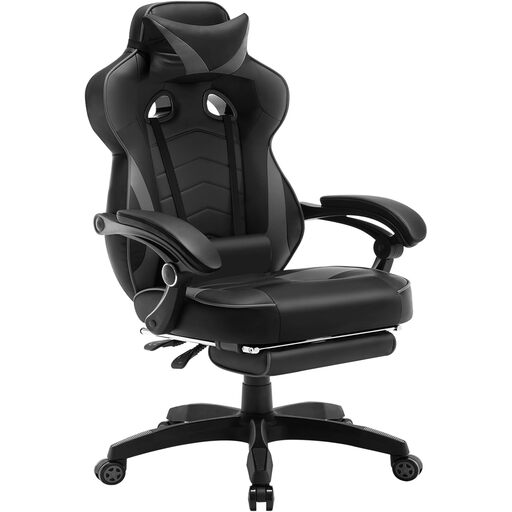
Why It Stands Out: The Woltu Gaming Chair combines the aesthetics of a gaming chair with practical ergonomic functions. Its standout feature is the retractable footrest and the wide recline angle of the backrest, making it a versatile option for both work and relaxation.
Pros:
Who It's For: Users looking for a multifunctional chair for gaming and home office use who value an integrated relaxation feature like the footrest.
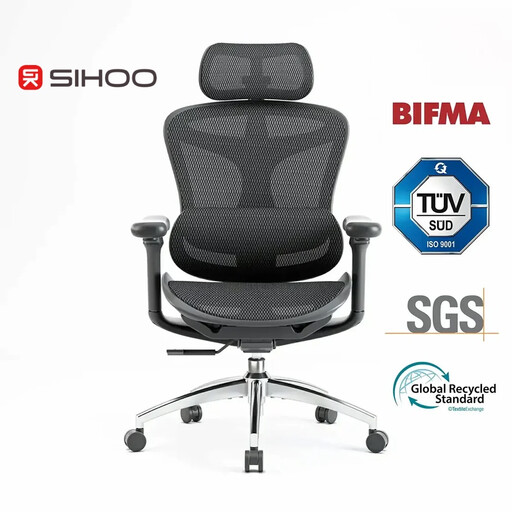
Why It Stands Out: The Sihoo Doro C300 is a specialised executive chair that is ergonomically designed for long workdays. It is distinguished by its intelligent adjustment mechanisms, such as the self-adaptive lumbar support and a weight-sensitive recline function.
Pros:
Who It's For: Individuals seeking a technologically advanced office chair for intensive and long workdays at home, who place the highest value on dynamic, automatic adjustments.
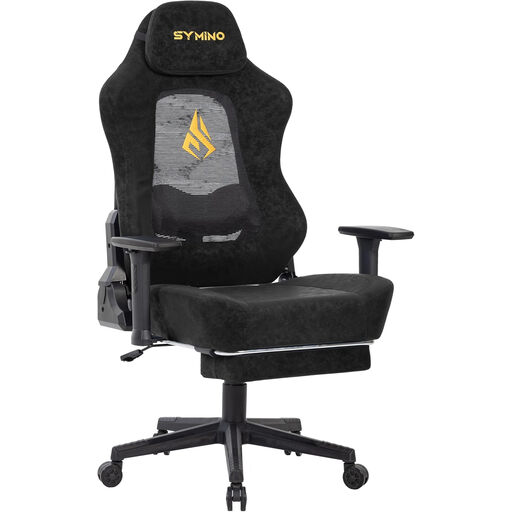
Why It Stands Out: The SYMINO Gaming Chair features an innovative design with a cut-out mesh backrest for maximum air circulation. The wingless seat design offers more freedom of movement, while the adaptive 3D lumbar support provides targeted back relief.
Pros:
Who It's For: Gamers and office workers who work in warmer environments or tend to sweat easily and prefer a chair with maximum breathability and freedom of movement.
If the models presented don't quite meet your expectations or if you prefer a different colour scheme, you can find more alternatives in our collection. Explore our extensive range of black gaming chairs to find the perfect model for your workspace.
An office chair is considered ergonomic if it has multiple adjustable components that allow it to be customised to an individual's body. These typically include an adjustable seat height, a reclining backrest, customisable armrests, and some form of lumbar support. The goal is to support a healthy and comfortable sitting posture over extended periods.
Lumbar support is a central feature of an ergonomic chair. It fills the gap between the backrest and the natural S-curve of the lumbar spine. This stabilises the lower back, which can help reduce strain on the spinal muscles and promote an upright posture.
Even in a very well-equipped ergonomic chair, it is advisable not to sit continuously. Ergonomic guidelines recommend changing your position regularly and standing up, stretching, and walking a few steps at least once an hour. An ergonomic chair provides support during sitting phases but does not replace the need for movement.