
Lieferung heute & morgen

Qualitätsgarantie

Willkommens-Angebote freischalten: KOSTENLOSE Lieferung | Bis zu 80 % RABATT | Kostenlose 30-Tage-JoyPlus-Testphase
App herunterladen
An ergonomic office chair should do more than simply look good. If you spend many hours at your desk, you need the right seat height, sufficient seating space and adjustable features that suit your height and workspace. At the same time, many models are advertised with terms such as “ergonomic”, “massage” or “premium comfort”, without clearly highlighting the measurements that really matter.
A headrest, footrest or massage function can be useful, but it cannot replace a suitable seating position. An office chair with lumbar support, for example, should be adjustable so that the support actually sits against your lower back. If it is too high, too low or cannot be adjusted, its everyday usefulness remains limited.
A chair may look spacious in product images and still have a narrow seat. You should therefore check seat width, seat depth, seat height and maximum weight capacity. The stated weight capacity is a technical limit, not an indication that the chair is suitable for particularly dynamic use.
PU leather can usually be cleaned with a damp cloth, while fabric surfaces may be more susceptible to stains depending on their finish. For daily home-office use, sturdy castors, a durable base and a reliable height-adjustment mechanism are also more important than purely decorative details.
With a height-adjustable office chair, your feet should be completely flat on the floor. Ideally, your knees should form an approximately right angle, while your forearms rest as comfortably as possible on the desk. The right height depends on your height, desk height and footwear.
A hydraulic or pneumatic height adjustment allows for quick changes. Also check whether the adjustment range is stated in the product specifications. A swivel office chair with a 360-degree function makes it easier to reach documents and devices, but does not automatically improve seating ergonomics.
An office chair with a headrest can support your neck and head when you lean back. It is important that the headrest suits your height and does not constantly push your head forwards. An adjustable backrest allows you to change your seating position between focused work and short periods of rest.
With an office chair featuring lumbar support, check whether the support is integrated, separately padded or adjustable. Terms such as “ergonomic” or “spinal shape” are not measurable indicators of quality on their own. What matters are specific details about the construction and adjustability.
An office chair with a footrest can support your legs when you are reclining. Before buying, make sure that the footrest can be fully extended and retracted and that it fits the available space beneath your desk. For users who switch between work and gaming, a gaming chair with a footrest can be a flexible option.
The thickness of the padding also deserves attention. A 10 cm-thick seat cushion is a specific product detail, but it does not by itself indicate whether the chair will be comfortable for everyone. Seat width, foam density, upholstery and body weight all affect your personal seating experience. If included, a massage function should be viewed as an additional comfort feature, not as a medical or therapeutic property.
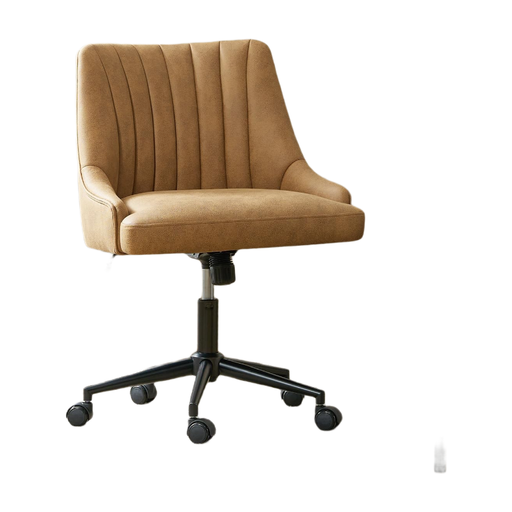
Why this product suits this profile: This compact office chair focuses on essential features for workspaces, study areas and smaller rooms. It has no armrests, making it easier to slide beneath many desks.
The product specifications state that it offers height adjustment, a 360-degree swivel function and a maximum weight capacity of 113 kg. This means that key buying criteria can be checked before ordering.
Padded seat, quilted backrest, metal frame, castors and adjustable seat height.
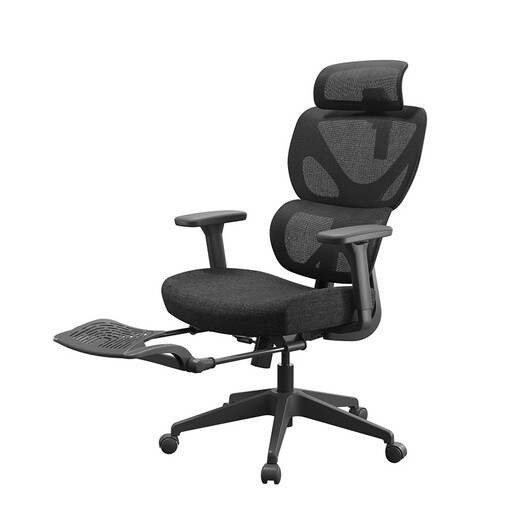
Why this product suits this profile: This model combines working and relaxing positions with an extendable footrest, adjustable armrests and headrest, plus a backrest with a stated recline angle of up to 132 degrees.
The key comfort features are clearly specified: a 10 cm-thick seat cushion, elastic lumbar support, rotating armrests and a footrest. Nevertheless, check the seat dimensions before buying.
Footrest, head and lumbar support, 132-degree recline and adjustable armrests for changing seating positions.
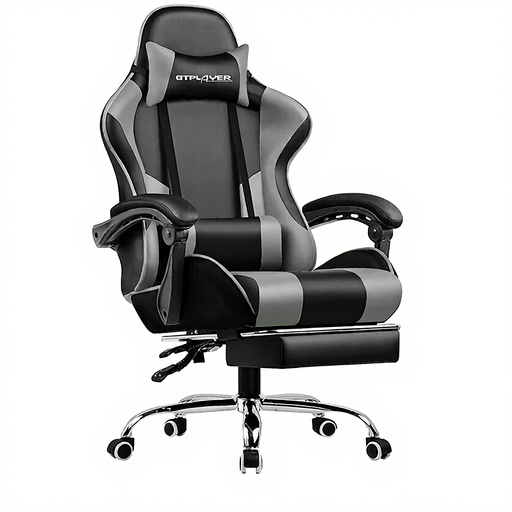
Why this product suits this profile: This ergonomic gaming chair is designed for people who switch between focused work, gaming and reclining. According to the product description, the backrest can be adjusted between 90 and 150 degrees.
The description specifies concrete ranges for backrest recline and height adjustment. The USB-powered massage function should be regarded as an optional comfort feature, not a health claim.
Extendable footrest, head and back cushions, 10 cm height adjustment, 360-degree swivel and easy-care PU leather upholstery.
We have compiled a complete, regularly updated list of products that fully meet these strict selection criteria and the safety regulations applicable in the EU.
Start with the seat height. Both feet should rest firmly on the floor. Then adjust the backrest and lumbar support. The armrests should be set so that your shoulders remain relaxed and your forearms rest as horizontally as possible.
Its lifespan depends on usage, materials, mechanisms and care. Check the castors, screws, gas lift and base regularly. Information about the maximum weight capacity and proper use is more important than general promises about durability.
A USB-powered massage function only uses electricity while it is operating. Actual consumption depends on the module fitted and the power source used. If you rarely use this feature, consider it an optional extra and base your choice primarily on the seat dimensions, adjustability and stability.
A gaming chair with a footrest can be used in a home office, provided that the seat height, distance from the desk, backrest and seat width are suitable. A striking design alone says nothing about whether it is suitable for long working days. What matters are the verifiable adjustment options and correct positioning for your workspace.