
Lieferung heute & morgen

Qualitätsgarantie

Willkommens-Angebote freischalten: KOSTENLOSE Lieferung | Bis zu 80 % RABATT | Kostenlose 30-Tage-JoyPlus-Testphase
App herunterladen
If you spend every day at an office desk, working from home or gaming, you need more than a padded seat. An ergonomic office chair should suit your height, desk and daily usage. But terms such as “ergonomic” or “back-friendly” don’t necessarily tell you much on their own. What matters are specific measurements, adjustable features and clear information about weight limits.
An office chair with lumbar support, a headrest and armrests may have plenty of features. But if the support can’t be adjusted for height or depth, it may not suit the way you sit. A reclining function is only useful if the backrest mechanism is stable and its tension can be adjusted to suit your body weight.
A “up to 150 kg” rating usually refers to the maximum static load stated in the product details. It doesn’t automatically tell you how the chair will perform with intensive daily use, frequent reclining or uneven flooring. You should also look for a stable base, suitable castors and clear safety information.
A mesh office chair can help air circulate around the back and seat. However, a tightly tensioned mesh surface won’t feel comfortable for everyone. A foam seat distributes pressure differently, but may feel warmer if ventilation is limited. Choose the material and firmness to suit your preferences and room temperature.
An adjustable-height office chair should let you sit with both feet flat on the floor. Ideally, your knees should form an open angle, with your thighs resting evenly on the seat. Check the actual height range rather than relying on the term “height-adjustable”.
Seat depth matters too: there should be a little space between the front edge of the seat and the backs of your knees. A seat that’s too short may offer less support, while one that’s too deep can restrict your movement. The models featured here have seat widths ranging from around 50 to 53 cm, depending on the version.
An adjustable lumbar support should not only be included, but should also lock into a position that suits your body shape. The GTIMEX model with extensive adjustment is listed as having lumbar support that can be adjusted by up to 6 cm in height and up to 3 cm in depth. These figures come from the manufacturer’s product information.
An office chair with a headrest can provide extra support when you recline. Check whether the headrest can be adjusted for height and angle. It shouldn’t push your head forwards constantly.
For an office chair with armrests, height, width and, where relevant, the size of the support surface all matter. Adjustable armrests can make it easier to match the chair to different desk heights. Folding armrests are especially handy if you want to tuck the chair fully under your desk.
Also look for:
The Yaheetech model’s product information includes references to EN1335 and SGS. The product description states a maximum weight capacity of 136 kg. Before buying, check that these details match your intended use.
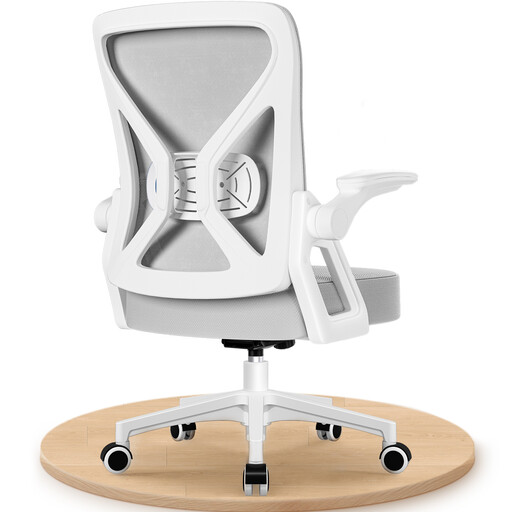
Why this chair suits you: According to the product details, the seat height adjusts from 43 to 53 cm. Folding armrests make it easier to tuck the chair under smaller desks, while the backrest reclines to 125°.
The product description gives specific measurements for seat height and a recommended user height of around 145 to 185 cm, rather than relying on general claims about ergonomics.
Height adjustment, adjustable lumbar support, breathable mesh and a stated weight capacity of up to 150 kg.
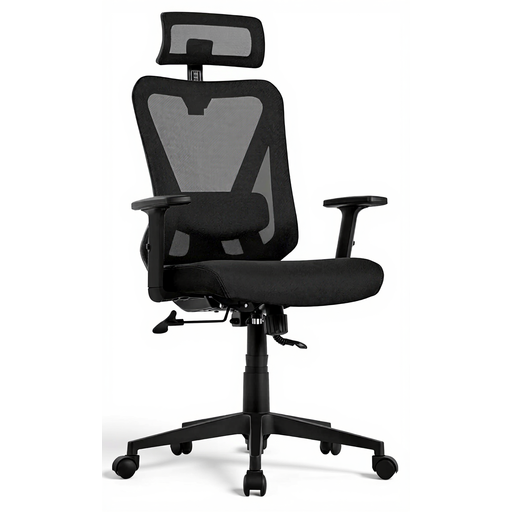
Why this chair suits you: This model combines an adjustable headrest, armrests and backrest with a 53 × 52 cm seat. According to the product details, the backrest can be locked at angles between 90° and 130°.
The product details list specific adjustment ranges and a weight capacity of 136 kg, making it easier to check whether the features suit your needs.
Headrest with height and angle adjustment, height-adjustable armrests, mesh backrest, and stated EN1335 and SGS credentials.
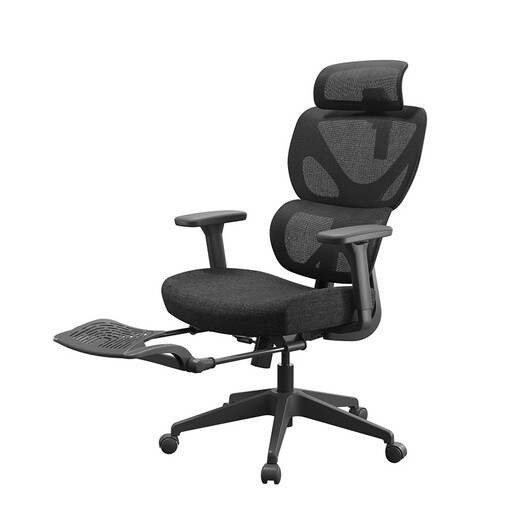
Why this chair suits you: The integrated footrest and recline of up to 132° are designed for people who want to switch between focused work and a more relaxed break.
The extra features are clearly listed, so you can decide whether you really need a footrest or whether it would simply take up extra space.
Footrest, 10 cm-thick seat padding, elastic lumbar support, and rotating armrests and headrest according to the product description.
Once assembled, adjust your office chair ergonomically to suit the way you sit:
An office chair reclining function can be useful for breaks, but it doesn’t replace moving around during the working day. Whatever features your chair has, it’s still a good idea to vary your sitting position and stand up regularly.
We’ve put together a complete, regularly updated list of products that meet these strict selection criteria and fully comply with the safety regulations in force in the EU.
Its lifespan depends on the load it carries, its materials, how it’s assembled and how well it’s maintained. There’s no reliable one-size-fits-all figure. Check the warranty terms, availability of spare parts and any maintenance guidance. With daily use, you should check the screws, castors and gas lift at suitable intervals.
Lumbar support can make it easier to adjust your sitting position, provided it can be adjusted for height or depth. It should be positioned to suit your body rather than treated as a fixed setting. If you already have discomfort, seek medical advice rather than relying on advertising claims when choosing a chair.
A swivel chair rated up to 150 kg may be a good choice if your height, weight and daily usage match the product specifications. However, you should never exceed the stated maximum weight capacity. Sturdy castors, a suitable seat width and a correctly assembled base matter too.