
Lieferung heute & morgen

Qualitätsgarantie

Willkommens-Angebote freischalten: KOSTENLOSE Lieferung | Bis zu 80 % RABATT | Kostenlose 30-Tage-JoyPlus-Testphase
App herunterladen
Long hours at a desk, whether in a home office, studying, or during intense gaming sessions, can take a toll on the body. Neck strain and lower back pain are common consequences of poor posture. An ergonomic office chair with a footrest is designed to address these exact problems by not only promoting correct posture but also enabling relaxing breaks.
This article serves as your guide. We will introduce a selection of models and provide you with practical criteria to help you choose the right chair for your home office or gaming setup.
The selection of chairs is vast. To find the right model, it's helpful to understand a few key features and define your own requirements.
For a chair to be called an ergonomic office chair, it must be adaptable to the individual's body. Look for the following adjustment features:
The durability and safety of a chair depend significantly on the materials used.
A desk chair with a footrest offers more than just comfort. Elevating your legs during breaks or less intensive work periods can improve blood circulation and take pressure off your legs and lower back. Especially when combined with a reclining function, the office chair transforms into a place for a short, relaxing break.
Based on the criteria mentioned, we have compiled a selection of chairs that stand out for their features and applications.
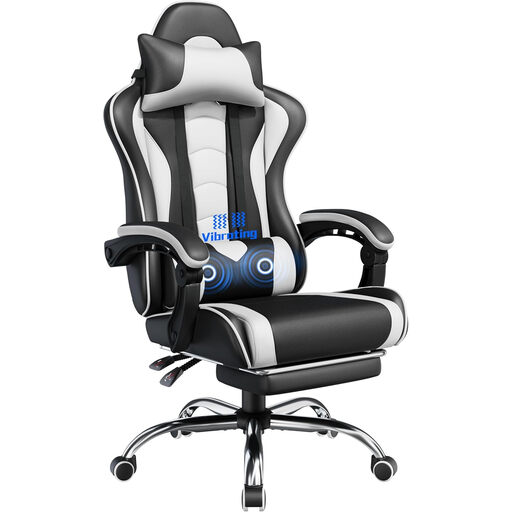
What Makes It Stand Out: This model combines the typical aesthetic of a gaming chair with a footrest with additional comfort features. The integrated massage function in the lumbar cushion aims to relieve tension after long periods of sitting. The backrest can be tilted up to 135 degrees, which, combined with the retractable footrest, allows for a near-flat reclining position.
Benefits at a Glance:
Who Is This Model For? Ideal for gamers and users looking for a feature-rich chair who value extra relaxation options like a massage function. Its design fits well into gaming setups.
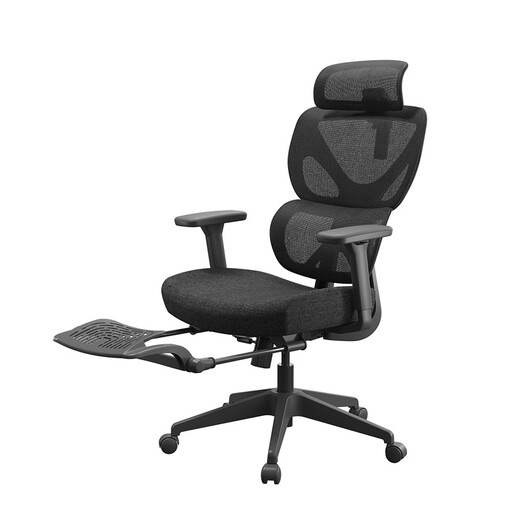
What Makes It Stand Out: The Ochama Z7 focuses on targeted ergonomic support for the office environment. It features an elastic lumbar support that adapts to the movements of your back. The 10 cm thick seat cushion provides excellent comfort even during long workdays. With a recline of up to 132 degrees and the integrated footrest, it's also suitable for relaxing breaks.
Benefits at a Glance:
Who Is This Model For? This chair is an excellent choice for home office professionals who want an understated yet highly functional chair for the home office. The focus is on sustained comfort and ergonomic support throughout the workday.
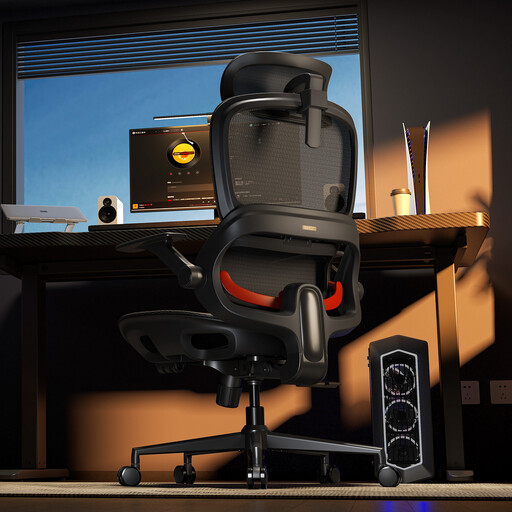
What Makes It Stand Out: The SIHOO B100JT is distinguished by its practical flip-up armrests. This feature is particularly useful in smaller spaces, as it allows the chair to be tucked away neatly under the desk to save space. The adaptive lumbar support automatically adjusts to your posture, providing continuous support. The wide headrest effectively supports the neck and head area.
Benefits at a Glance:
Who Is This Model For? Perfect for users with limited space or for individuals who frequently switch between different tasks at their desk and don't always need armrests. It is a versatile executive chair with a reclining function and practical details.
The selection presented here covers a range of needs. However, if you wish to compare more models or are looking for specific designs and features, you can find additional alternatives in our broader product category.
Discover more computer chairs with footrests
1. Is a footrest on an office chair really useful? Yes, a footrest can improve blood circulation in the legs and reduce pressure on the lower back and thighs. It allows for a more relaxed posture, especially when the backrest is reclined, thus contributing to greater overall comfort during long periods of sitting.
2. What is the difference between a gaming chair and an ergonomic office chair? Traditionally, gaming chairs are characterized by a racing-style bucket seat design, bold colours, and pronounced side bolsters. Ergonomic office chairs often have a more subdued design and focus on adaptive support mechanisms. However, the lines are increasingly blurring. Many models, like the Yaheetech chair, combine the aesthetics of a gaming chair with a footrest with the features of a fully-fledged ergonomic chair.
3. How do I properly adjust an ergonomic office chair? Set the seat height so that your feet are flat on the floor and your knees form an angle of about 90 degrees. The lumbar support should fill the natural curve of your lower spine. The armrests should be positioned so that your shoulders are relaxed and your forearms can rest horizontally.