
Lieferung heute & morgen

Qualitätsgarantie

Willkommens-Angebote freischalten: KOSTENLOSE Lieferung | Bis zu 80 % RABATT | Kostenlose 30-Tage-JoyPlus-Testphase
App herunterladen
Long hours of sitting in the office or at home often lead to tension and discomfort. An ergonomic office chair with an integrated footrest promises relief, but not every model lives up to its advertising. Many buyers invest in products that, due to design flaws or low-quality materials, cause more problems than they solve after only a short time. This guide will show you what to look for to avoid a bad purchase and find the right solution for your workspace.
Before you make a decision, it's crucial to recognize the typical weaknesses often hidden behind appealing product images.
To make an informed choice, you should examine three core technical parameters. These are key in determining the comfort and longevity of your chair.
The way the seat and backrest move is crucial for dynamic sitting. A basic desk chair with a recline function often only has a simple tilt mechanism, where the angle between the seat and backrest remains fixed. Higher-quality models offer a synchro-mechanism, where the backrest reclines more than the seat pan. This promotes blood flow and relieves pressure on the intervertebral discs. Look for a recline angle of at least 135 degrees to allow for a relaxed resting position.
A truly ergonomic chair adapts to you, not the other way around.
The longevity of your home office setup depends directly on the materials used.
Instead of making a one-size-fits-all recommendation, we have matched products to different usage scenarios.
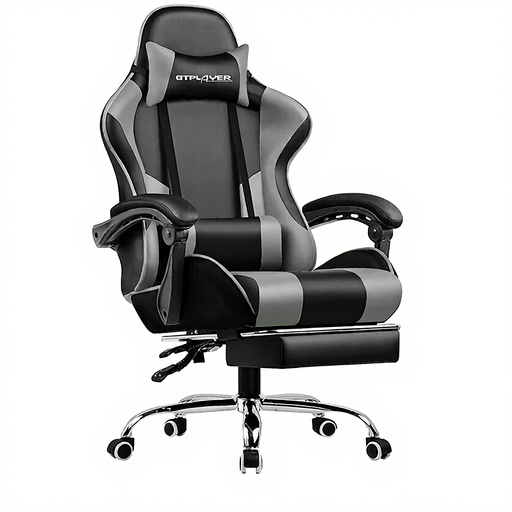
Why This Fits Their Persona: Ideal for users who need a chair for both focused work and relaxed gaming sessions. The combination of a recline function, footrest, and massage cushion offers flexibility for various situations.
The adjustable head and lumbar pillows bypass the problem of rigid supports. The retractable footrest is designed for rest periods, not for continuous load-bearing.
USB-powered massage lumbar cushion to relieve fatigue; backrest reclines from 90° to 150°.
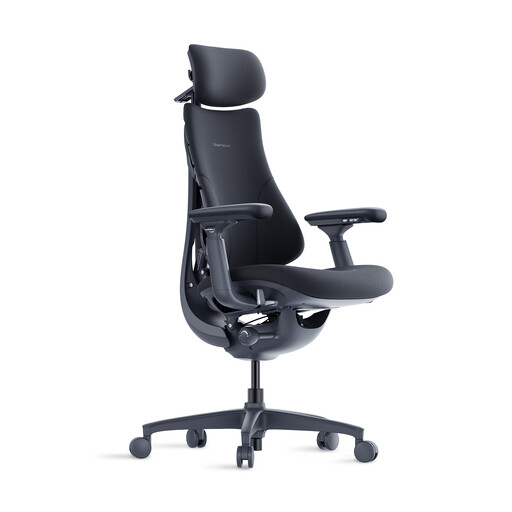
Why This Fits Their Persona: Designed for individuals who spend many hours at their desk daily and value a professional, understated look as well as advanced ergonomic features.
The adaptive lumbar support and integrated spinal extension go beyond a rigid support, offering dynamic adjustment to the user's movements.
A wide 160° recline angle for extended breaks; adaptive lumbar support automatically adjusts to your posture.
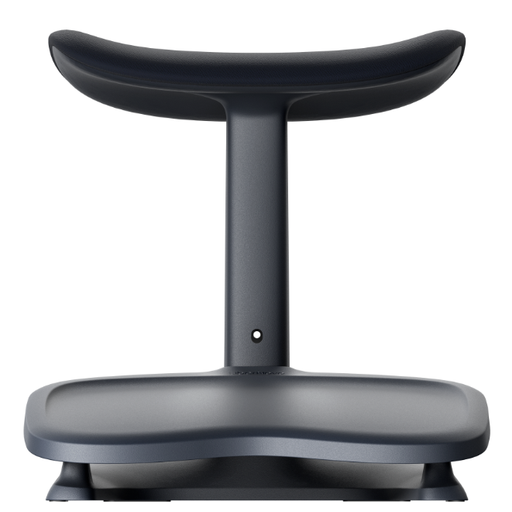
Why This Fits Their Persona: Perfect for anyone who already owns a good office chair but wants to specifically improve their posture with an external under-desk footrest, without buying a whole new chair.
As a separate, stable unit, this product bypasses the instability of wobbly, chair-mounted footrests. Its non-slip base ensures it stays firmly on the floor.
The dual-layer design allows for versatile height adjustment for a custom fit; the textured surface prevents feet from slipping.
We have compiled a complete, up-to-date list of products that fully meet these strict selection criteria and applicable safety regulations.
Yes, many models marketed as a gaming chair with a footrest are also well-suited for office work. They often offer extensive adjustability and a high backrest that supports the entire back. However, pay attention to a professional appearance if that's relevant for your work environment, and prioritise ergonomic adjustment options over purely design-focused features.
A high-quality lumbar support is more than just a firm pillow. It should be adaptable to your spine. Ideally, it is adjustable in height to position it precisely in the small of your back. An additional depth adjustment allows you to regulate the pressure. Adaptive systems that automatically adjust to your movements represent the most advanced solution.
Adjust your chair so that your thighs are parallel to the floor and your feet can rest flat on it. If your feet don't comfortably reach the floor, use an under-desk footrest to bridge this gap. Both feet should rest flat on the support, with your knees and hips bent at approximately a 90-degree angle. This relieves pressure on the back of your thighs and your lower back.