
Lieferung heute & morgen

Qualitätsgarantie

Willkommens-Angebote freischalten: KOSTENLOSE Lieferung | Bis zu 80 % RABATT | Kostenlose 30-Tage-JoyPlus-Testphase
App herunterladen
By the Joybuy Product Recommendation Officer
Long days at a desk, whether in the office or at home, place significant demands on our bodies. Improper seating can lead to muscle tension and difficulty concentrating. An ergonomic office chair is therefore not just a matter of comfort, but a fundamental component of a productive and health-conscious workspace.
This guide is designed to help you navigate your options. We will introduce various models and their specific features, providing you with objective criteria to help you select the right chair for your needs.
The market offers a vast array of models. To make an informed decision, you should consider several key features that make a desk chair truly ergonomic.
A chair can only be ergonomic if it can be adapted to your body. Look for the following adjustment features:
Prolonged sitting puts particular strain on the lower back. An office chair with lumbar support is designed to maintain the natural S-curve of the spine. Ideally, this support should be height-adjustable to align perfectly with your lumbar region.
For individuals who work long hours or like to recline during breaks, a computer chair with a headrest is a valuable addition. It supports the neck and head, helping to prevent tension in this area.
The material affects both the comfort and the durability of the chair. Mesh fabric is breathable and promotes good air circulation, which is especially beneficial on warm days. Seats with foam padding offer excellent pressure distribution.
Also, pay attention to the chair's maximum static weight capacity, indicated in kilograms (kg). A stable base made of steel or heavy-duty nylon and smooth-rolling casters suitable for your flooring are also key quality indicators for a home office swivel chair.
Based on the criteria above, we have compiled a selection of chairs that stand out for their functional features.

Ochama Ink Black Ergonomic Mesh Swivel Chair – 62×62.4×(120.4-127.4) cm
Why It Stands Out This model combines essential ergonomic functions with a practical design. The S-shaped backrest is equipped with an adjustable lumbar support and a headrest to promote a healthy posture. A special feature is the flip-up armrests, which allow the chair to be pushed under the desk to save space when not in use.
Product Features
Who Is It For? This chair is a great choice for home office or office users looking for a functional ergonomic chair for long sitting periods that also offers flexible, space-saving features.
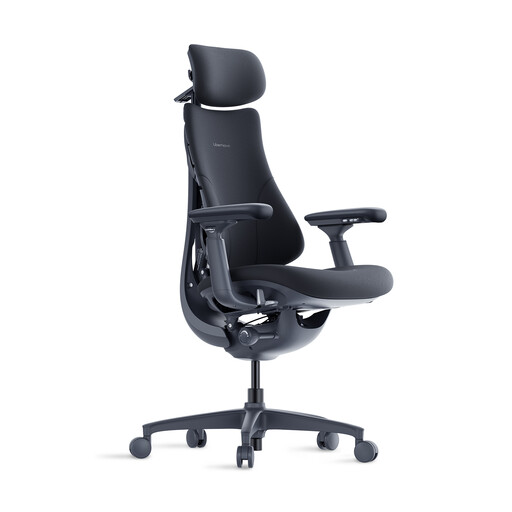
LiberNovo Omni Ergonomic Office Chair with Footrest, Adjustable with Adaptive Lumbar Support
Why It Stands Out The LiberNovo Omni stands out for its extensive comfort features that go beyond standard ergonomics. With a recline angle of up to 160° and a retractable footrest, it also allows for relaxing rest periods. The adaptive lumbar support adjusts to your back's movements, providing continuous support.
Product Features
Who Is It For? This model is aimed at users who value maximum adjustability and additional relaxation features. It is ideal for long workdays where breaks are taken directly at the desk.
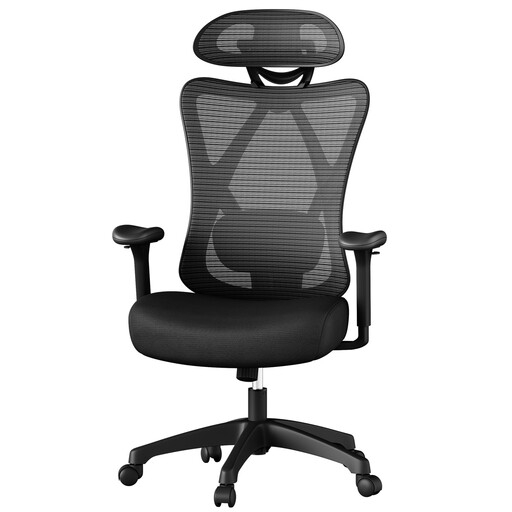
Ochama Black Ergonomic Mesh Computer Chair – 70×71×(114-124) cm, up to 150 kg capacity
Why It Stands Out This chair is designed for high durability and a robust build. With a maximum static weight capacity of 150 kg and a wider seat, it offers stable support and comfort for larger or heavier individuals. The soft lumbar pillow and adjustable headrest provide targeted support.
Product Features
Who Is It For? This computer chair with a headrest is an excellent option for users who need an exceptionally sturdy and high-capacity chair without compromising on ergonomic adjustments.
The models featured here focus on functional ergonomics with mesh fabric. If you prefer a design with different materials or a different aesthetic, you might find a suitable alternative in our selection of office chairs with chrome accents.
An office chair is considered ergonomic when it offers a wide range of adjustments to fit the user's individual body dimensions and needs. These typically include adjustable seat height, seat depth, backrest tilt, as well as customisable armrests and lumbar support. The goal is to promote a healthy posture and minimise physical strain during long periods of sitting.
Basic adjustment can be done in a few simple steps:
Even in the best ergonomic office chair, it is advisable to take regular breaks. It is generally recommended to stand up, stretch, and walk around for a few minutes at least once an hour. Dynamic sitting—regularly changing your sitting position—can also help keep your muscles active.