
Lieferung heute & morgen

Qualitätsgarantie
App herunterladen
Kategorien
Choosing the right chair for your workspace is a decision that should be based on objective criteria. With several hours of daily use, factors like adjustability, material, and support functions significantly impact posture and comfort. An ergonomic office chair is designed to adapt to the user, not the other way around. This article analyses the technical features relevant to selecting a model for your home office, corporate office, or gaming setup.
The functionality of an office chair is defined by its mechanical components and adjustment options. An informed decision is based on an analysis of the following technical specifications.
Adaptability is the core feature of an ergonomic chair. Check for the following adjustment options:
A lumbar support is an element integrated into or adjustable on the backrest that supports the natural S-curve of the spine in the lumbar region. Height-adjustable lumbar supports offer the advantage of being precisely tailored to individual anatomy. The backrest itself should be high enough to support the entire back. Models with an integrated headrest provide additional relief for the neck, especially in a reclined working position.
The seat bears the main weight of the body. A "waterfall edge" (rounded front edge) reduces pressure on the underside of the thighs and promotes blood circulation.
A stable base, usually made of metal or robust plastic, forms the foundation for any swivel chair. The casters should be appropriate for the flooring: soft casters for hard floors (parquet, laminate) and hard casters for soft floors (carpet). Some specialised chairs, such as those for stationary use, deliberately omit casters and use fixed feet for maximum stability.
Based on an analysis of technical specifications and intended use cases, we present three models that address different user requirements.
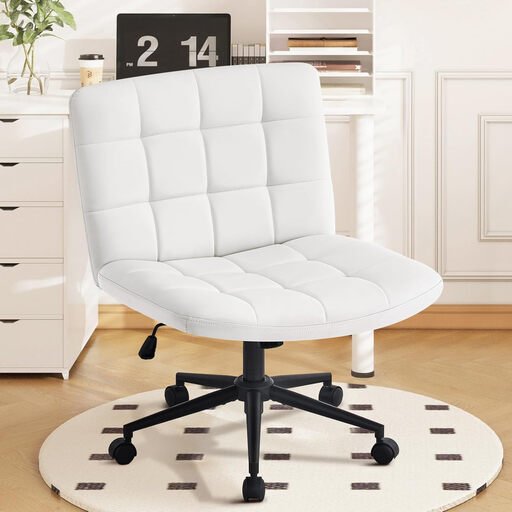
Why we recommend it: This model addresses a specific niche: users who enjoy working while sitting cross-legged. The extra-wide, U-shaped seat (64 x 52 cm) without armrests provides the necessary space. The caster-less design with stabilisers ensures a firm stance, which is advantageous for focused tasks without unintentional rolling.
Pros:
Best for: Individuals who prefer a flexible posture in their home office chair or at a vanity table and often sit cross-legged. Less suitable for work environments that require frequent movement over larger distances.
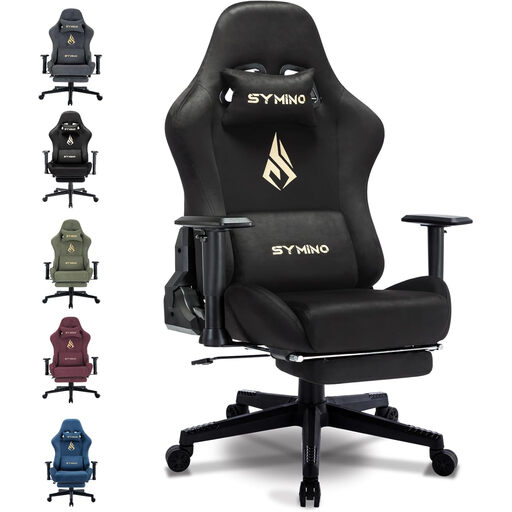
Why we recommend it: The SYMINO gaming chair combines the typical racing-seat aesthetic with extensive adjustment options. The backrest, which reclines up to 150 degrees, and the retractable footrest allow for switching between an upright work position and a relaxed lounging position. The separate head and lumbar pillows offer targeted support.
Pros:
Best for: Gamers and power users looking for a multifunctional PC chair for long sessions. The extensive adjustment options also make it appealing for users who want to use their chair for both work and relaxation.
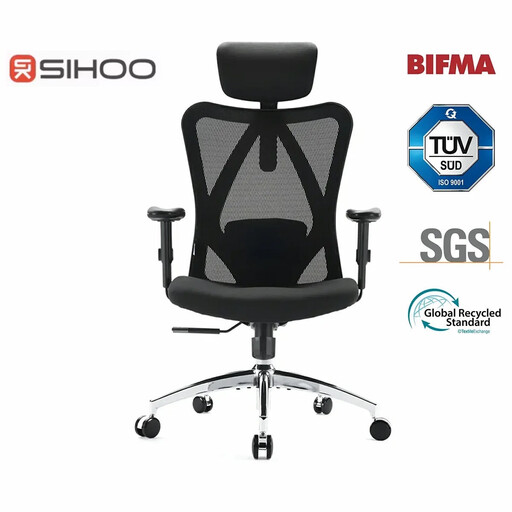
Why we recommend it: The SIHOO M18 is a classic executive chair with a focus on certified ergonomics. The BIFMA and SGS certifications confirm compliance with high standards for durability and safety. With a fully adjustable headrest, lumbar support, and armrests, it offers a high degree of individual customisation for professional use.
Pros:
Best for: Office workers and home office users who need a technically advanced and highly adjustable desk chair for long workdays and value recognised industry standards.
An ergonomic chair reaches its full potential when combined with a workspace that is equally adaptable. For a holistic ergonomic environment, the height of the desk is just as crucial. A height-adjustable desk allows for alternating between sitting and standing and ensures that the arms are always positioned at the correct angle to the work surface.
Discover our selection of Adjustable Ergonomic Desk to perfectly complement your seating position.
1. How do I correctly adjust an ergonomic office chair? Start with the seat height, so your feet are flat on the floor. Adjust the seat depth to leave a small gap between the back of your knees and the edge of the seat. Set the lumbar support to the height of your lower back. Finally, adjust the armrests so your shoulders are relaxed and your forearms rest on the desk at a right angle.
2. What is the difference between a gaming chair and an office chair? A gaming chair is often characterised by a racing-seat design, high backrests with pronounced side bolsters, and additional features like a deep recline function and footrests. A classic ergonomic office chair primarily focuses on neutral, adjustable support functions for an upright working posture, often with a more understated design and materials like mesh for breathability.