
Lieferung heute & morgen

Qualitätsgarantie

Willkommens-Angebote freischalten: KOSTENLOSE Lieferung | Bis zu 80 % RABATT | Kostenlose 30-Tage-JoyPlus-Testphase
App herunterladen
An ergonomic office chair should help you maintain a proper sitting position, whether you're working from home, at the office, studying, or gaming. However, product pages often throw around terms like "ergonomic", "comfortable" or "back-friendly" without properly explaining the crucial details. If you choose based purely on design or price, you can easily overlook important factors.
A height-adjustable swivel chair isn't automatically suitable for every body size. What really matters is whether the seat height, seat depth, backrest and armrests fit your own build. A simple height adjustment can be useful, but it's often not enough for prolonged sitting.
An office chair with lumbar support can provide targeted support for your lower back. However, if the support is too high, too low, or not adjustable, it can feel uncomfortable. Details about its position and adjustment range are therefore more important than simply the label "lumbar support".
A breathable mesh office chair can improve airflow around your back. But mesh materials vary in tension, stability and build quality. For the seat itself, you also need to consider cushion thickness and material. A very soft cushion isn't automatically suitable for many hours at a desk.
Your feet should be able to rest flat on the floor when you're sitting normally. Your knees should form roughly a right angle. So check the stated height range and compare it with your own height. For example, the GTIMEX model offers a seat height of 43 to 53 cm; according to the product description, it's designed for people between 145 and 185 cm.
A backrest should support your upper body adequately without unnecessarily restricting your freedom of movement. An office chair with a tilt or recline function allows you to change position while sitting. The GTIMEX chair describes a backrest recline of up to 125°. That's a specific technical detail, but on its own it doesn't tell you whether the adjustment will suit every user.
Also check whether the lumbar support is actually height- or depth-adjustable. For product descriptions that mention "dynamic lumbar support", you should verify the specific adjustment options on the product page.
An office chair with adjustable armrests can make it easier to adapt to your desk height and body width. What matters are the details about the direction of adjustment: flip-up armrests, for example, give you more freedom when pulling up to your desk, but they don't necessarily change your arm position.
If you're looking for a desk chair up to 150 kg, you should explicitly check the maximum weight capacity in the technical specifications. For the GTIMEX model, the product description states it's suitable for people under 150 kg. However, a weight capacity figure is no substitute for a properly fitting seat, stable castors and correct assembly.
If a standard such as DIN EN 1335 or a GS mark is mentioned, you should check the specific product documentation or certificate details. Not every marketing claim constitutes proof of a particular standard.
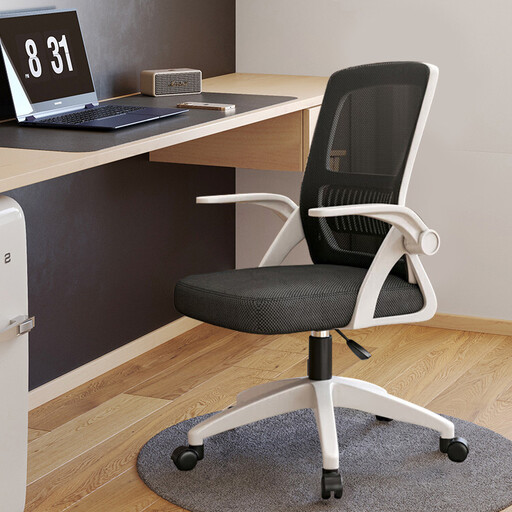
Why this product fits the profile: The mesh back, 360-degree swivel function, flip-up armrests and stated lumbar support cover the key requirements for a simple home office workstation.
The product name lists specific features rather than just general comfort promises. Adjustment ranges and weight capacity should still be checked before purchase.
Breathable mesh back and flip-up armrests; 360-degree swivel function according to the product name.
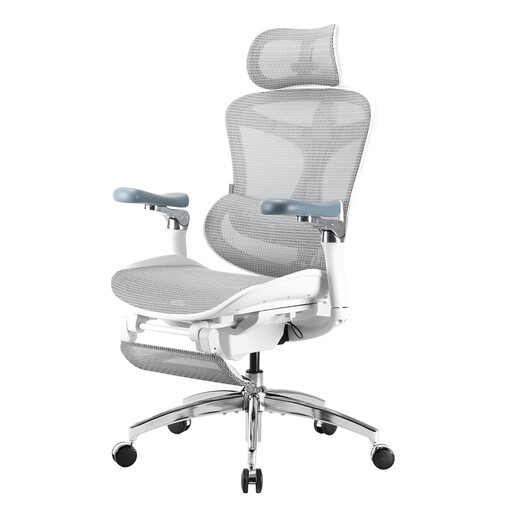
Why this product fits the profile: The product name highlights 3D armrests, dynamic lumbar support and an adjustable backrest. This model is aimed at users who want multiple adjustment options.
Several stated adjustment features reduce the risk of ending up with just a fixed standard position. The actual adjustment directions and measurements should be checked against the product details.
3D armrests, dynamic lumbar support and adjustable backrest according to the product name.
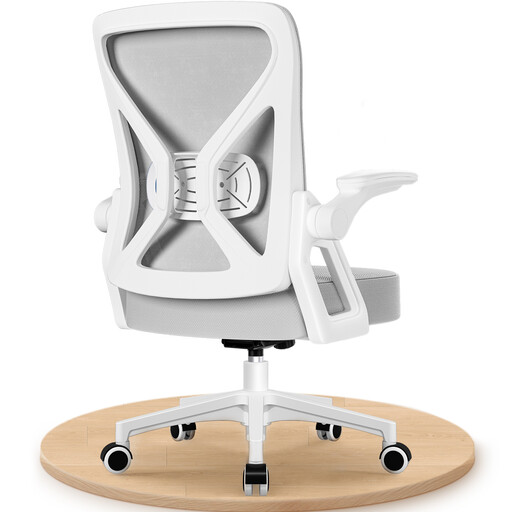
Why this product fits the profile: For longer working sessions, the described recline function of up to 125° can provide additional sitting positions. The manufacturer also states a weight capacity for people under 150 kg.
Specific details about seat height, recline angle, body size and weight capacity make it easier to check before buying. The assembly instructions should be followed carefully.
Seat height from 43 to 53 cm, recline function up to 125°, 360-degree castors and stated weight capacity under 150 kg.
After assembly, don't just give the chair a quick try – adjust it to your workstation:
Even a suitable home office chair doesn't replace regular changes of position and short movement breaks. The chair should allow movement, rather than locking you into a single posture for many hours.
We've put together a complete, regularly updated list of products that fully meet these strict selection criteria and the safety regulations in force in the EU.
It's impossible to give a reliable lifespan without details about the mechanism, cushioning, gas lift and daily load. Look for information about spare parts, warranty conditions and a verifiable weight capacity. Regularly tightening screws can help maintain safe operation.
The price depends mainly on the range of adjustment, mechanism, materials and weight capacity. Don't just compare the purchase price – also consider assembly effort, potential spare parts and suitability for your body size. A cheaper chair can be sufficient if the key measurements and functions match your workstation.
First, check the seat height, backrest, lumbar support and armrests. A 360-degree swivel function makes it easier to move around your workstation; a tilt or recline function allows you to change position. What really matters is whether these features can be adjusted to suit your own sitting posture.