
Lieferung heute & morgen

Qualitätsgarantie

Willkommens-Angebote freischalten: KOSTENLOSE Lieferung | Bis zu 80 % RABATT | Kostenlose 30-Tage-JoyPlus-Testphase
App herunterladen
Anyone looking to buy ergonomic office and gaming accessories will find a wide range of office chairs, keyboards, mouse sets and iPad solutions. Product descriptions often list numerous features, but not every detail is relevant to your everyday needs. What matters most is fit, connection type, layout, material and whether the accessories can be set up sensibly for long-term use.
An ergonomic office chair can offer a wide range of functions. However, if the seat height, seat depth, backrest and armrests do not suit your height and desk, those features will remain unused. So focus on specific measurements rather than terms such as “ergonomic” or “comfort”.
Important features include:
A wireless keyboard and mouse set is convenient if you use several devices or regularly change workstations. For German-speaking users, however, a genuine QWERTZ keyboard layout is important. A different layout can lead to unnecessary adjustment when using special characters, umlauts and key labels.
Also check whether the keyboard works via Bluetooth, a 2.4 GHz receiver or both connection types. Bluetooth is often the obvious choice for tablets and smartphones, while a desktop PC may benefit from a USB receiver.
An RGB keyboard can make it easier to find the right keys in low light and allows visual customisation. However, it does not automatically improve hand positioning or typing comfort. A mechanical keyboard is not suitable for everyone either: switches vary in actuation force, noise and travel.
If you type frequently, pay attention not only to the lighting but also to key spacing, the wrist rest and noise levels. For gaming, response characteristics, anti-ghosting and programmable functions may be more important.
With an office chair, it is the combination of adjustments that matters. Dynamic lumbar support can move with the backrest as you change position, but it does not replace the correct seat height or a suitable distance from the desk. Check whether the dimensions suit your height and whether the seat is deep enough or can be adjusted.
According to the product details, the Sihoo Dora S100 features adjustable seat height, a seat depth adjustable by 5 cm, an independently adjustable backrest and dual dynamic lumbar support. The 4D armrests can be adjusted in several directions, according to the supplier. The stated height range for the backrest is 150 to 190 cm. The materials are associated with BIFMA and SGS according to the product description. Before buying, such details should be checked against the complete manufacturer information and the permitted load.
For office work, spreadsheets and longer texts, a full-size layout with a number pad is practical. A foldable Bluetooth keyboard saves space when travelling, but its more compact key spacing may take some getting used to. A model with several Bluetooth channels is useful if you switch between a laptop, tablet and smartphone.
For a mechanical gaming keyboard, the following points are also important:
An iPad keyboard case must match the device generation and screen size exactly. Magnetic mounts can simplify the setup, but they are not compatible with every iPad model. Check the listed model range, viewing angle, weight and trackpad position.
A keyboard with trackpad is particularly useful if you often use your iPad for documents, research or spreadsheets. For occasional typing, however, a lighter keyboard without an integrated trackpad may be sufficient.
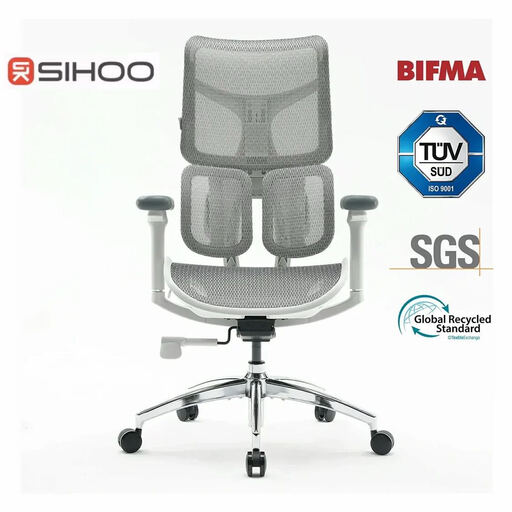
Why this product suits this profile: This chair is designed for people who want to adjust several sitting parameters to suit their height and working position, whether working from home or in the office.
The product details specify adjustment ranges for the seat depth, backrest and armrests instead of relying solely on general terms relating to comfort.
Dual dynamic lumbar support, 4D armrests, adjustable seat depth and mesh backrest according to the product description.
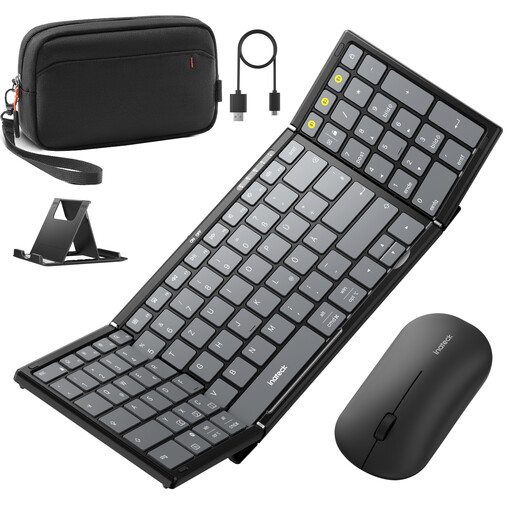
Why this product suits this profile: This set combines a keyboard, mouse, stand and carry case for working from home, studying and mobile work.
The stated QWERTZ layout reduces the risk of ending up with an unsuitable key layout. However, device compatibility should still be checked before buying.
99-key layout with number pad, Bluetooth 5.3, three keyboard channels and a tri-mode mouse with 2.4 GHz and Bluetooth, according to the product details.
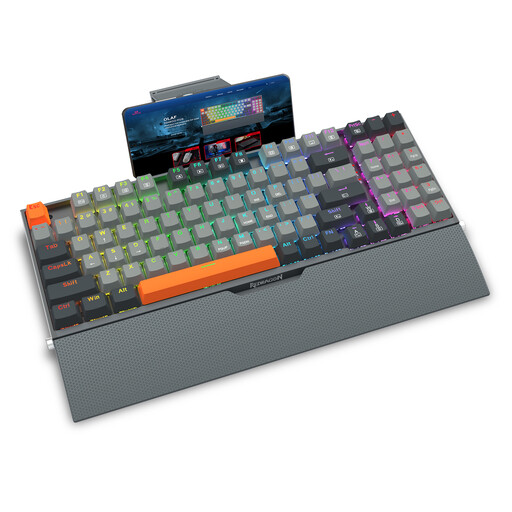
Why this product suits this profile: Suitable for users looking for a wired keyboard with mechanical switches, RGB lighting and replaceable switches.
The wired connection means you do not have to recharge the keyboard while using it. The layout, switch characteristics and noise level should still suit the intended environment.
94 keys, hot-swap PCB, PBT double-shot keycaps, RGB lighting and detachable wrist rest according to the supplier.
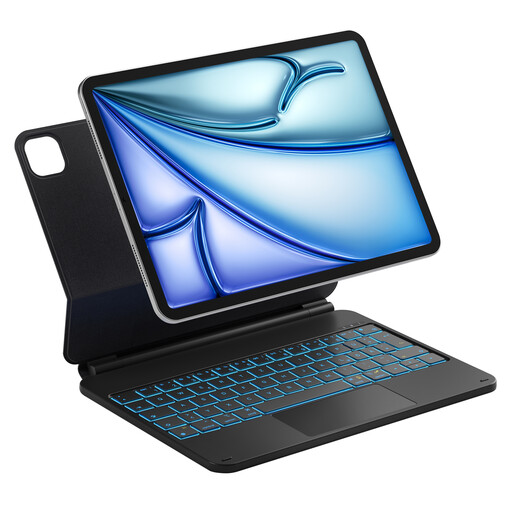
Why this product suits this profile: The magnetic iPad keyboard supports a freestanding setup for typing, video conferencing and mobile office tasks.
The compatibility list specifies particular iPad series. Even so, it should be checked against your device’s model number before ordering the case.
130-degree tilt adjustment, multi-touch trackpad, iPadOS shortcut keys and seven-colour backlighting according to the product description.
We have put together a complete, regularly updated list of products that fully meet these strict selection criteria and the safety regulations applicable in the EU.
These include an adjustable office chair, a suitable keyboard and mouse, a wrist rest, a monitor or tablet stand and, where appropriate, a height-adjustable desk. It is not the number of accessories that matters, but whether they work together to support a neutral working position.
Its lifespan depends on the switch type, frequency of use, care and build quality. A hot-swappable keyboard can make it easier to replace individual switches. With wired models, there is also no integrated battery to wear out. Specific durability claims should always be taken from the manufacturer’s information.
Power consumption depends on the battery, lighting, connection type and power-saving mode. An RGB keyboard will generally use more energy when the lighting is on than when it is switched off. If you work on the go, check the charging time, standby behaviour and whether the device can also be used with a cable.