
Lieferung heute & morgen

Qualitätsgarantie

Willkommens-Angebote freischalten: KOSTENLOSE Lieferung | Bis zu 80 % RABATT | Kostenlose 30-Tage-JoyPlus-Testphase
App herunterladen
By Joybuy Product Recommendation Officer, August 29, 2026
Long days at a desk often lead to discomfort in the hand, wrist, and arm. An ergonomic mouse is frequently touted as the solution, but the market is overwhelming. Many products promise comfort but fail in practice due to fundamental flaws. This guide will help you identify marketing traps and find a mouse that genuinely boosts your productivity and ensures a relaxed posture long-term.
Before you make a decision, you should be aware of three common problems that often lead to a bad purchase:
To make an informed decision, focus on the following three technical features that are crucial for professional use.
The ergonomics of a mouse are directly related to its shape and the size of your hand. A good ergonomic office mouse supports the hand in a natural position. Look for a shape that suits your grip style (e.g., Palm Grip, where the entire hand rests on the mouse). A critical technical detail is the sensor. For modern workspaces with various surfaces, a precise mouse for glass is essential. Models with high-quality laser sensors, such as Darkfield sensors, work reliably on almost any surface, including glass desks.
A seamless workflow requires a stable and flexible connection. A mouse for multiple devices is ideal for users who switch between a desktop PC, a laptop, and perhaps even a tablet. Features like "Easy-Switch" allow you to change devices at the push of a button. Look for modern and secure wireless technologies like Logi Bolt, which ensure an encrypted and interference-free connection—an important aspect for enterprise use. A rechargeable mouse with USB-C is also practical and more environmentally friendly than models with disposable batteries.
Boosting efficiency goes beyond pure ergonomics. A mouse with a thumb wheel makes horizontal scrolling in large spreadsheets or on video timelines significantly easier. Programmable buttons allow you to assign app-specific shortcuts. For open-plan offices or the home office, a quiet-click mouse is beneficial as it minimises noise and aids concentration.
Here are some recommendations tailored to specific user needs that avoid the pitfalls mentioned above.
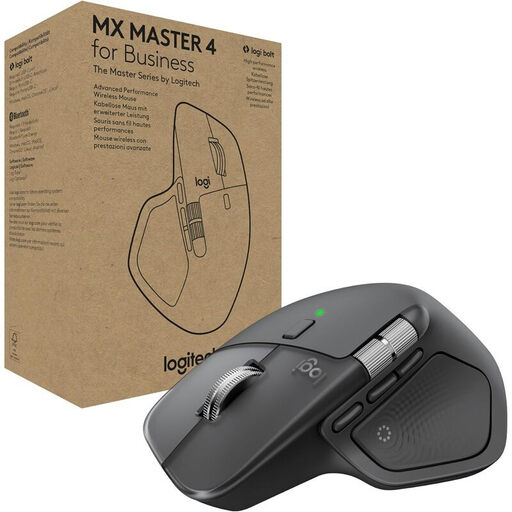
Why This Fits Their Persona: Ideal for users who need maximum efficiency and control across multiple systems. The combination of its ergonomic shape, thumb wheel, and customisable buttons optimises complex workflows for programmers, analysts, and creatives.
Its ergonomics are field-tested and designed for prolonged use. The features are focused on productivity, not gaming. The Logi Bolt USB-C receiver provides a stable and secure connection for enterprise environments.
MagSpeed scroll wheel for fast or precise scrolling; 8K DPI sensor works even on glass; seamless switching between up to three devices.
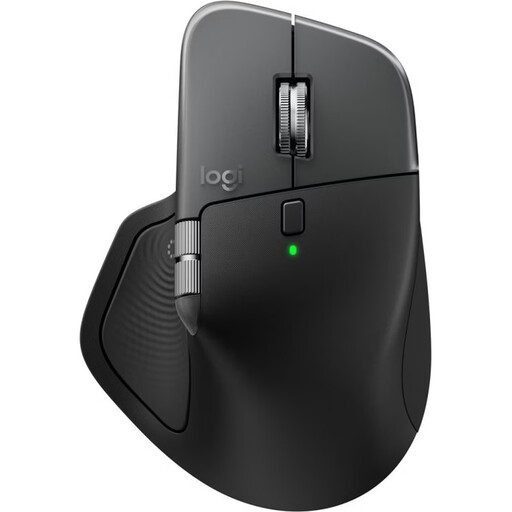
Why This Fits Their Persona: Specially optimised for the Apple ecosystem. The mouse connects seamlessly with Mac and iPad, and the Space Black colourway perfectly matches the aesthetic of Apple hardware. An ideal Mouse for Mac and Windows users who work primarily within the Apple universe.
Offers the same practicality-tested ergonomics as the standard version. Connectivity is focused on Bluetooth, which is the standard for Mac users and works without an additional dongle.
Optimised for macOS and iPadOS; charges via USB-C to USB-C; all the advanced features of the MX Master 4 in a Mac-friendly package.

Why This Fits Their Persona: An all-in-one solution for a tidy and quiet workspace. The set offers a reliable, rechargeable mouse and a high-quality keyboard at an attractive price point. The symmetrical 6-button mouse is suitable for many hand sizes and for both right- and left-handed users.
CHERRY focuses on the essentials: a stable, encrypted wireless connection, quiet clicks, and long battery life. It forgoes expensive but unnecessary extra features, which is reflected in the price.
Complete set with keyboard and mouse; both devices are rechargeable via USB-C; very quiet keys and mouse clicks; AES-128 encryption.
We have compiled a complete, up-to-date list of products that fully meet these strict selection criteria and German safety regulations.
1. How long does the battery of a rechargeable mouse last in daily office use? Battery life varies by model and usage. High-end models like the Logitech MX Master 4 offer up to 70 days on a full charge, according to the manufacturer. Many modern mice also feature a quick-charge function, where a few minutes of charging can provide several hours or even a full day of use.
2. Is a vertical mouse always the better ergonomic choice? Not necessarily. Vertical mice promote a "handshake" position, which can relieve strain on the forearm and counteract twisting (pronation). This can be beneficial for individuals with existing wrist problems. However, it takes some time to get used to, and not everyone finds this posture comfortable. A well-shaped, non-vertical productivity mouse can be an equally good or even better solution for many users.
3. Do I need special software for an ergonomic mouse? For basic functions, no software is usually required (plug-and-play). However, to unlock the full potential—such as customising button assignments, changing DPI levels, or creating app-specific profiles—installing the manufacturer's software (e.g., Logi Options+) is recommended. This allows for deep personalisation to perfectly adapt the mouse to your workflow.