
Lieferung heute & morgen

Qualitätsgarantie

Willkommens-Angebote freischalten: KOSTENLOSE Lieferung | Bis zu 80 % RABATT | Kostenlose 30-Tage-JoyPlus-Testphase
App herunterladen
An ergonomic wireless mouse should make working comfortable, respond precisely and stay reliably connected to your computer. In practice, however, it is not just the shape or DPI rating that matters. An unsuitable hand rest, an incompatible connection or a battery with no clear charging indicator can make everyday use considerably more difficult.
This guide will help you avoid common purchasing mistakes and choose a wireless mouse that suits your requirements.
A vertical mouse can keep your wrist in a different position from a classic design. However, that does not mean every hand will be comfortable with every angle. A pronounced shape can be impractical for smaller hands or users who frequently change their grip.
You should therefore consider:
An ergonomic mouse for the office and home working should also be easy to move. A higher weight can feel stable, but is less suitable if you frequently reposition the mouse.
A mouse with a high DPI rating can move the cursor a long way with small movements. That does not automatically mean more accurate control. For office work, spreadsheets and web navigation, lower to medium settings are often sufficient. Creative applications and gaming, on the other hand, benefit from finer adjustment.
More important than the maximum value are:
For example, the Logitech MX Vertical offers an adjustable range of 400 to 4,000 DPI. The Logitech MX Master 3S for Business specifies a sensor value of up to 8,000 DPI. Both figures should be considered in relation to your actual workflow.
A Bluetooth mouse does not need a separate receiver, but your computer must have a compatible Bluetooth module. This is convenient for MacBooks, tablets and many laptops. A 2.4 GHz connection with a USB receiver, on the other hand, can be easier to set up with desktop PCs or older devices.
Before buying, check the following:
For a multi-device mouse, the number of devices it can store is important. Some models support up to three devices, while simpler models only allow a single connection.
Bluetooth is often the more straightforward option for a laptop with few ports. If you prefer a stable receiver, check which connector it uses. A USB-C receiver plugs directly into many modern notebooks, while a USB-A receiver may require an adapter.
The charging port also matters: a mouse with USB-C can be charged using many cables you already own. Even so, check what is included, as some models do not come with a charging cable.
A rechargeable mouse reduces the need for disposable batteries, but it does need to be charged regularly. The stated battery life depends on usage, lighting, wireless mode and software features. For battery-powered models, remember to factor in the cost and availability of suitable AA or AAA batteries.
A fast-charging function is useful. According to the product specifications, the Logitech MX Master 3S for Business offers up to 70 days of battery life and USB-C charging. The Logitech MX Vertical is stated to offer up to four months of battery life. These figures are guidelines, not a guarantee for every usage scenario.
A quiet mouse can be useful in open-plan offices, libraries or home offices where you share your workspace. However, click volume also depends on the surface and the amount of pressure you apply. A quiet switch cannot replace a comfortable button layout.
Pay attention to:
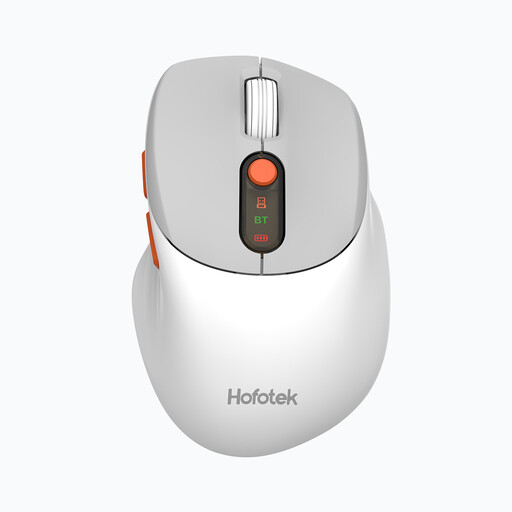
Why this product suits the profile: This compact model combines Bluetooth 5.1 and 2.4 GHz wireless connectivity, making it suitable for everyday office and laptop tasks.
The five DPI settings from 800 to 4,000 allow you to adjust sensitivity without unnecessarily high maximum values. Quiet clicks reduce noise in the working environment.
62-gram weight, support for up to three devices and one AA battery included.
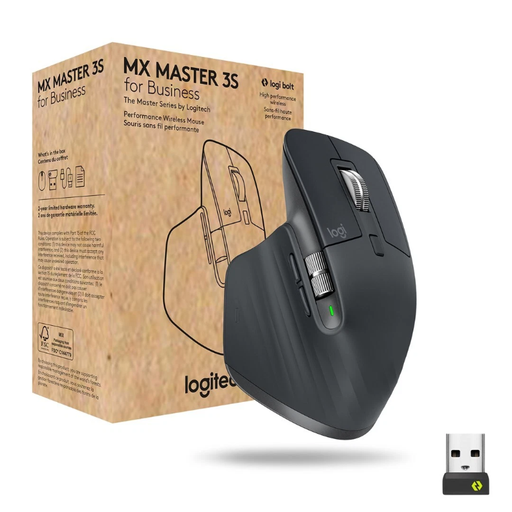
Why this product suits the profile: The right-handed design, multiple buttons and support for up to three devices are well suited to long office, analysis and creative sessions.
According to the product specifications, the Darkfield sensor is also suitable for glass of the minimum specified thickness. Bluetooth and the Logi Bolt receiver offer two connection options.
Up to 8,000 DPI, MagSpeed scroll wheel, seven programmable buttons and USB-C charging.

Why this product suits the profile: The vertical design with a 57-degree angle is aimed at users who deliberately want an alternative hand position for longer work sessions.
The fixed angle makes the design easy to compare objectively. Before buying, you should consider your hand size and whether you are comfortable using vertical mice.
400 to 4,000 DPI, Bluetooth and USB receiver, plus up to three paired devices.
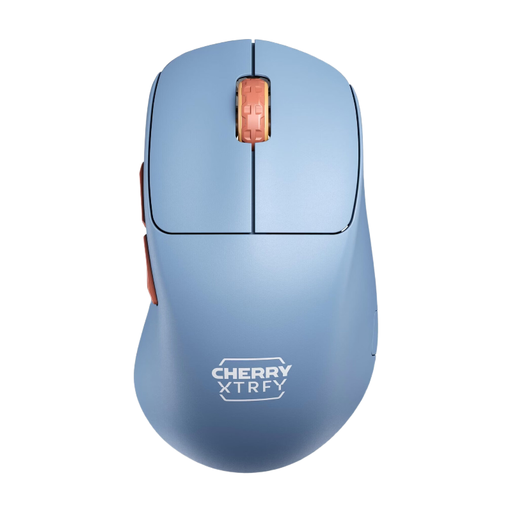
Why this product suits the profile: This 53-gram model with 2.4 GHz wireless connectivity is designed for fast movements and a right-handed gaming grip.
The polling rate can be selected from 125 to 1,000 Hz. The USB-C port also allows you to use the mouse while it is charging.
PixArt-3395 sensor, up to 26,000 DPI, up to 90 hours of battery life and a charging cable included.
We have put together a complete, regularly updated list of products that fully meet these strict selection criteria and the safety regulations applicable in the EU.
Bluetooth is convenient if your laptop already supports it and you do not want to use a USB receiver. A 2.4 GHz receiver can be an alternative if Bluetooth is unavailable or you prefer a dedicated wireless connection. Check the receiver port before buying: USB-A and USB-C are not interchangeable without an adapter.
Battery life depends on the model, usage, wireless mode and additional features. Manufacturer claims such as 70 days or several months should be treated as guidelines. For regular users, USB-C charging and a fast-charging function are particularly convenient. With a mouse that uses a replaceable battery, there is no need to wait for charging, but ongoing battery costs apply.
That depends on the shape, sensor, polling rate and button layout. Office models are designed for navigation, comfort and use with multiple devices. A gaming mouse such as the CHERRY XTRFY M64 Wireless, on the other hand, offers a lightweight design, high DPI settings and a selectable polling rate. Ultimately, what matters is whether the shape suits your grip and preferred style of play.