
Lieferung heute & morgen

Qualitätsgarantie

Willkommens-Angebote freischalten: KOSTENLOSE Lieferung | Bis zu 80 % RABATT | Kostenlose 30-Tage-JoyPlus-Testphase
App herunterladen
An ergonomic gaming chair should provide a comfortable sitting position for gaming, working or streaming. Many models advertise a wide range of adjustment options, but not every feature is equally useful in everyday life. What matters are reliable details about seat height, backrest, armrests, padding and maximum user weight.
As a Joybuy Product Recommendation Officer, I therefore filter the most important buying criteria from the product information. This makes it easier to see whether a model suits your height, desk and intended usage time.
A reclining or rocking function may sound useful at first. However, if the backrest can only be locked into a few positions or the seat height is not suitable for your desk, its practical benefit is limited. Therefore, check specific details such as the backrest angle, height adjustment and armrest adjustment range.
A gaming chair supporting up to 150 kg is not automatically suitable for every body shape or height. The weight limit primarily describes the permitted load. Seat width, seat depth, base and recommended user height are equally important. If these details are missing, making a direct comparison is more difficult.
“High quality” is not particularly meaningful without specific material details. PVC and PU leather can generally be cleaned with a damp cloth, but they may feel different from a breathable fabric cover. For long-term use, buyers should also consider the type of padding and the construction of the seat cushion.
An height-adjustable gaming chair should be adjustable so that both feet rest securely on the floor. According to the available product information, the height adjustment range extends up to 10 cm, depending on the model. Some models are specified as suitable for people between 158 and 190 cm tall.
The correct height supports a stable sitting position at your desk. There should be no constant, uncomfortable pressure between your thighs and lower legs. Before buying, also measure the height of your desktop and compare it with the chair’s seat-height range.
A gaming chair with lumbar support or a gaming chair with headrest can offer a more personalised fit thanks to adjustable cushions. Check whether the supports are genuinely adjustable or simply fixed to the backrest.
Several selected models specify a backrest range of 90 to 170 degrees, along with an additional tilt or rocking function of 30 degrees. On the model with a footrest, the specified reclining angle is 132 degrees. Figures like these are more useful than general claims about comfort.
Adjustable armrests should at least offer height adjustment. For some models, the product data specifies an adjustment range of 8 cm. This allows you to position your forearms closer to desk height. Also check whether the armrests move together with the backrest or can be adjusted independently.
The models differ considerably in terms of padding. Options include shape-retaining foam, high-density cold-cure foam and a seat cushion with individual pocket springs. The latter may feel different from a conventional foam seat. A general assessment is therefore less useful than choosing a design that suits your own sitting habits.
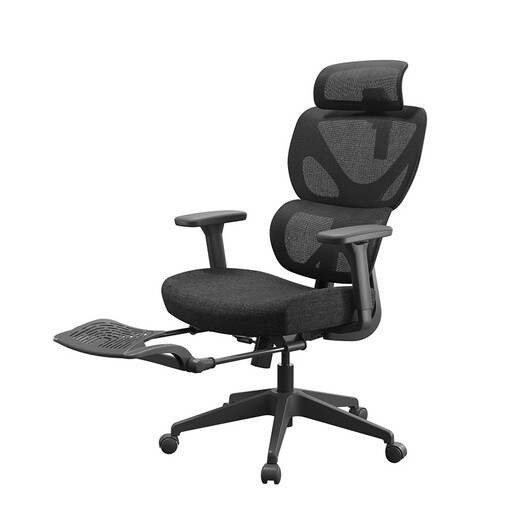
Why this product suits this profile: This model combines a footrest with elastic lumbar support, rotating armrests and a headrest. The specified 132-degree reclining angle is suitable for gaming and short breaks at your desk.
The product details specify concrete features and 10 cm-thick seat padding rather than relying on vague claims about comfort.
Footrest, rotating armrests, headrest and a specified reclining angle of 132 degrees.
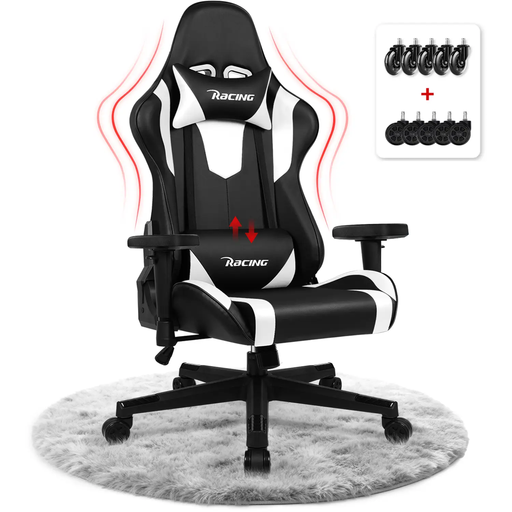
Why this product suits this profile: This model features a metal construction, a stated weight capacity of 150 kg, adjustable lumbar support and headrest, as well as height-adjustable armrests.
The product data clearly lists the weight capacity, adjustment ranges, materials and a two-year warranty.
90- to 170-degree backrest, 30-degree tilt function, 10 cm seat-height adjustment and 8 cm armrest adjustment.
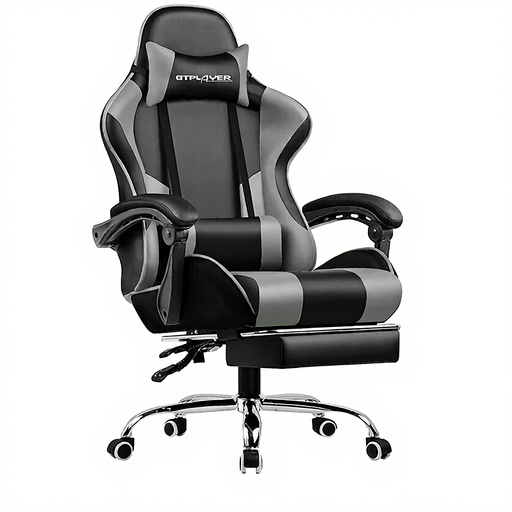
Why this product suits this profile: For people who want additional features while sitting, this model combines a retractable footrest, head and back cushions, and a USB-powered massage cushion.
The additional features are clearly specified: USB port, retractable footrest and a backrest with a range of 90 to 150 degrees.
PU leather, high-density cold-cure foam, 10 cm height adjustment and 360-degree swivel function.
A gaming chair is usually delivered in several parts and must be assembled according to the instructions. Initially, tighten all screws fully and check the connections at regular intervals. The chair should stand on a level surface. The castors, gas lift and adjustment components must be free from visible damage.
PVC and PU surfaces can be cleaned with a soft, damp cloth. Harsh cleaning products and abrasive sponges may damage the surface. Do not stand on the seat and never exceed the stated weight limit.
We have put together a complete, regularly updated list of products that fully meet these strict selection criteria and the safety regulations applicable in the EU.
Start with the seat height: both feet should rest on the floor. Next, adjust the backrest and lumbar support. Set the armrests so that your forearms can rest comfortably. The headrest and reclining function should only be adjusted as far as necessary to maintain a stable sitting position.
Its lifespan depends on daily usage time, body weight, materials, assembly and care. A stated warranty, sturdy metal frame and regularly checked screw connections can make maintenance more predictable. However, it is not possible to give a reliable fixed lifespan without knowing how the chair will be used.
A USB-powered massage cushion only uses energy when it is connected and switched on. Actual consumption depends on the specific module and should be taken from the manufacturer’s technical specifications. A mechanical model without an electrical additional function uses no electricity.