
Lieferung heute & morgen

Qualitätsgarantie

Willkommens-Angebote freischalten: KOSTENLOSE Lieferung | Bis zu 80 % RABATT | Kostenlose 30-Tage-JoyPlus-Testphase
App herunterladen
Anyone who spends several hours at a desk every day needs more than an attractive design. An ergonomic office chair should suit your height, desk height and duration of use. Terms such as “ergonomic”, “premium seating comfort” or “back support” alone are not enough to base a purchase decision on. What matters are specific adjustment options, reliable product specifications and a suitable seating geometry.
A contoured backrest does not automatically mean that a chair will fit every user. Check whether the seat height, backrest, lumbar support and armrests can actually be adjusted. Fixed padding may feel comfortable, but it offers fewer options for adapting the chair to different body sizes.
The stated maximum weight capacity is a technical limit, not a promise of comfort. Check whether the figure refers to static load capacity or dynamic use. The base, casters and gas lift should also appear sturdy. For intensive use, it is advisable to leave a safety margin below the manufacturer’s maximum rating.
An office chair with a headrest can be useful when reclining, but it is not suitable for every body size. A headrest positioned incorrectly may even interfere with a healthy sitting posture. The same applies to an office chair with a footrest: the footrest should only be used during breaks or in a reclined position and must not replace a correctly adjusted seat height.
A height-adjustable office chair should be set so that both feet rest fully on the floor and the knees form approximately a right angle. The height range stated in the product specifications is therefore more important than a general description such as “suitable for office and home office use”.
For example, the GTIMEX Ergonomic Office Chair offers a seat-height range of 43 to 53 cm and is recommended in the product specifications for people approximately 145 to 185 cm tall. These figures are intended as a guide; the actual fit also depends on leg length and desk height.
An adjustable lumbar support should not merely be included—it should also be adjustable in height or depth. When seated, it should gently support the lower back without creating pressure points. Models with a height-adjustable backrest allow for additional adjustment to the user’s upper body.
According to its product description, the ochama×J.ZAO Z5 Soft Chair combines 4D lumbar support, a backrest adjustable by 40 mm and an adjustable headrest. The backrest reclines between 105° and 140°. This may be useful for alternating between working and break positions.
An office chair with armrests should allow the forearms to rest in a relaxed position. Height-adjustable armrests are more practical than fixed models when several people use the chair. Foldable armrests can also create additional space beneath the desk.
Material plays an important role during long periods of sitting. An office chair with breathable mesh allows air to circulate more effectively than a fully enclosed faux-leather surface. Foam padding may initially feel soft; also pay attention to the padding thickness and information about the chair’s construction.
A rocking or reclining function allows you to change position throughout the day. It should engage in a controlled manner or lock securely. Before buying, also check the type of casters and the flooring: hard casters are suitable for carpets, while soft casters typically reduce the risk of scratches on hard floors.
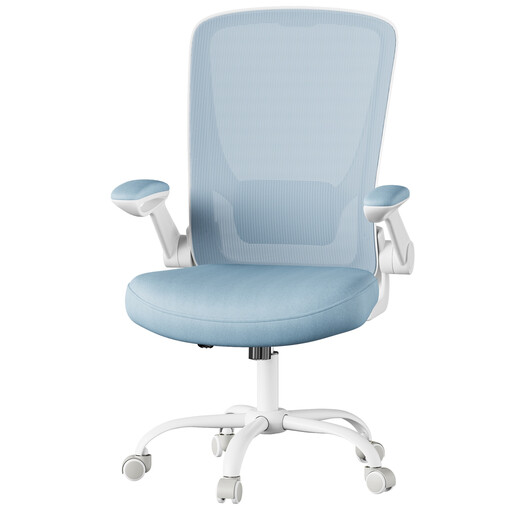
Why This Fits Their Persona: Suitable for home offices, studying or a compact workspace with regular but not continuously intensive use.
The product specifications list an adjustable seat height and lumbar support rather than relying solely on a fixed backrest shape.
Dimensions of 64 × 60 × 103–110 cm, stated static load capacity of 120 kg, foldable armrests and rocking function.
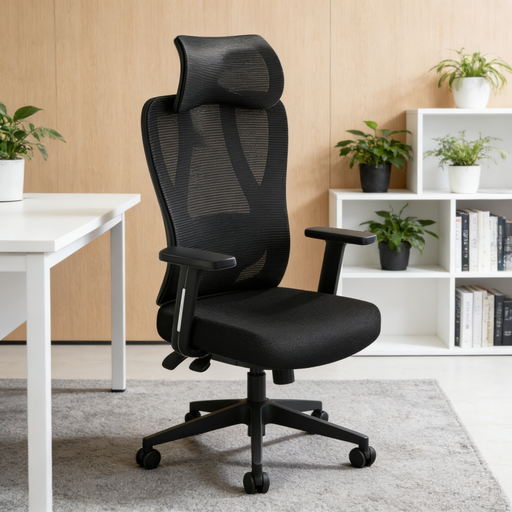
Why This Fits Their Persona: An option for people who frequently alternate between focused work and reclining while using an office swivel chair at home.
Multiple adjustable components make it easier to personalise the fit, while the advertised functions are described with specific recline and adjustment values.
Two-layer mesh, 4D lumbar support, adjustable headrest, 10.5 cm seat padding and a recline range of 105° to 140°.
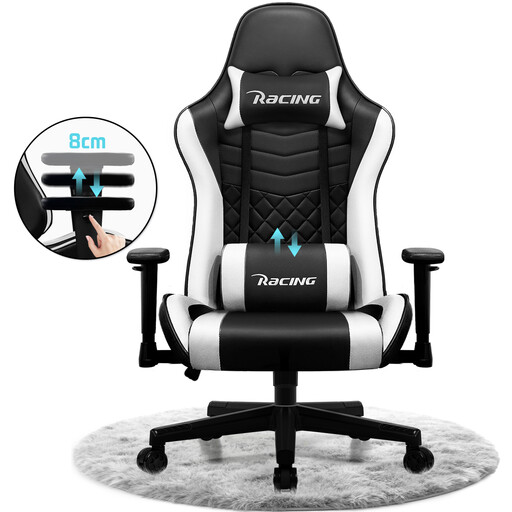
Why This Fits Their Persona: This gaming office chair is designed for users looking for a padded seat, armrests and a reclining backrest for long gaming or work sessions.
The specifications list height-adjustable lumbar support and armrests with 8 cm of vertical adjustment instead of merely highlighting a decorative racing-seat design.
Stated load capacity of up to 150 kg, headrest, tilt function and 360-degree swivel.
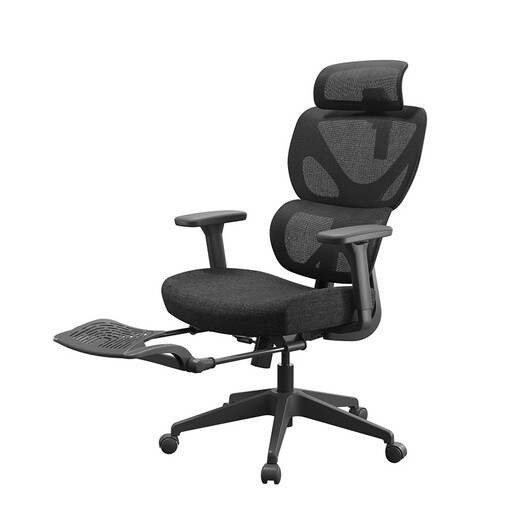
Why This Fits Their Persona: Suitable for workstations and gaming setups where users want an additional leg rest during breaks.
The footrest is identified as an additional feature and should be used specifically when reclining during breaks.
The product specifications list a 10 cm-thick seat, elastic lumbar support, swivel armrests and a recline angle of up to 132°.
For school pupils and students, a compact ergonomic desk chair with a limited adjustment range may be sufficient. Anyone who sits for eight hours or more while working from home should pay closer attention to the backrest, seat, materials and adjustability.
In the complete category, you will find ergonomic chairs with different adjustment ranges, materials and features for offices, home offices and gaming.
Service life depends on daily usage, body weight, flooring, assembly and maintenance. Check the casters, gas lift and screw connections regularly. Avoid sharp objects when using mesh fabric, and clean non-removable covers according to the manufacturer’s instructions.
Yes, provided that the seat height, backrest and armrests suit the workstation. Faux-leather gaming models may feel different from an office chair with breathable mesh. The decisive factors are the specific dimensions and adjustment options—not the product category alone.
Apart from the purchase price, there are usually no regular operating costs. However, replacement casters, potential wear parts and cleaning should be taken into account. A stable surface and correct assembly can help prevent unnecessary wear.