
Lieferung heute & morgen

Qualitätsgarantie

Willkommens-Angebote freischalten: KOSTENLOSE Lieferung | Bis zu 80 % RABATT | Kostenlose 30-Tage-JoyPlus-Testphase
App herunterladen
An ergonomic wireless Logitech mouse should offer more than a wireless connection. For office workers, developers, creatives and home-office users, the right shape, precise cursor control, quiet clicks and effortless compatibility with Windows and macOS all matter. Anyone who regularly switches between a laptop, desktop and tablet will also benefit from a multi-device mouse with reliable device switching.
However, product names and technical specifications can vary considerably. A high DPI rating alone says little about actual comfort during extended use. Likewise, long battery life may come with a non-replaceable battery or no charging cable included. This buying guide explains the key criteria and presents a selection suited to different usage scenarios.
A mouse with 8000 DPI can increase maximum pointer sensitivity. This can be useful with large monitor setups or certain creative applications. For word processing, spreadsheets and everyday office tasks, lower settings are usually sufficient. Sensor quality, the surface being used and the ability to adjust sensitivity are equally important.
If you regularly work on glass or exceptionally smooth desk surfaces, pay close attention to the specific sensor technology. According to the product specifications, several models in the MX range use a Darkfield sensor with up to 8000 DPI.
An ergonomic shape depends on hand size, grip style and hand preference. Larger models may require too much reach for smaller hands. A vertical mouse, meanwhile, changes the entire position of the hand and requires an adjustment period.
Before buying, check the dimensions, weight and whether the mouse is designed for right- or left-handed use. During long workdays, the positioning of the thumb wheel, side buttons and gesture controls is also important.
Bluetooth is practical for MacBooks, tablets and modern laptops because it does not require a USB receiver. A Logi Bolt receiver, on the other hand, can be a useful alternative for desktop PCs or managed work environments. Check whether your device supports Bluetooth Low Energy and whether it has a USB-A or USB-C port.
For rechargeable models, also verify whether a charging cable is included. According to the product description, the Logitech MX Master 4 does not come with a charging cable. This is worth noting even though the mouse charges via USB-C.
Do not focus solely on the word “ergonomic”; consider the actual design:
No design can replace regular breaks or a well-arranged workstation. If you perform repetitive movements, vary your hand position regularly.
For office work, spreadsheets and programming, finely controllable pointer movements are more important than the highest possible maximum setting. The MX Master 3S, MX Anywhere 3S and MX Master 4 are specified with up to 8000 DPI. According to the product data, the MX Vertical offers up to 4000 DPI.
Accurate sensor performance also depends on the surface. According to the manufacturer or product specifications, the Darkfield models mentioned above are designed to work on a wide range of surfaces, including glass. Actual suitability may still vary depending on the characteristics of the surface.
For a mouse for Mac and Windows, check the compatibility list. Depending on the model, Linux, ChromeOS, iPadOS or Android may also be supported. According to the product specifications, full button customisation through Logitech Options+ is primarily available on Windows and macOS.
There are two main power options:
“Up to” figures are guidelines. Lighting, connection type, frequency of use and software settings can all affect actual battery life.
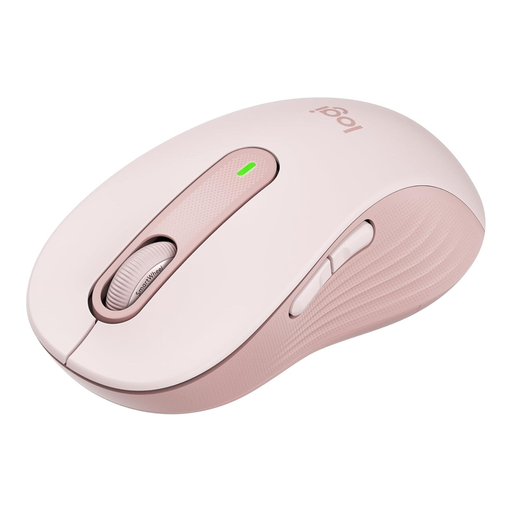
Why does it suit this profile? The M650 L is designed for right-handed users with larger hands who want a straightforward Bluetooth mouse for the office or home office.
Its size is clearly specified, and an exceptionally high DPI rating is not used as the primary selling point. Power comes from a replaceable AA battery.
SilentTouch clicks, SmartWheel and up to 24 months of battery life, according to the product specifications.
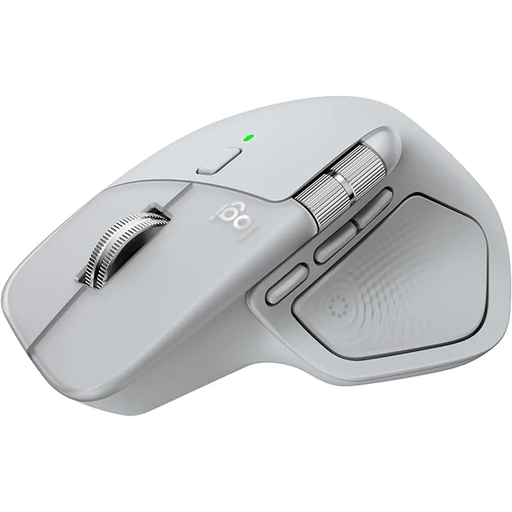
Why does it suit this profile? For data analysts, developers and creatives, the MX Master 4 offers multiple controls, a MagSpeed scroll wheel and connections for up to three devices.
Bluetooth and a Logi Bolt receiver are both available. However, full customisation requires Logitech Options+ on Windows or macOS.
8K DPI sensor, USB-C charging, quiet clicks and up to 70 days of battery life, according to the product specifications.
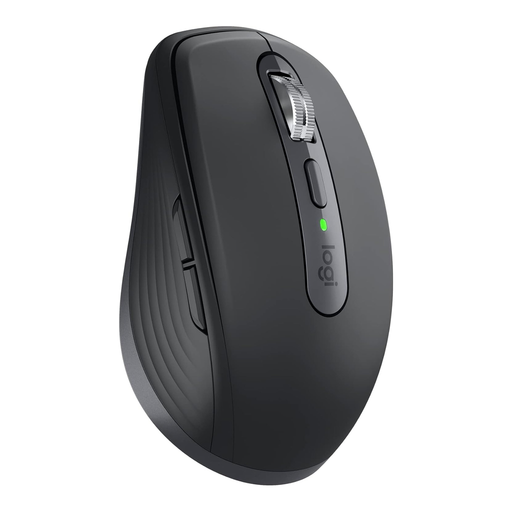
Why does it suit this profile? Weighing just 99 grams, its compact design is ideal for commuters, business trips and frequently changing workspaces.
The compact design is accompanied by specific dimensions. Bluetooth and Logi Bolt also enable connectivity with devices that have limited ports.
8K Darkfield sensor, quiet clicks, USB-C fast charging and up to 70 days of battery life, according to the product specifications.
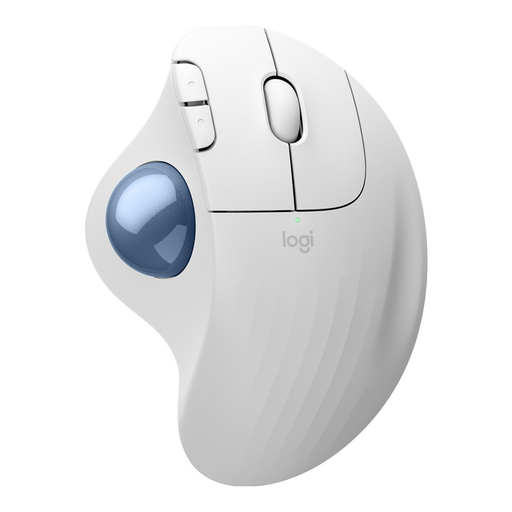
Why does it suit this profile? The thumb-operated trackball takes up very little space and suits users who do not want to move a mouse across the entire desk.
Its design clearly identifies it as a trackball model. This makes it easier to assess space requirements before purchase than with a conventional mouse.
Bluetooth and Logi Bolt connectivity, three customisable buttons and up to 18 months of battery life with an AA battery, according to the product specifications.
Our overview lets you explore additional models by design, connectivity, scroll wheel and intended use.
The Logitech MX Master 3S is an alternative to the MX Master 4, featuring an 8K DPI sensor, MagSpeed scroll wheel, seven buttons and support for up to three devices. According to the product description, the Bluetooth edition can be used without an additional receiver. Mac users can also consider the Logitech MX Anywhere 3S for Mac, which is designed around portability, quiet clicks and USB-C charging.
The Logitech MX Vertical takes a different approach with its 57-degree design. According to the product specifications, it offers Bluetooth, a USB receiver, connections for up to three devices and sensitivity of up to 4000 DPI. Users accustomed to a conventional hand position may initially find the transition unfamiliar.
Many of the models listed support Windows and macOS, according to the product specifications. The MX Master 4, MX Master 3S, MX Anywhere 3S, MX Vertical and Signature M650 L are also specified as compatible with additional systems such as Linux, ChromeOS, iPadOS and Android. Logitech Options+ may be required for advanced features and button customisation.
Battery life depends on the model and usage. Rechargeable mice such as the MX Master 3S, MX Anywhere 3S and MX Master 4 are rated for up to 70 days. Models powered by an AA battery, including the Signature M650 L, can last up to 24 months according to the product data. Actual usage time may vary.
A quiet mouse can reduce distracting click sounds in shared offices, meeting rooms or home offices used by multiple people. The Signature M650 L, MX Master 3S, MX Anywhere 3S and MX Master 4 are described as featuring SilentTouch or Quiet Click technology. The precise noise level depends on the environment, clicking pressure and surface.