
Lieferung heute & morgen

Qualitätsgarantie

Willkommens-Angebote freischalten: KOSTENLOSE Lieferung | Bis zu 80 % RABATT | Kostenlose 30-Tage-JoyPlus-Testphase
App herunterladen
An ergonomic wireless mouse should work reliably in the office, at home or during creative tasks, without filling your desk with cables. However, many product descriptions advertise high DPI values, exceptionally quiet clicks or multiple connection options. These specifications are only useful if they suit the way you work.
An 8K DPI mouse may initially sound like it offers particularly accurate control. However, DPI mainly describes the sensitivity of the sensor. Lower settings are often sufficient for word processing, spreadsheets and photo editing. What matters is whether the sensitivity can be adjusted and whether the sensor tracks reliably on the surface you use.
If you are looking for a precise mouse for glass surfaces, pay attention to specific manufacturer information about the sensor technology. The Logitech MX Master 4 model is described as having an 8K DPI Darkfield laser sensor, which, according to the product description, can also work on glass with a minimum thickness of 4 mm. This is a technical specification, but it is not a guarantee for every type of glass or every desk.
A wireless Bluetooth mouse can be connected directly to compatible devices. However, a USB receiver may be more practical with desktop PCs or workstations where devices are frequently changed. Check the following before buying:
A multi-device mouse such as the Logitech MX Master 4 can be paired with up to three devices, according to the product data. Actions Ring, Smart Actions and haptic functions can be customised using Logi Options+ on Windows and macOS. If you only need a simple mouse for one computer, you may not use these features.
A quiet computer mouse can be useful in shared offices, libraries or during video conferences. The MX Master 4 product description states that click noise is reduced by up to 90%. Such percentages should be understood as manufacturer specifications and cannot automatically be applied to every acoustic environment.
A mouse with haptic feedback provides tactile responses for actions, shortcuts or notifications. This can be helpful when using many programmable functions, but it also increases reliance on the relevant software. The feature is not necessary for straightforward pointer control.
Ergonomics depend on more than the brand name. Hand size, preferred grip and working position are all important. The Logitech MX Master 4 is listed as measuring approximately 126 × 85 × 51 mm and weighing around 141 g. It has an angled shape, a thumb scroll wheel and a gesture button.
A larger, heavier mouse may sit securely on the desk during long office tasks, but could feel cumbersome for smaller hands. Lightweight gaming models weighing around 60 to 67 g, on the other hand, are more suited to fast movements and certain grip styles. “Ergonomic” is therefore not a standard size category.
Pay attention to:
A high polling rate such as 8KHz is mainly relevant for games with fast inputs. For office applications, an ergonomic shape, stable connection and comfortable button layout are usually more important than maximum technical specifications.
According to the product data, the MX Master 4 has a battery life of up to 70 days; one minute of charging is said to provide up to three hours of use. The supplied package reportedly includes the mouse, a Logi-Bolt USB-C receiver and documentation, but no charging cable. You should therefore check whether an existing USB-C cable is suitable in terms of connector and length.
For lithium batteries, the following applies: do not open them, damage them or expose them to excessive heat. The device should be charged using a certified USB-C power source with 5 V. Accessories such as a suitable USB-C mouse cable may be useful, but are not automatically included with every mouse.
The following cards group products according to specific requirements rather than broad advertising claims.
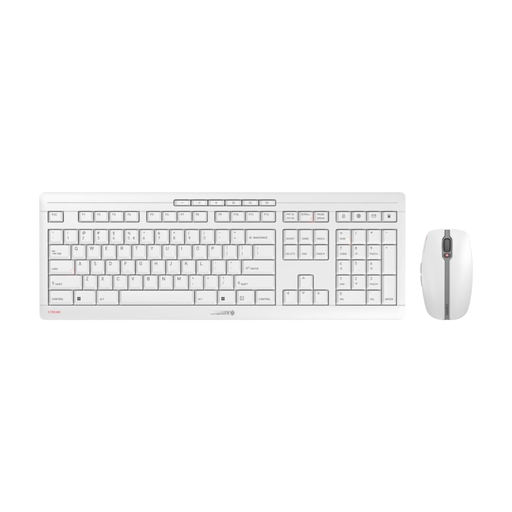
Why this product suits the profile: The set combines a wireless mouse with a keyboard, making it suitable for users who want to equip their workstation with a shared solution.
The specifications state a 2.4 GHz connection, USB-C charging, a symmetrical mouse shape and three DPI levels of 1,000, 1,600 and 2,400 DPI.
Rechargeable NiMH batteries, quiet clicks and an EU QWERTY keyboard layout. The mouse has six buttons.
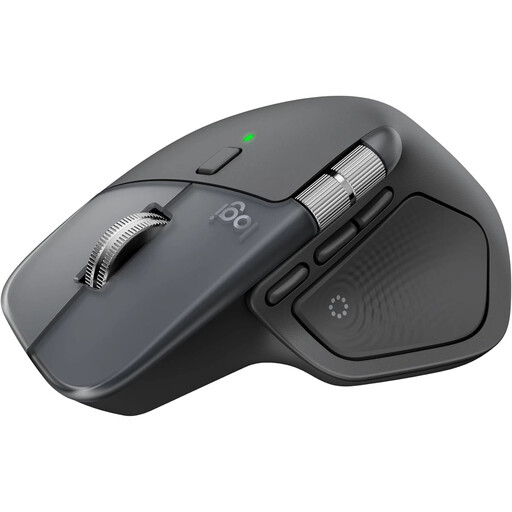
Why this product suits the profile: For office and home working with multiple devices, this mouse offers a wide range of customisable functions and two connection options.
Bluetooth and a Logi Bolt USB-C receiver are clearly specified. The connection can be used with up to three devices, and the software requirement is stated transparently.
8K Darkfield laser sensor, MagSpeed scroll wheel, USB-C charging, haptic feedback and a thumb scroll wheel. The product description states a battery life of up to 70 days.
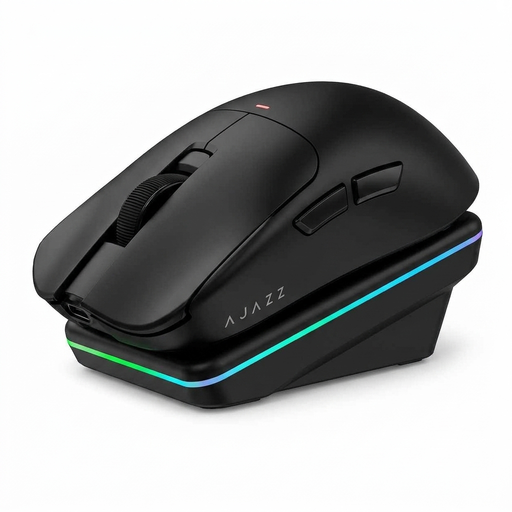
Why this product suits the profile: This model is aimed at users who combine office work and gaming and want to switch between Bluetooth, 2.4 GHz and USB.
The three connection methods and customisable software are clearly specified. This allows the mouse to be adapted to different devices and usage situations.
PAW3311 sensor with up to 24,000 DPI, 300-mAh battery, magnetic charging dock option and a weight of approximately 65 g according to the product information.
We have put together a complete, regularly updated list of products that fully meet these strict selection criteria and the safety regulations applicable in the EU.
For Bluetooth models, open your operating system’s Bluetooth settings and select the mouse. If you are using a USB receiver, plug it into the appropriate port and switch on the mouse. Manufacturer software may be required for special functions such as button assignment, Actions Ring or haptic feedback.
Battery life depends on the sensor, lighting, connection method and usage. The Logitech MX Master 4 is listed as offering up to 70 days, according to the product description. For a realistic assessment, you should also check whether a charging cable is included and whether the mouse can continue to be used while charging.
No. Ergonomics describes how well a mouse suits your hand, grip and working style, rather than referring to a fixed size. A large mouse with a thumb wheel may suit larger hands, while compact or lightweight models may be more comfortable for other users. Before buying, check the dimensions, weight, button positions and returns policy.