What should you consider when choosing one?
Existing Wi-Fi or smartphone hotspot
A good fit if: you only need to access a ticket occasionally and the existing connection works where you’re staying.
The trade-off: A smartphone hotspot uses your phone’s battery and the data allowance on your tariff. With the holiday cottage’s Wi-Fi, the connection depends on its broadband service.
Battery-powered mobile LTE router
A good fit if: several devices need to share a connection and LTE is available from your chosen network at the property.
The trade-off: You’ll need a suitable SIM and data tariff. The manufacturer’s stated battery life and data speeds don’t guarantee a connection at your holiday cottage.
Battery-powered mobile 5G router
A good fit if: you also want to use the router for other, more data-intensive tasks, and both your tariff and the network at your destination support 5G.
The trade-off: Maximum 5G and Wi-Fi speeds don’t prove you’ll get better reception indoors, or offer any benefit when you’re simply displaying a ticket.
Router for a fixed location with mains power
A good fit if: you’ll use the connection mainly at the holiday cottage, there’s a power socket available and the router can stay in one place.
The trade-off: A device without a battery isn’t a like-for-like option if there’s no mains power. The coverage map can’t reliably predict reception inside the property.
First, check how you’ll access your ticket and what reception is like where you’re staying. Then choose based on shared use, power supply and tariff – not just the advertised top speed.
| Purchase priority |
What to check before buying |
Who is this important to? |
| Reliable reception |
Check coverage for the network used by your intended tariff at the property; if possible, test it indoors too. |
If I don’t know which network works at the holiday cottage, reception on site is my first priority. Reception is likely to be the most important purchase consideration for around 36% of consumers. |
| Ticket ready in time |
Check how your specific ticket will be delivered; set up the app or supported wallet before you leave. |
If I want to show my ticket without delay, I’d rather get it ready before travelling. Having a ticket ready is likely to be the top priority for around 29% of consumers. |
| Several devices and power supply |
Count the devices that will be connected at the same time; check whether there’s a power socket where you want to set up the router. |
If several guests are sharing a connection, the number of devices and the power supply need to suit how we’ll use it. Sharing a connection between devices is likely to be the main concern for around 21% of consumers. |
| Data tariff and ongoing costs |
Check the data allowance and tariff terms; activate a new prepaid SIM in good time. |
If I only need the router occasionally, I want to weigh up the tariff and how I’ll use it before buying. Ongoing costs are likely to be the top priority for around 14% of consumers. |
Joybuy products for holiday cottages and mobile connectivity
The devices below include mobile LTE hotspots, as well as LTE and mobile routers for a fixed location with access to mains power. Before choosing one, check that the network, SIM and power supply are right for how you plan to use it.
 No image available
AVM FRITZ!Box 6825 4G LTE
For a fixed location with usable 4G coverage and an available USB-C power source.
Cat 6, 300 Mbps; Wi-Fi 6 AX 600 Mbps; 1 × Gigabit LAN; Nano-SIM.
Requires a USB-C power source; no built-in battery is specified.
View at Joybuy
 No image available
MERCUSYS MT110 4G LTE Mobile Wi-Fi
A mobile LTE hotspot for sharing a connection when there’s no power socket available for the router.
150 Mbps; Nano-SIM; built-in 2200-mAh battery.
Requires a compatible Nano-SIM and mobile data tariff.
View at Joybuy
 No image available
ASUS 4G-AX56
For a fixed location with a power socket and suitable LTE coverage.
Wi-Fi 6; Dual-Band; Gigabit Ethernet.
Requires a power socket and a suitable power adapter.
View at Joybuy
 No image available
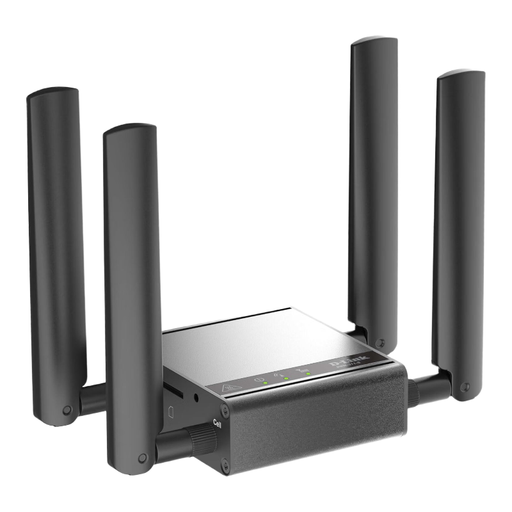
D-Link DWM-311-G
Described as a router, gateway and modem; before using it, check that the connections, mobile network and power supply are suitable for your location.
View at Joybuy
 No image available
TP-Link M7000
A mobile 4G/LTE Wi-Fi router for sharing a connection when you want to use the router without a power socket.
Up to 150 Mbps download and 50 Mbps upload; 2000-mAh battery.
Requires a Nano-SIM and a suitable mobile data tariff.
View at Joybuy
Frequently asked questions
Does the mobile coverage map guarantee reception at a holiday cottage?
No. The Federal Network Agency describes its map as a prediction of outdoor coverage. Walls, glazing and conditions at the actual location can affect the reception available inside the property.
Do I always need an internet connection to get into an event with a mobile ticket?
It depends on the ticket provider and how the ticket is delivered. For tickets with a moving barcode, Ticketmaster Help Germany recommends opening the ticket in advance or saving it to a supported wallet; screenshots won’t work. Check the requirements set by your specific provider.
What should I do before using the router for the first time?
Check the SIM format, tariff and network, set up the router and test the connection before you need to access your ticket. If you have a battery-powered router, charge that and the smartphone you’ll use to show your ticket.
Can I use a new German prepaid SIM straight away without an identity check?
No. Under Section 172(2) of the TKG, providers of prepaid mobile services must verify the relevant account holder details before activation. Arrange activation before your stay; how long it takes depends on the provider and the process used.
Do German tariff terms also apply if the holiday cottage is in another EU country?
Not necessarily without changes. The Federal Network Agency explains the ‘Roam Like At Home’ principle for EU roaming, while also noting that service quality may differ. Check network coverage and the terms of your tariff for the country you’re visiting.


