Teams in busy exhibition spaces
If visitor traffic or the distance to the seat can’t be reliably controlled, you’ll need to decide whether a recorder can be positioned close to the speaker or a wearable microphone would work better for your setup.


If you can position the recorder securely and close to the seated speaker, a handheld model with built-in microphones is a straightforward place to start. If distance, echo or visitor traffic makes recording difficult, a wearable lapel microphone may be more suitable for capturing a single voice. The key is to make a test recording in the actual location. The recording format and file transfer method should also suit how you plan to use the recording.
If visitor traffic or the distance to the seat can’t be reliably controlled, you’ll need to decide whether a recorder can be positioned close to the speaker or a wearable microphone would work better for your setup.
If you can plan the seating and recorder position, and the speaker doesn’t want to wear a microphone, a handheld recorder with built-in microphones could be a good option. A test recording will show whether the position works.
If you need to control the recording and provide it for an agreed purpose, the recording format, playback options and file transfer method should fit your intended workflow.
First, decide where the microphone can be positioned during the introduction. Then make sure the controls, file workflow and planned recording time suit your event.
Suitable if: The speaker will remain seated and you can position the device securely at a suitable distance.
Consider: If the microphone is further away, room reflections and background noise can affect speech quality.
Suitable if: Capturing a single voice is the priority and you can’t position a recorder close to the seat.
Consider: The attachment, cable and clothing all need to work together. If other voices are just as important, you’ll need a separate recording plan for them.
Suitable if: You want to record, play back and transfer short sections of speech, and a test recording from the intended position is clear.
Consider: Built-in storage or playback features alone don’t tell you whether a distant voice will be clear in a reverberant room.
| What matters to you | What to check | Who it matters most to |
|---|---|---|
| Speech clarity | Compare a test recording from the planned recorder position with one made using a lapel microphone. Listen for echo, visitor traffic and clothing noise. | If the voice needs to remain clear despite distance or background noise, this is crucial. Around 36% of consumers put it first. |
| Easy set-up | Check that the device stands securely, that you can easily tell when it’s recording and that you can play back the recording. | If you want to record the seated speaker without attaching a microphone, a straightforward set-up is important. Around 29% of consumers rank this first. |
| File control and delivery | Confirm the required format and playback method. Check recording, playback and file transfer on the specific model. | If you need to control the recording and then provide it in a particular format, the file workflow is a priority. Around 21% of consumers focus on this. |
| Recording time | Allow for the introduction, a test and any possible retakes. Check the power supply and available storage before the event. | If the recording needs to run without interruption, power and storage are especially important. Around 14% of consumers prioritise this. |
A recording mode affects how recording levels are handled, but it won’t change the distance between the microphone and the speaker or the reflections in the room.
Decide on the microphone position first and listen to a test recording. Then choose a recording mode to suit your workflow.
A microphone attached to one person won’t automatically capture other voices.
Before you buy, decide whether you need to record just the introduction or the questions and answers as well.
If other voices are equally important, you may need additional recording equipment.
Zoom describes Bluetooth control for the F2-BT. The optional AK-BT1 is required for certain wireless functions on the Tascam DR-10L Pro.
Check the full model name and the included accessories against the relevant manufacturer’s description.
Depending on the feature you want, you may need a different variant or optional accessories.
The DR-05XP and DR-10L Pro are designed for different recording situations: built-in microphones or a wearable lapel microphone.
The H1essential is a handheld recorder with built-in X/Y microphones, while the F2 is a recorder designed to be used with a lavalier microphone.
The ICD-UX570 is a compact voice recorder with internal storage, playback and file transfer.
The LS-P5 is a compact recorder with three built-in microphones, internal storage and a choice of recording formats.
The product cards below feature compact voice recorders for talks and subsequent documentation. Before the event, make a test recording to check whether the voice is clear from the seat.
 No image available
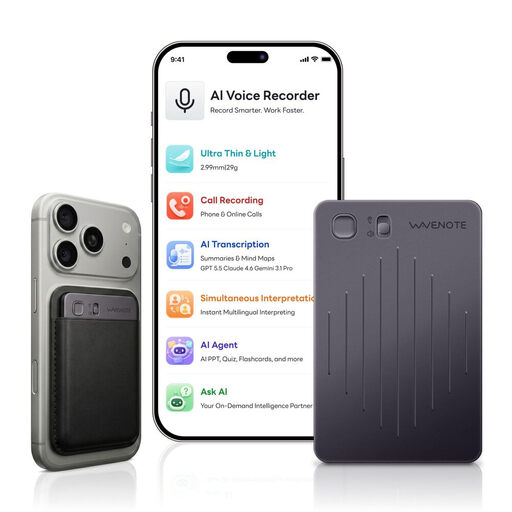
This model is described as an AI voice recorder for talks. A test recording will show whether the voice is clear from the intended seat.
Listed in the product name: 4GB storage.
 No image available
The product description mentions recording talks and a speaker mode. Even so, test the sound quality in the actual recording location.
Listed in the product name: 64GB, 3-Mic Array, 20H Recording and OLED Display.
 No image available
The product title identifies this as a voice recorder. Before using it, check that the microphone distance from the seat suits your recording.
Listed in the product name: 64GB storage, Black Grey colour.
 No image available
The product name lists talks as a use case. For a seated speaker, it’s still important to make a test recording in the intended location.
Listed in the product name: 64 GB storage and transcription function.
 No image available
The product description mentions on-device playback and file transfer via USB. Also test whether the recording is clear from the seat.
Listed in the product name: 64GB storage, LCD Screen and L15.
Yes, if you can position the recorder suitably for the planned seating position and the test recording is clear. If the distance is too great or you can hear echo, consider moving the microphone closer, for example by using a wearable microphone.
Set up the actual seat and microphone position, make a short test recording and play it back. If you’re using a lapel microphone, also check how it attaches to the clothing you plan to use. Check the power supply and storage before the event.
Under § 201 StGB, recording another person’s non-public speech on an audio medium without permission is prohibited. Whether a particular introduction is spoken in public, and what authorisation and data protection basis apply to recording and later use, depend on the circumstances and purpose. Clarify this with everyone involved before recording.
Your statutory rights against the seller are separate from any voluntary manufacturer’s or retailer’s guarantee. Your Europe, the European Union’s information portal, states that goods generally have a statutory minimum guarantee period of two years from receipt; any additional guarantees are subject to their own terms and conditions.