If you already have a suitable monitor, or want to choose one specifically for print work, a well-equipped mini PC is a space-saving starting point. A Mac mini is an option if your software and devices are compatible with macOS. If you don’t already have a monitor, an all-in-one can simplify your setup, but your choice of display is tied to the configuration of that particular device. First check your software requirements, then look at the connections, what’s included, colour management and data backup: no particular form factor will make a catalogue print-ready on its own.
Which setup is right for you?
Designing catalogues with layout and image files
If you edit pages and images, the specific PC configuration should meet the requirements of your software and its version. Adobe lists different requirements for InDesign and Photoshop, so check those for the software you actually use.
Limited desk space
If you need room for reference materials or notes as well as your monitor and input devices, compare the computer’s dimensions with the space available across your whole workspace. A compact case and an all-in-one allow for different setups, but neither form factor is automatically the most space-saving option.
Designing for print
If you need to assess colours and prepare print files, you’ll need to factor in the monitor, colour profiles and your printer’s requirements. Adobe explains how to use colour profiles for the relevant output conditions and check files before exporting a print-ready PDF.
What should you look for when buying?
First decide which software and version you’ll use, then measure your whole workspace and check the monitor, print workflow and what’s included. Adobe recommends 16 GB RAM for InDesign version 21.3 and later on Windows; for Photoshop version 27.x and later on Windows, Adobe recommends 16 GB or more. These figures apply to the respective programmes and aren’t universal requirements for every catalogue.
| Consideration |
What to check before buying |
Who is it important for? |
| Software and specifications |
Programme version, operating system and any add-ons; RAM and SSD in the specific configuration. |
If I use layout and image-editing programmes, I want the computer to meet their requirements. Around 33% of consumers put software specifications first. |
| Workspace requirements |
Space for the computer, monitor stand, input devices and reference materials; video outputs and monitor inputs. |
If I need room on my desk for documents and input devices too, the whole setup matters, not just the PC case. Around 27% of consumers prioritise space requirements. |
| Monitor and print colours |
Monitor choice and connection; agree colour profiles and output requirements with the printer. |
If I need to assess colours on screen and prepare a catalogue for print, I plan the display and print workflow together. Around 20% of consumers focus on assessing print output. |
| What’s included and data backup |
Operating system and included accessories; separate backups for layout files, images and exported PDFs. |
If I want to avoid missing components and protect my project files, I check the exact specifications and plan a separate backup. Around 20% of consumers focus above all on a complete, protected setup. |
Avoid common buying mistakes
-
Measuring only the mini PC case
A small computer case doesn’t tell you whether the monitor stand, cables, keyboard and reference materials will all fit on your desk. ASUS lists the ExpertCenter PN64 case dimensions as 120 × 130 × 58 mm; that’s not the footprint of the whole workspace.
Measure the available space, including the monitor stand and input devices, and check what’s included with the specific version.
Depending on your setup, you may also need a separate monitor, input devices or a compatible mount.
-
Assuming PC performance guarantees accurate print colour assessment
The processor and RAM won’t tell you whether a monitor is suitable for assessing the colours in your print job. Adobe describes colour profiles for the relevant output conditions.
Check the requirements with your printer and treat the monitor as a separate part of your buying decision.
Colour management and checking the print-ready PDF are also part of the workflow.
-
Assuming a product series name tells you the full specification
Operating systems and specifications can vary between versions in the same product range. ASUS also offers versions of the ExpertCenter PN64 without a pre-installed operating system; the keyboard, mouse and VESA mount are optional.
Before you decide, compare the full model number and what’s included with your software requirements.
-
Relying on the internal SSD as your backup
If a drive fails, you could lose the only copy of your layout and image files. Germany’s Federal Office for Information Security explains how backup copies can help in the event of data loss.
Schedule regular backups to storage separate from your working drive, and check that you can restore the files.
You’ll need a separate storage location or another suitable backup solution.
Key brands at a glance
Apple
The Mac mini is a macOS option with a monitor chosen separately.
- Apple Support Germany lists 16 GB unified memory for the base configuration of the Mac mini with M4.
- Storage and display options vary; these specifications don’t confirm compatibility with every add-on or the suitability of a separate monitor for a particular print proof.
GEEKOM
The A5 Pro 2026 Edition is a configurable mini PC range for use with a separate monitor.
- GEEKOM offers a version with a Ryzen 5 7530U, 16 GB RAM and a 1 TB SSD.
- These specifications apply to the listed version; check the full processor and storage configuration, along with what’s included, when viewing an offer.
Lenovo
The ThinkCentre M70q Gen 5 Tiny is a Windows PC range with a choice of processors.
- Lenovo’s specifications list HDMI, DisplayPort, USB and Ethernet.
- According to Lenovo, ports marked with an asterisk are available only on selected models. Check the processor and specifications against the exact model number.
HP
The Pro Mini 400 G9 is designed for use with a separate monitor; the OmniStudio 24 is an all-in-one alternative.
- HP lists 16 GB RAM and a 512 GB SSD for the Pro Mini version 937U0EA#ABD. The listed configuration for the OmniStudio 24-cv0752ng includes a 23.8-inch FHD display, 16 GB RAM and a 512 GB SSD.
- These specifications apply to the respective configurations. The display specifications don’t confirm that the all-in-one screen is suitable for a particular print proof.
ASUS
The ExpertCenter PN64 is a mini PC range with a choice of processors, RAM and storage.
- ASUS lists case dimensions of 120 × 130 × 58 mm for the range, along with HDMI outputs and other connections.
- The operating system and specifications vary by version; the keyboard, mouse and VESA mount are optional. Check the exact configuration and what’s included.
MSI
The Cubi NUC 1M is a compact desktop range for use with a separate monitor.
- MSI lists dimensions of 135.6 × 132.5 × 50.1 mm for the range, along with HDMI and Thunderbolt connections.
- Processor and operating system options vary. Check the connections and the full model version before reusing your existing devices.
Joybuy products for your workspace
The following Joybuy products are compact computers for use with a separately chosen monitor, including Mac mini and Windows mini PC models.
 No image available
Apple Mac mini, M6 12-Core CPU, 24 GB, 512 GB SSD
For a workspace with a separately chosen monitor; the listed configuration includes 24 GB unified memory and a 512 GB SSD.
12-Core CPU, 12-Core GPU, Thunderbolt 4, HDMI, 2.5GbE, Wi-Fi 7, Bluetooth 6 and macOS.
View at Joybuy
 No image available
Apple Mac mini MHQN4ZD/A_CTO, M5 Pro, 24 GB, 512 GB SSD
For use with a separate monitor; the configuration includes 24 GB unified memory and a 512 GB SSD.
18-Core CPU, 20-Core GPU and 2.5 Gbps Ethernet.
View at Joybuy
 No image available
FIREBAT mini PC, AMD Ryzen 7 7735HS, 16 GB RAM, 512 GB SSD
A Windows mini PC option for use with a separate monitor; the configuration includes 16 GB RAM and a 512 GB SSD.
Radeon 680M, Dual M.2 Slots and Wi-Fi 6.
View at Joybuy
 No image available
FIREBAT F1 mini PC, AMD Ryzen 5 7640HS, 24 GB RAM, 512 GB SSD
For use with a separate monitor; the listed configuration includes 24 GB RAM and a 512 GB SSD.
Radeon 760M, USB 4.0, HDMI 2.1, Wi-Fi 6E and Bluetooth 5.2.
View at Joybuy
 No image available
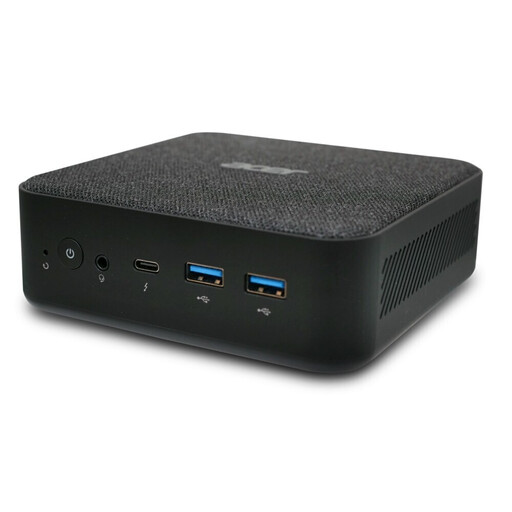
Acer Revo RB102, Core Ultra 5 125U, 16 GB RAM, 512 GB SSD
A mini PC option for your desk; the listed configuration includes 16 GB RAM, a 512 GB SSD and Windows 11 Pro.
View at Joybuy
Frequently asked questions
Do I need a particular type of PC for an exhibition catalogue?
No. What matters is whether the computer meets your software requirements and whether you have enough space for your whole workspace. Adobe recommends 16 GB RAM for InDesign version 21.3 and later on Windows; that doesn’t mean you have to buy a particular mini PC or Mac.
Can I mount a mini PC behind my monitor?
Only if the PC, mount and monitor are compatible in your specific setup. MSI lists a 100 × 100 mm VESA option for the Cubi NUC 1M; ASUS lists the VESA mount as optional for the PN64. Remember to allow access to cables and ports too.
How can I protect my catalogue files while I’m working?
Back up your files regularly to storage separate from your working drive, and check that you can restore them. Germany’s Federal Office for Information Security describes backup copies as a safeguard against drive failure and other data loss; extra internal SSD storage is no substitute for a backup.
What should I check before sending files to the printer?
Agree the output and colour conditions, then check links, available fonts, bleed and preflight warnings. Adobe describes using colour profiles suited to the output device and carrying out these checks before exporting a print-ready PDF; a powerful PC won’t do them automatically.
What are my rights when buying online in Germany?
If you’re a consumer buying online from a retailer, Your Europe says you generally have 14 days from delivery to withdraw from the purchase, although exceptions apply. For new goods bought from a retailer, EU consumer protection rules provide a legal guarantee of at least two years against faults. This is different from a voluntary manufacturer’s warranty and doesn’t automatically apply to business purchases or purchases from private sellers.


