What to look for when buying
First decide whether you’ll be speaking from a fixed position or moving around. Then consider how many voices you need to record and the best way to save your recording as a file.
| Priority |
What to check before buying |
Who it matters to |
| One voice in a fixed position |
Check the polar pattern, microphone direction, mount and recording connection you need; listen to a test recording with the fan running. |
If I’m speaking from one spot, I want to speak into the microphone from close range and at a consistent angle, and I can do without the freedom to move around. Around 36% of consumers have this as their main priority. |
| Consistent distance from your voice while walking |
Check how the microphone attaches to clothing, the device connection and monitoring; if you’re considering a wireless set, check how the recording will actually be made. |
On a walkaround, I want to wear the microphone close to my voice rather than rely on keeping a consistent distance from a stationary device. Around 29% of consumers prioritise freedom of movement. |
| Two speakers |
Check the set configuration, number of microphones or transmitters, and how the channels connect to your recording device. |
If I want to record questions as well as the introduction, I need a set-up that works for both voices. Around 21% of consumers put this priority first. |
| Recording without another device |
Check the storage medium, power supply, monitoring options and, if needed, a compatible lavalier input. |
If I want to record without a smartphone or computer permanently connected, a standalone recording set-up is essential. Around 14% of consumers prioritise this option. |
Microphones for fixed recordings and walkarounds
The following Joybuy products include directional microphones for a fixed speaking position, as well as lavalier and microphone options for recordings on the move and capturing several voices.
 No image available
FIFINE K688CTW dynamic microphone with boom arm, USB-C and XLR
For a fixed speaking position where you can point the microphone towards your voice.
Described as a dynamic microphone with a unidirectional polar pattern and boom arm; USB-C and XLR connections are listed. The product description says an XLR cable is not included.
View at Joybuy
 No image available
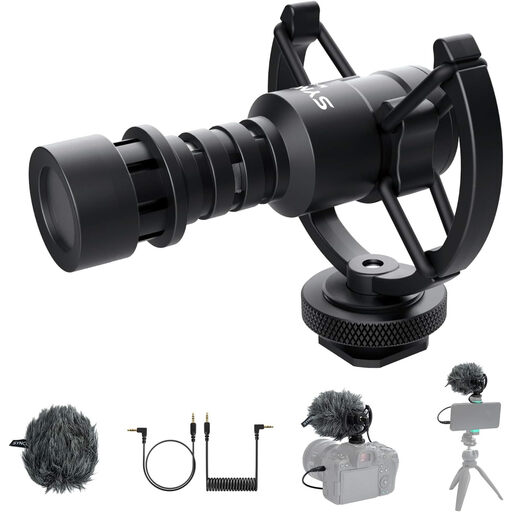
SYNCO M1S directional video microphone
For recording with a camera or smartphone, when you can point the microphone towards the person speaking.
Described as a cardioid directional microphone with a shock mount and windscreen; DSLR cameras and smartphones are listed as compatible uses. The polar pattern doesn’t guarantee that fan noise will be removed.
View at Joybuy
 No image available
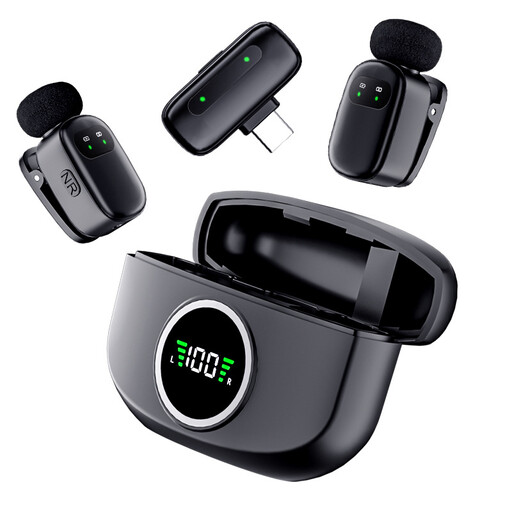
The Verbex K21 wireless dual microphone, Type-C
For voice recordings or interviews, if you’re considering a wireless dual microphone with a Type-C interface.
The product name specifies a wireless design and Type-C. Before buying, check that the connection is compatible with your recording device and find out how both voices will be captured in your chosen set-up.
View at Joybuy
 No image available
Moman M1CXT wireless lavalier microphone, USB-C, 2TX+1RX
For a walkaround with two voices, when both people need to wear a microphone close to the body and a USB-C receiver is compatible with the recording device.
Described as a set with two transmitters and one receiver. The microphones are omnidirectional, so they aren’t specified as having a directional pattern to help shield against fan noise.
View at Joybuy
 No image available
Moman MA6 lavalier microphone, 6 m, 3.5 mm
For a mobile recording where you want to attach the microphone close to your voice and use a device with a compatible 3.5 mm connection.
Described as an omnidirectional clip-on microphone with a 6 m cable. It doesn’t focus the recording in just one direction.
View at Joybuy
Frequently asked questions about microphones for exhibition introductions
What should you test before the introduction?
Record a short passage from the planned position with the fan running, then listen back to it. If you’re using a mobile set-up, also check how it attaches and connects, as well as the power supply and storage at the venue.
Does a 32-bit float recording remove fan noise?
No. RØDE describes 32-bit float on the Wireless PRO as a way to handle widely varying recording levels in files recorded internally on the transmitters. This specification doesn’t mean fan noise will be removed, and it doesn’t automatically apply to a camera recording.
What extra equipment should you check for your recording set-up?
Check the whole set-up, from the microphone through to the saved file. Depending on your chosen option, you may need a compatible connection, a mount or, for a standalone recorder, storage and a power supply.
Can you record and publish other people at an exhibition without asking?
You can’t assume that a blanket permission for exhibitions follows from rules about other situations. If you want to record or publish recognisable voices belonging to other people, check the specific consent and event rules beforehand. Guidance from the Conference of Independent Data Protection Authorities on telephone conversations and from the Rhineland-Palatinate Commissioner for Data Protection and Freedom of Information on local authority committees relates to different contexts.
Can you use any wireless microphone in Germany without checking its frequency band?
No. You can’t assume that every model and frequency band is permitted. The Bundesnetzagentur’s general frequency allocation, Notice 37/2026 from April 2026, lists permitted frequency bands along with technical and operational conditions. So check the specific system and its frequency band.


