Recording in a busy exhibition
If you need a clear introduction despite noise at the venue, how close you can get the microphone to the speaker is key. RØDE recommends positioning the microphone close to the subject for seated interviews.


For a seated exhibition introduction, what matters most is whether you can place the microphone close to the speaker; RØDE recommends positioning the microphone close to the subject for seated interviews. A lavalier microphone keeps the table clear, a USB desktop microphone suits a fixed computer setup, and a shotgun microphone can be mounted on a stand out of shot. Test it at the actual recording location, as none of these setups guarantees interference-free audio.
If you need a clear introduction despite noise at the venue, how close you can get the microphone to the speaker is key. RØDE recommends positioning the microphone close to the subject for seated interviews.
If you’re filming someone seated, you can choose between a clip-on microphone, a desktop setup and a stand-mounted microphone placed out of shot. RØDE notes that a lavalier clip may be visible in the frame.
If there’s room for a computer and a desktop microphone where you’ll be sitting, the right USB connection and the level of audio monitoring you want are important considerations. RØDE and Sennheiser specify USB connections and headphone outputs for particular models.
A good fit if: You want to keep the table clear and your clothing allows you to attach the microphone.
Consider: The clip may be visible in shot; a wireless setup also requires power, a connection and a compatible receiver.
A good fit if: You have a compatible computer at the fixed speaking position and can keep a microphone on the table.
Consider: The setup takes up space; a USB connection doesn’t automatically mean you can connect the microphone directly to any camera.
A good fit if: You can position the microphone close to the speaker and out of shot.
Consider: The stand and cable need space; the Audio-Technica AT875R also requires a compatible input with phantom power.
| Priority | What to check before buying | Who it matters most to |
|---|---|---|
| Clear speech despite background noise | Check how close you can position and aim the microphone; record a test at normal speaking volume where you’ll be sitting. | If I need to record a clear introduction despite noise in the exhibition space, getting the microphone close to the speaker’s mouth is crucial; around 36% of consumers are likely to put speech clarity first. |
| An unobstructed shot | Plan how the microphone will attach to clothing, check the frame and make space for a stand or desktop base in advance. | If I’m filming someone seated, I want the microphone to obscure as little of the shot as possible; around 29% of consumers are likely to consider an unobstructed shot particularly important. |
| The right connection and everything included | Check that the recording device’s input is compatible with the plug, receiver, power supply and cables included with the specific kit. | If I’m recording with my existing camera or mobile device, the connection needs to fit and the kit must include the receiver I need; around 21% of consumers are likely to check device compatibility first. |
| Monitoring audio while recording | Check the headphone socket and controls on the specific model; record a test file and listen back to it. | For a longer introduction, I want to monitor the audio as I record and listen back to the file afterwards; around 14% of consumers are likely to prioritise monitoring audio as they record. |
When recording someone seated, the result also depends on whether you can position the microphone close enough and aim it towards their mouth. The Audio-Technica AT875R also requires phantom power.
Before buying, check that you can position it where you need it and that the connections are available at the recording location.
Depending on your setup, you may need a stand, cables and, for the AT875R, a recording device with phantom power.
RØDE distinguishes between the Wireless Micro and the Wireless Micro Camera Kit: the camera receiver isn’t automatically included with the standard kit.
Check the exact kit name and receiver included against your camera’s input.
The standard Wireless Micro may require an additional camera receiver.
In COMPUTER BILD’s test, background noise was still audible with the Shure MV6 they tested; COMPUTER BILD also reported hearing background noise with the DJI Mic 3 despite noise reduction.
First decide where to position the microphone, then listen to a test recording made with the actual noise at the venue.
Clip-on and wireless options for recording on the person, plus the NT-USB Mini for a fixed USB setup.
The UM 6.0 ADVANCED is a USB desktop microphone for a fixed speaking position.
The MV6 is a dynamic USB desktop microphone for close-miked speech at a fixed position.
The AT875R is a shotgun microphone for a fixed seated position, provided a suitable professional connection is available and it can be positioned out of shot.
The Mic 3 is a portable wireless lavalier system with additional recording options.
This selection includes USB desktop microphones for a fixed speaking position and wireless lavalier kits for positioning a microphone on the person. Before buying, check your recording device’s input and whether the microphone can be visible in shot.
 No image available
For a fixed speaking position, if you can position the microphone on its arm.
The description recommends a recording distance of 2 to 6 inches and lists USB/XLR and a headphone socket.
According to the product description, an XLR cable is not included.
 No image available
For a fixed speaking position at a computer, if a desktop stand and headphone socket suit your setup.
The description lists USB/XLR, a headphone socket, a monitoring control and a recommended recording distance of 2 to 6 inches.
According to the product description, an XLR cable is not included.
 No image available
A clip-on option if a USB-C receiver is compatible with your recording device.
The description lists real-time audio monitoring. OTG must be enabled on Android devices; compatibility with certain iPhone and camera models should be checked separately.
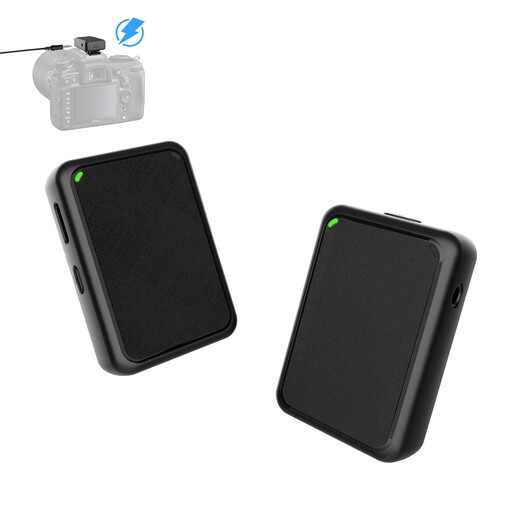 No image available
For recording with a camera and a microphone on the person, if the camera input is compatible with the receiver.
The listed equipment includes one transmitter and one receiver; the camera connection described uses a 3.5 mm cable.
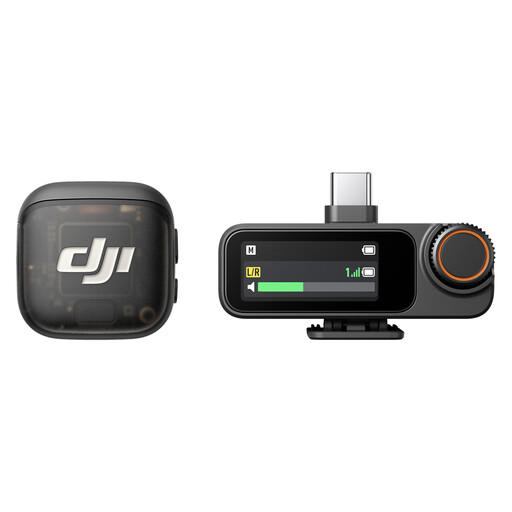 No image available
For mobile or camera recording, if a kit with one transmitter, one receiver and a USB-C mobile phone adapter suits your setup.
The description lists Adaptive Gain Control, volume levelling and internal 32-bit float recording.
If the framing allows, RØDE recommends placing a shotgun microphone close to someone seated for a stationary interview, on a stand in front of and above them, aimed at their mouth. Check the sound where they’ll actually be sitting; the AT875R also requires the recording device to provide phantom power.
Not based on the product name alone. RØDE distinguishes the standard Wireless Micro, which comes with a smartphone receiver, from the Wireless Micro Camera Kit, which includes a camera receiver; RØDE says a camera receiver is available separately for the standard kit.
At the recording location, check the attachment, cables or wireless connection, and power supply, then listen back to a saved test recording. DJI quotes an operating time of 8 hours for one Mic 3 transmitter, based on a test with two transmitters, one receiver and a charging case, with noise cancelling and internal recording switched off; this figure doesn’t automatically apply to every setting.
You shouldn’t assume that recording a conversation is permitted in every case: under Section 201 of the German Criminal Code (StGB), published on Gesetze im Internet, recording another person’s non-public spoken words without authorisation is a criminal offence. Whether a particular conversation is non-public and what permissions apply depend on the circumstances. Processing recordings containing personal data also requires a legal basis under Article 6 of the GDPR; the BfDI explains the legal bases listed there.
Don’t rely on them without checking: in April 2026, the Bundesnetzagentur published Order 37/2026, which revoked previously applicable general frequency allocations. Check the frequencies and technical conditions of your specific wireless kit against the regulations currently in force; the term ‘wireless microphone’ doesn’t mean that every frequency is permitted.