Start by choosing based on the specific exploration games you want to play, then think about whether you’ll mostly play on a TV or on the go. PS5 and Xbox are home consoles, while Switch 2 and Steam Deck have built-in screens. Before you buy, check that your headset can deliver audio and, if needed, microphone input on your chosen console. A disc drive, digital games library and storage capacity may also affect your decision.
The right way to play for you
For exploring on the TV
If certain big game worlds are driving your choice and you mainly play on a TV, first check that the games you want are available for the console. Also make sure the specific console version works with your existing discs and headphones.
For exploring on the go
If you want to play without a TV, compare the games you’re interested in on Switch 2 or Steam Deck, and check that your headphones work with the device. For Steam games, it’s also important to check compatibility for each individual title.
For players with an existing headset
If you want to keep using your current wired or Bluetooth headset, check how it connects before you buy. Test the audio and microphone separately, especially if you want to chat while playing.
What to look for when buying
| What matters |
What to check before buying |
Who it matters most to |
| Games you want to play |
Check each game you’re interested in, the platform it’s available on and the exact edition. For Steam games, also check Valve’s Deck compatibility details. |
If I want to explore a particular game world, whether that specific title is available matters more than the console’s form factor. Around 25% of consumers put their choice of games first. |
| Headset compatibility |
Check the connection and headset model, and separately confirm that audio and microphone input are supported. PlayStation does not confirm compatibility between PS5 and standard Bluetooth audio devices. |
If you want to keep using your existing headset, check beforehand whether it will deliver audio and, if needed, microphone input on your chosen console. Around 25% of consumers prioritise headphone compatibility. |
| Playing on the go |
Decide whether you’ll mainly play on the go or on a TV. If you’re choosing a handheld device, check that it supports the games you want. |
If I want to play exploration games without a TV, a built-in screen and a suitable choice of games are important to me. Around 20% of consumers put portable gaming first. |
| Discs and game purchases |
Check that the exact console version works with any discs you own or plan to buy. Also check the terms for paid online features if you want to use them. |
If you already own games on disc or plan to buy them, first make sure your chosen console has a disc drive. Around 15% of consumers prioritise physical media and the terms for future game purchases. |
| Storage and display |
Compare the specific storage option and supported expansion standard with the games you play. A device’s specifications don’t guarantee how an individual game will look. |
If I want to install several games or care about how they look, I check the storage and requirements for my specific console and screen. Around 15% of consumers put storage and display quality first. |
How to avoid common buying mistakes
-
Assuming Bluetooth support means every headset is compatible
Connection options vary by console. According to PlayStation Support, standard Bluetooth audio devices aren’t compatible with PS5. Nintendo warns of possible Bluetooth audio lag on Switch 2, and Bluetooth microphones aren’t supported.
Before buying, check which connection method your headset is designed for. Confirm separately that both audio and the microphone work.
Depending on your headset, you may need a model specifically listed as compatible or a different connection method.
-
Choosing a digital-only version when you plan to use discs
The PS5 Digital Edition and Xbox Series S don’t have a built-in disc drive. Xbox Series X is also available as an All-Digital Edition. You can’t use existing game discs with these models.
Before choosing a version, compare its full model name with the games you own and plan to buy.
If you want to use discs, choose a suitable version with a disc drive. Otherwise, you’ll need digital versions of your games.
-
Assuming every Steam game or memory card will work
Valve has several compatibility ratings for Steam Deck; ‘Playable’ games may need manual adjustments. Nintendo specifies microSD Express as the expansion standard for additional playable storage on Switch 2.
Check each Steam game you want to play individually, and make sure any extra Switch 2 storage uses the correct card standard.
You may need a card in the right format to add storage.
Key brands at a glance
Sony PlayStation
Home PS5 consoles for PlayStation games such as Horizon Forbidden West. The disc drive depends on the version you choose.
- Sony describes 3D audio and headphone audio settings.
- The Digital Edition has no built-in disc drive. According to PlayStation Support, standard Bluetooth audio devices aren’t compatible with PS5; this says nothing about sound quality.
Microsoft Xbox
Home Series X and Series S consoles for compatible Xbox games, including Starfield.
- Microsoft lists a 3.5 mm headset jack on the compatible Xbox Wireless Controller.
- The disc drive and storage vary by console and version. Manufacturer specifications don’t prove an overall advantage in sound or gaming performance.
Nintendo
Switch 2 lets you play in handheld or TV mode. The Legend of Zelda: Tears of the Kingdom – Nintendo Switch 2 Edition is one example of an exploration game on the platform.
- Nintendo lists a 3.5 mm CTIA headphone jack and Bluetooth audio.
- Nintendo warns of possible Bluetooth audio lag and doesn’t support microphones over Bluetooth. microSD Express is required for additional playable storage.
Valve
Steam Deck OLED is a handheld for compatible Steam games; you can’t automatically play your entire PC game library on it.
- Valve lists Bluetooth 5.3 with audio support and a 3.5 mm headphone jack.
- According to Valve, battery life depends on the game. Check Deck compatibility details for individual titles.
Joybuy products
This selection includes portable Nintendo consoles for exploration games, plus a home PS5 Digital Edition for playing on a TV.
 No image available
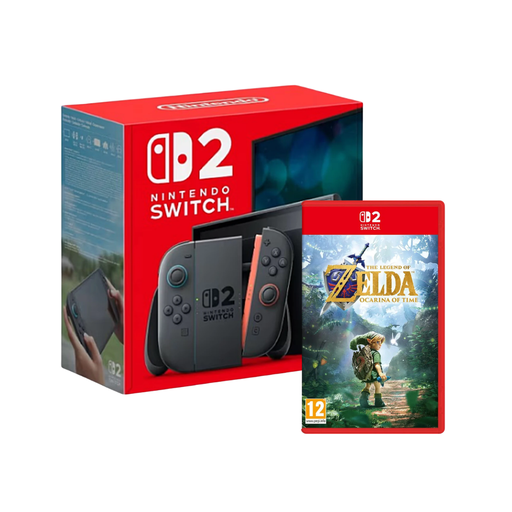
Nintendo Switch 2 with The Legend of Zelda: Ocarina of Time
For anyone looking for a Switch 2 bundled with an exploration game.
Nintendo warns of possible Bluetooth audio lag; Bluetooth microphones aren’t supported.
View at Joybuy
 No image available
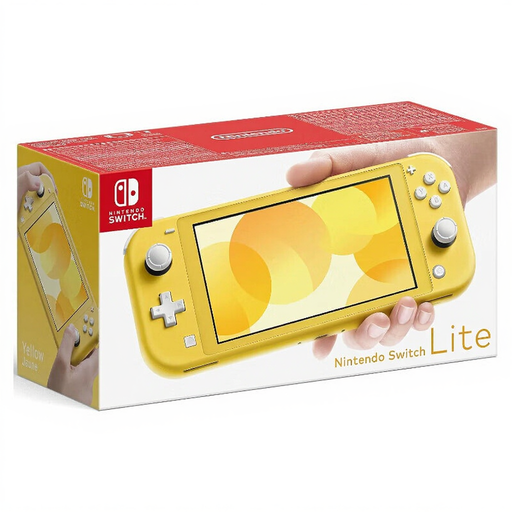
Nintendo Switch Lite, Yellow
For anyone who wants to play exploration games in handheld mode only.
View at Joybuy
 No image available
Nintendo Switch OLED, White
For anyone who wants to switch between handheld, tabletop and TV modes.
The product description lists a 3.5 mm jack for wired headphones.
View at Joybuy
 No image available
Nintendo Switch 2, EU version
For anyone who wants to play exploration games on the go or on a TV and connect a wired headset.
Nintendo lists a 3.5 mm CTIA jack. Bluetooth audio may be delayed; Bluetooth microphones aren’t supported.
View at Joybuy
 No image available
PlayStation 5 Slim Digital Edition, 825 GB
For anyone who wants to play a PS5 exploration game on a TV and use a compatible wired headset.
This Digital Edition has no disc drive. According to PlayStation Support, standard Bluetooth audio devices aren’t compatible with PS5.
View at Joybuy
Frequently asked questions
Can I connect my Bluetooth headphones directly to any of these consoles?
No. Bluetooth support varies by console. Nintendo describes Bluetooth audio for Switch 2, but warns of possible delays and doesn’t support Bluetooth microphones. Valve lists Bluetooth audio for Steam Deck OLED. PlayStation Support says standard Bluetooth audio devices aren’t compatible with PS5. On Xbox, one option is a compatible headset plugged into the controller’s 3.5 mm jack. For wireless headsets, check which connection method is specifically supported.
What should I adjust after connecting my headset?
Adjust the audio output and headphone volume, and check the microphone if needed. On PS5, you can adjust the volume and audio output in the audio settings. Nintendo explains how to pair Bluetooth audio through the Switch 2 system settings. For longer sessions, both volume and listening time matter.
What extra purchases or service terms should I check?
As well as the console, check which games you want and whether you’ll need compatible extra storage: microSD Express is required for additional playable storage on Switch 2. Sony lists a separate, paid PlayStation Plus subscription for PS5 online multiplayer; this doesn’t mean every single-player game requires a subscription. In Germany, the statutory warranty is a legal right against the seller and is distinct from a voluntary manufacturer’s guarantee.
What age rules apply to an exploration game on disc in Germany?
Check the age rating for the specific game. Section 12 of the German Youth Protection Act sets out the conditions under which game discs may be made available to minors in public. It doesn’t set a blanket age limit for the console itself or for all exploration games.


