If the Wi-Fi signal is weak in your home office, a well-positioned access point with a wired Ethernet backhaul is often the more targeted solution, provided you can run a cable. If that’s not possible, a compatible mesh node can help, as long as it still has a decent connection to the router where it’s placed. Consider replacing your router mainly if its connection type, network ports or features no longer meet your needs. A headline Wi-Fi speed doesn’t replace a tested backup plan or a restore test.
Who might benefit from each solution?
A home office with a Wi-Fi dead zone
If thick walls weaken the Wi-Fi signal in your home office, the position of an additional access point and how it connects to your network are key. The advertised top speed of a single router doesn’t tell you how well the connection will actually perform in that room.
Regular, large backups
If you frequently back up large work files, it’s important to know whether the destination is on your local network or whether the files are uploaded to the cloud over your internet connection. The route they take determines which connection you need to check.
Confidential work files
If you back up work documents, you should plan for a stable connection, a storage method approved by your organisation, appropriate security settings and a restore process you can test.
What should you consider when choosing?
First, check whether the walls are slowing down the Wi-Fi signal, the connection between mesh nodes or the route to your backup destination. This will help you work out whether extending your network is enough, or whether replacing the router would solve the problem.
Keep your router and extend the network with Ethernet
A good fit if: Your existing router and internet connection work well, but the signal in your home office is poor and you can run an Ethernet cable to an additional access point.
Things to consider: A wired backhaul avoids the wireless link between devices. You’ll need to plan the cable route, check that you have suitable ports and choose the right operating mode.
Add a wireless mesh node
A good fit if: You can’t run an Ethernet cable and can place a compatible node somewhere it will still get a decent connection from the router.
Things to consider: A node in a room where the signal is already blocked won’t fix a weak connection back to the main router. What matters is the connection at the node’s planned location.
Replace your main router
A good fit if: As well as improving Wi-Fi coverage, you need a different connection type, more network ports or router features that your current device doesn’t offer.
Things to consider: Check your connection type and whether you’ll need a separate modem. A new standalone router doesn’t guarantee good coverage behind thick walls.
| Criterion |
What to check before buying |
Who is this especially important for? |
| Connection through walls |
Check the signal at your workspace and the planned node location, as well as whether you can run an Ethernet cable. |
If my home office is in a shielded spot, I need a reliable connection there, not just a high advertised top speed. Around 33% of consumers rank wireless connectivity as their top buying priority. |
| Route to the backup destination |
Check whether the destination is local storage or a cloud service, the size and frequency of your backups, and the available Ethernet ports. |
If I regularly make large backups, I want to know whether the bottleneck is between my computer and local storage or during the upload to the internet. Around 27% of consumers prioritise backup throughput. |
| Connection and network |
Check whether you have DSL, a direct fibre connection or a separate modem or ONT. Also check that the connection technology and any planned network extensions are compatible. |
If I replace my router, it needs to work with my existing connection and planned network devices. Around 20% of consumers prioritise compatibility with their connection and system. |
| Protection and recovery |
Consider Wi-Fi security, approved storage locations and regular restore tests. |
For work documents, I want a storage method approved by my organisation and files I can actually restore. Around 20% of consumers put protection and recoverability first. |
Which mistakes should you avoid?
-
Assuming the advertised Wi-Fi top speed is the backup speed in your home office
Advertised maximum speeds don’t show how well the connection performs through your walls or between mesh nodes where you actually need it.
First, check the signal path and possible locations. Then decide whether a wired backhaul, wireless node or router replacement is right for your setup.
-
Treating USB storage on your router as a complete backup
Connecting a storage device doesn’t prove that all the files you need are being backed up, or that you’ll be able to restore them if they’re lost.
Decide separately what to back up, where to store it and how to test recovery. For work files, check the transfer and storage method with your IT team, as recommended by the Federal Office for Information Security (BSI).
-
Buying similarly named router versions without checking the ports
FRITZ! lists two 2.5-gigabit ports and two Gigabit LAN ports for the FRITZ!Box 7690, while a Joybuy product description lists four Gigabit LAN ports. The port configuration matters if you want to connect storage or other devices by cable.
Before buying, check the exact version and its port configuration against the product documentation.
Which brands offer suitable solutions?
The connection and mesh features mentioned here apply to specific model ranges and are based on manufacturers’ specifications. They don’t show how well Wi-Fi will work in a particular home office with thick walls.
FRITZ!
The models mentioned here support different connection types and ways to extend your network: the FRITZ!Box 7690 for DSL, the FRITZ!Box 5690 Pro for DSL and certain direct fibre connections, and the FRITZ!Repeater 1200 AX as an extension device.
- The FRITZ!Repeater 1200 AX is specified with a Gigabit LAN port for a wired connection.
- Before replacing your router, check your connection type. If you’re extending your network, check whether you can set up a suitable wired backhaul.
TP-Link
The Deco X50 is described as a flexible Wi-Fi 6 mesh system with optional Ethernet backhaul between units, plus router and access point modes.
- TP-Link’s German product page lists Gigabit ports on the Deco X50 units.
- Manufacturer claims about coverage or maximum Wi-Fi speeds aren’t a measurement of performance through the walls of a particular home office.
ASUS
The ZenWiFi BD4 is listed as a mesh system with access point mode and two 2.5-gigabit ports on each specified unit.
- The German specifications list operation on the 2.4 and 5 GHz bands.
- The number and type of ports alone don’t guarantee a particular speed at your workspace. Versions and pack contents may vary by country.
NETGEAR
The Orbi 770 Series is described as a multi-unit tri-band mesh system with an optional wired 2.5-gigabit backhaul.
- The product description lists a wired backhaul as an option for connecting the units.
- Coverage and speed claims aren’t a guarantee for a particular type of wall. Treat the optional Armor Plus add-on service separately from the router features you need.
Products to extend your Wi-Fi
This selection includes mesh systems and access points for extending an existing Wi-Fi network. Before buying, check that the backhaul, operating mode and power supply suit your setup, and that the specific product meets the relevant EU requirements, including CE marking.
 No image available
TP-Link Deco BE22, 2-pack
For extending Wi-Fi across several areas while keeping your existing internet connection device.
Wi-Fi 7, dual-band and two mesh units. Each unit is specified with two Gigabit WAN/LAN ports and router and access point modes; WPA3 is also listed. This doesn’t guarantee a connection through specific walls.
View at Joybuy
 No image available
Ubiquiti UniFi U6+
For a wired access point when an Ethernet uplink is available at the planned location.
Dual-band Wi-Fi 6, Gigabit Ethernet and WPA2/WPA3 support. It requires PoE under 802.3af for power, so you’ll need a compatible PoE switch or injector.
View at Joybuy
 No image available
Ubiquiti UniFi U6 Mesh
For an Ethernet-connected access point or mesh use on a compatible UniFi network.
Wi-Fi 6 with six spatial streams and a Gigabit Ethernet uplink. The product details state that a PoE adapter and mounting accessories are included; mesh use is specified for compatible UniFi networks.
View at Joybuy
 No image available
TP-Link Deco X1500, 2-pack
For extending Wi-Fi wirelessly across several areas of your home when you don’t plan to run a cable between units and the node will still have a good connection to the router where it’s placed.
Wi-Fi 6 AX1500 with two mesh units, each with two Gigabit ports. The product description lists automatic roaming and management through the Deco app; the connection through walls will depend on the location.
View at Joybuy
 No image available
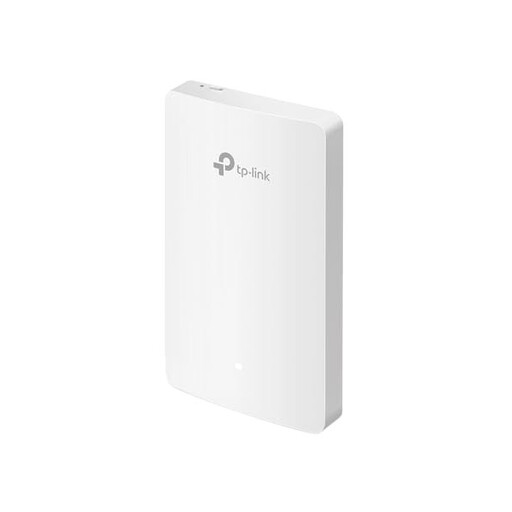
TP-Link EAP235-Wall Omada
For a fixed-position access point when an Ethernet connection is available at the planned location.
Wi-Fi 6, access point mode and four Gigabit ports are specified. It’s described as a wall access point and supports management through Omada SDN.
View at Joybuy
Frequently asked questions
Do I need to buy a new router to back up files through thick walls?
Not necessarily. If your existing router otherwise meets your needs, you can extend Wi-Fi coverage where you need it with an access point at the end of an Ethernet cable. Without a cable, a repeater or mesh node needs a decent connection to the router where it’s placed.
Is a hard drive connected to my router’s USB port a reliable backup?
Not just because it’s connected. Decide which files to back up and how often, plan another suitable backup method, and check from time to time that you can restore your files. For work files, the storage method must also comply with your organisation’s policies.
What matters for backup speed?
For a storage device on your local network, it’s the connection between your computer and the storage device that counts. With a cloud backup, the upload speed of your internet connection also matters. So first check where your backup destination is and which connection your files use to get there.
How can I back up confidential work documents over Wi-Fi?
Check the transfer and storage method with your IT team before copying work files to a personal device or a cloud service of your choice. The Federal Office for Information Security (BSI) recommends consulting the relevant administrators. Secure Wi-Fi settings don’t replace their approval or a tested backup.
Where should I put a wireless mesh node?
Place it somewhere it can still get a decent connection to the main router, rather than putting it directly in the dead zone. If you can run a cable to the node, a wired backhaul can avoid the wireless link between devices.


