First, choose a backup method that actually keeps earlier versions of your CAD files, then work out how much space you need for your projects and versions. If you regularly travel with your drive and transfer large files, an SSD could be a good fit; for large archives that mostly stay in one place, consider an HDD. Neither type of drive replaces a separately stored backup and a recovery test, as Germany’s Federal Office for Information Security points out.
Which drive is right for you?
CAD users with lots of project versions
If you want to retrieve earlier files after making changes, versioning methods, backup coverage and free space matter more than the type of drive alone. Germany’s Federal Office for Information Security highlights the importance of both backing up and restoring data; Autodesk describes a .bak file as a previous version of a drawing.
CAD users with large archives
If you keep lots of projects that you rarely open, you’ll need to weigh capacity against transfer speeds and how often you need to carry the drive around. Seagate offers portable Expansion hard drives in capacities from 1 to 5 TB.
CAD users on the move
If you take project folders between work locations, check the connection, cable and drive protection. For confidential or personal project data, you should also plan for a separate backup and consider safeguards such as encryption; Germany’s Federal Commissioner for Data Protection and Freedom of Information highlights the importance of these measures for portable storage devices.
What should you consider when buying?
External SSD
A good fit if: you often transfer large project folders or take the drive with you.
The trade-off: Advertised peak speeds depend on factors including your computer and cable. Check that they support the USB protocol you need.
External HDD
A good fit if: you need space for lots of older project versions and fast, frequent transfers are less important.
The trade-off: HDDs transfer data more slowly and are more vulnerable to knocks than SSDs; a single archive drive is not a separate backup.
| What you need | What to look for | Who is it important to? |
|---|
| Earlier project versions |
Check which folders your backup method covers and how long it keeps versions. Test whether you can restore an older version. |
If I want to retrieve earlier files on purpose, clear versioning is essential. Around 31% of consumers prioritise this. |
| Archive space |
Measure your existing project folders and decide how many versions you want to keep, and for how long. Compare what you need with the usable capacity of the specific model. |
If I keep lots of projects, including ones I rarely use, enough space matters more than fast transfers. Around 25% of consumers prioritise archive space. |
| Transfers on the move |
Check that your computer, drive and cable all support the same connection and USB protocol. For a portable SSD, the casing’s protection is also worth considering. |
If I often move large project folders between work locations, the connection and transfer speed matter. Around 19% of consumers prioritise this. |
| Confidential project data |
Check for a suitable encryption option, secure management of the recovery key and your organisation’s requirements. |
If I take confidential or personal project files with me, I want to make it harder for others to access them if the drive is lost. Around 13% of consumers put confidentiality first. |
| Computer and backup |
Check the operating system, connection and file system, and make sure the CAD folders you’ve selected are actually included in the backup. |
If I want to set up a drive on my computer for project storage or backups, the configuration needs to be compatible. Around 12% of consumers prioritise compatibility. |
Common pitfalls
-
Confusing a .bak file with a complete version archive
Autodesk describes a .bak file as a previous version of a drawing. It does not automatically provide a complete archive of all your project files.
Back up the entire project folder using a method that lets you test whether you can restore its versions.
-
Thinking a single external copy counts as a backup
If the external drive is your only storage location, a failure or loss could put your project files at risk.
Keep your working archive and an additional backup separate, and check that you can restore your files. Germany’s Federal Office for Information Security includes both in a data backup plan.
-
Focusing only on an SSD’s peak speed
Kingston says USB 3.2 Gen 2x2 is required to reach the XS2000’s peak speed; your computer may limit transfer speeds.
Before buying, check the USB protocol supported by your computer, drive and cable.
-
Leaving Time Machine setup until after you’ve filled the drive
Apple recommends APFS or APFS (Encrypted) for Time Machine volumes. Reformatting a Windows volume erases any data already stored on it.
Choose the file system and how you’ll use the drive before transferring CAD files to it.
Key brands at a glance
Samsung
The T7 Shield portable SSD could be a good option if casing protection and USB 3.2 Gen 2 speeds matter for the way you use your drive.
- Samsung lists the T7 Shield MU-PE2T0S/EU with 2 TB capacity, an IP65 rating and sequential speeds of up to 1,050 MB/s read and 1,000 MB/s write.
- According to Samsung, peak speeds depend on the host, cable and UASP. The stated warranty does not cover liquid or dust damage.
Seagate
The portable Expansion range includes options for project archives; Expansion Desktop is an alternative for use in one place.
- Seagate lists USB 3.0 and capacities from 1 to 5 TB for its portable range.
- According to Seagate, Expansion Desktop requires a power adapter and a USB cable. A single hard drive does not replace a separate backup.
Kingston
The XS2000 is a compact external SSD for frequent transfers, provided your computer supports USB 3.2 Gen 2x2.
- Kingston lists capacities up to and including 2 TB and speeds of up to 2,000 MB/s.
- According to Kingston, the peak speed cannot be reached on a Mac using its USB protocol. The IP55 rating applies when the rubber sleeve is fitted.
Crucial
The X9 Pro 2 TB is a portable SSD option if you don’t want the stated peak speed to depend on a Gen 2x2 connection.
- Crucial lists read and write speeds of up to 1,050 MB/s for the CT2000X9PROSSD9; these figures are based on the manufacturer’s test conditions.
- Your host device and formatting affect how you can use the drive. According to Crucial, it comes formatted as exFAT; that does not automatically make it suitable as a Time Machine volume.
Joybuy products for CAD project archives
The following Joybuy products are external hard drives for storing CAD project versions, including portable and desktop models. Set up versioning and a separately stored backup independently of the drive.
 No image available
WD Elements Portable 5 TB USB-C
For project files and multiple versions that you take between work locations. The stated capacity is 5 TB; the drive is described as a portable hard drive with USB-C.
Set up versioning and a separate backup separately.
View at Joybuy
 No image available
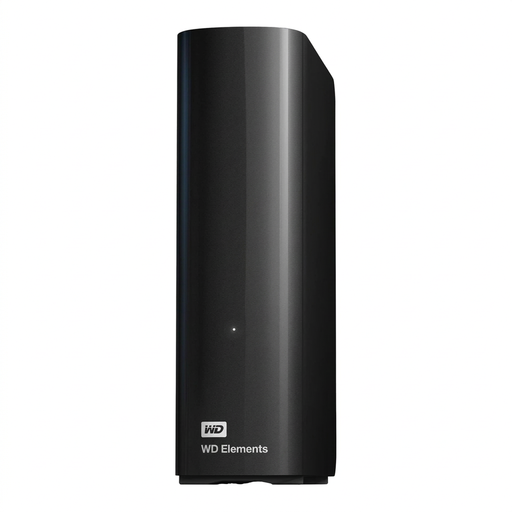
WD Elements 14 TB Desktop, USB 3.0, 3.5-inch, NTFS
For a desktop archive with a large collection of projects. The stated specifications are 14 TB, USB 3.0 and NTFS.
The drive requires an external power supply while in use. You’ll need to set up versioning and a separate backup separately.
View at Joybuy
 No image available
WD Elements 6 TB Desktop, USB 3.0, 3.5-inch, NTFS
For a desktop archive with multiple project versions. This model is listed with 6 TB, USB 3.0 and NTFS.
An external power supply is required while the drive is in use. You’ll also need to set up versioning and a separate backup.
View at Joybuy
 No image available
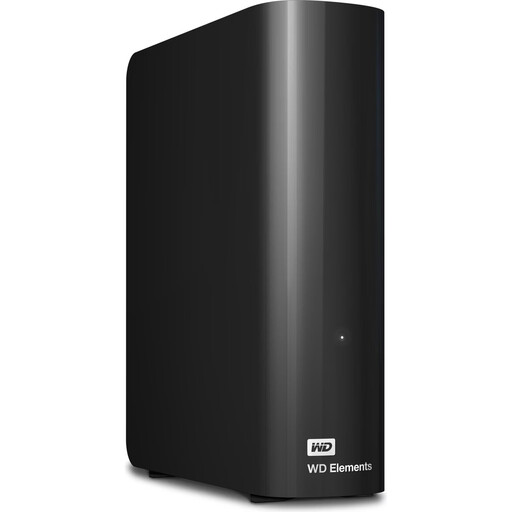
WD Elements 10 TB Desktop, USB 3.2 Gen 1, 3.5-inch, NTFS
For a desktop archive that needs plenty of space. The stated specifications are 10 TB, USB 3.2 Gen 1 and NTFS.
The desktop drive requires an external power adapter while in use. Versioning and a separate backup need to be set up separately.
View at Joybuy
 No image available
WD My Passport 5 TB, USB 3.0, Black
For project files and multiple versions that you want to take with you. This model is listed with 5 TB and USB 3.0.
Remember to set up versioning and a separately stored backup as well.
View at Joybuy
Frequently asked questions
Is it enough to copy CAD project folders regularly to a single external drive?
Not if you want to keep older versions that have been overwritten. Set up a backup with clear versioning and test that you can restore your files. Keep another copy separately in case the drive fails or is lost; Germany’s Federal Office for Information Security treats backup and recovery as parts of a data backup plan.
Does Windows File History automatically back up my CAD folder?
Microsoft lists libraries as folders that are backed up automatically. If your CAD project is stored elsewhere, add the folder to a library and check that it is actually backed up and can be restored.
Can I use a Windows-formatted drive as a Time Machine destination without reformatting it?
No. Apple recommends APFS or APFS (Encrypted) for Time Machine volumes. Reformatting a Windows volume erases any data already stored on it. So plan the setup before transferring project files.
Is a particular type of encryption always required for external CAD drives in Germany?
Not for every drive as a blanket rule. If you process personal data, check the data protection requirements and safeguards that apply to your specific situation. Germany’s Federal Commissioner for Data Protection and Freedom of Information describes encryption as an important safeguard for portable storage devices.


