Collectors of large project archives
You store finished designs and their associated project files, and need plenty of space as well as a backup you can restore later.


For large design archives that you rarely open, an HDD is a natural choice if its capacity suits your collection of folders. An SSD may be a better fit for frequent transfers or mobile access, provided the connection and host device are compatible with the specific model. Whichever drive you choose, plan to keep a separate second copy and test that you can restore your files. A single external drive is no substitute for a verified backup.
You store finished designs and their associated project files, and need plenty of space as well as a backup you can restore later.
You carry project folders between workstations and need to weigh up capacity, connection and transfer speed together.
You want to protect designs from unauthorised access. Whether they contain personal data matters when assessing data protection requirements; the Federal Commissioner for Data Protection and Freedom of Information explains when the GDPR applies.
A good fit if: You store large project archives that you rarely open at a fixed workstation.
Things to consider: Check the power supply and connections for the specific model. An archive connected to your computer is not a backup kept separately from it.
A good fit if: You occasionally take larger folders with you and a USB-powered hard drive suits your data collection.
Things to consider: Compare the capacity of the exact variant with your folders. Toshiba says the Canvio Basics needs to be reformatted for macOS.
A good fit if: You transfer project folders regularly or access them on the move frequently.
Things to consider: Manufacturer speed claims assume compatible host devices and cables. The Kingston XS2000 needs USB 3.2 Gen 2x2 to deliver its best performance.
Start by working out how much space you need and how you’ll back up your files. Then check that the connection and file system are compatible with the computers you plan to use with the archive.
The figures below relate to consumers choosing an external drive for large design project folders; each figure represents their most important buying priority.
| Priority | What to look for when buying | Who is it most relevant to? |
|---|---|---|
| Space for files and versions | Check the size of your folders against the capacity of the specific variant, allowing for future growth. | I want space for finished designs, project files and versions. Around 26% of consumers say sufficient capacity is their top buying priority. |
| Ability to restore files | Plan an additional copy, disconnect the drive after backing up, and test restoring your files. | I want to be able to restore a project if a drive fails, rather than having just one copy stored elsewhere. Around 26% of consumers say the ability to restore files is their top priority. |
| Speed for regular transfers | Check that your computer, connection and cable support the USB requirements of the specific SSD model. | If I regularly move large project folders, I want to check the connection on my own devices. Around 21% of consumers put transfer speed first. |
| Portability and switching computers | Check the cable, USB ports and file system. Back up any existing files elsewhere before reformatting. | I need storage I can take with me and use across different computers. Around 16% of consumers say portability and switching between computers are their top priority. |
| Confidential project content | Check whether the files contain personal data. If confidentiality is a concern, plan for encryption and keep the recovery key somewhere secure. | For sensitive designs, I want to consider the risk of unauthorised access. Around 11% of consumers say confidentiality is their top priority. |
The German Federal Office for Information Security points out that the lifespan of storage media cannot be predicted precisely. That’s why keeping a separate copy and testing your recovery process should be part of your archive plan, whether you choose an HDD or an SSD.
An external drive can fail, and an archive that remains connected may also be affected by a ransomware incident.
Keep a second copy somewhere separate, and test that you can restore and open files from it.
An SSD’s stated maximum speeds aren’t guaranteed on every computer. The host device, cable and connection can all limit performance.
Before relying on a manufacturer’s speed claim, compare your computer’s USB specification with that of the specific SSD model.
Toshiba says the Canvio Basics range uses NTFS for Windows and needs to be reformatted for macOS.
Before making your first archive copy, decide which computers you’ll use the drive with and back up any existing files before reformatting.
Changing the format later may mean extra setup and copying the files again.
The Canvio Basics range is a portable, USB-powered HDD option if its available capacity suits your archive.
The One Touch range includes portable drives and a desktop hub, offering different options for storing and backing up files.
The T7 Shield is a portable SSD range designed for regular file transfers and mobile access.
The XS2000 and XS1000 are different portable SSD ranges, each with its own connection and performance specifications.
Crucial’s German catalogue lists external SSDs in several capacity options as another choice for folders you move around frequently.
The Joybuy products below are external HDDs for portable storage or desktop archives. Capacity, connections and power requirements vary by model.
 No image available
A portable HDD for project folders you occasionally need to take with you.
6 TB; USB-C; USB 3.2 Gen 1.
No image available
A portable HDD option for project files you want to have with you when you’re out and about.
4 TB; USB-C.
 No image available
For portable, USB-powered storage of project files.
2 TB; USB-C; USB 3.2 Gen 1; 2.5-inch; exFAT.
 No image available
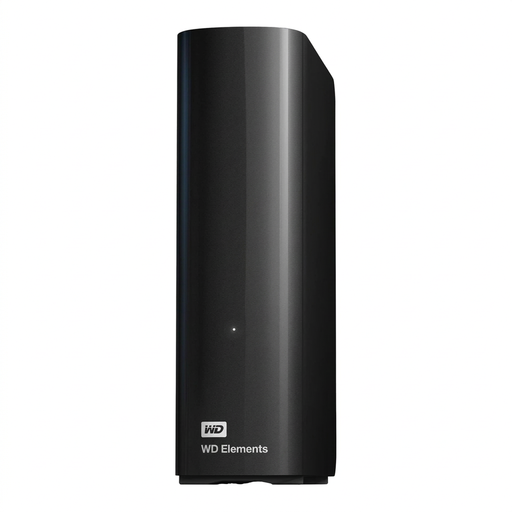
For large project archives at a fixed workstation. The product description says an external power supply is required.
14 TB; USB 3.0; 3.5-inch; NTFS. The product description says the drive needs to be reformatted for macOS.
 No image available
For storing large project folders in one place. The product description says an external power supply is required.
8 TB; USB 3.0; 3.5-inch. The product description says the drive needs to be reformatted for macOS.
Keep a separate additional copy and test that you can restore and open your project files. The German Federal Office for Information Security points out that the lifespan of storage media cannot be predicted precisely, and that you need to be able to restore a backup successfully.
There’s no single answer. Toshiba says the Canvio Basics range uses NTFS and needs to be reformatted for macOS. Check the details for your specific variant and back up any existing files before reformatting.
The file type alone doesn’t mean you have to buy a hardware-encrypted model. If the designs contain personal data and are processed in a context covered by the GDPR, you should assess suitable safeguards in proportion to the risks. The German Federal Office for Information Security also describes software-based encryption.
The German Environment Agency recommends collecting electronic waste separately rather than putting it in household rubbish; local collection points accept it free of charge. Delete personal data before handing over the drive. If it contains personal data, you should also consider secure data-carrier destruction in proportion to the risks, as covered by the Federal Commissioner for Data Protection and Freedom of Information.
No. These manufacturer services are no substitute for keeping a separate copy and testing that you can restore it. If you’re taking them into account when choosing a drive, check the terms for the specific variant.