For large projects that you regularly open or transfer directly from the drive, an external SSD may be a good option. Check that your computer and cable support the connection needed to achieve the speed you want. An HDD may suit an archive that stays in one place, but whatever type of drive you choose, important files need an additional backup stored separately.
Which option is right for you?
Designers with large project archives
If you want to keep lots of completed designs and related files locally, the capacity of the specific model and the space available for it are important factors. Seagate lists a desktop HDD with 8 TB, while Toshiba describes a 4 TB portable HDD powered via USB.
Designers working on large projects
If you regularly open or transfer large working files, compare the stated drive speed with the ports on your computer and the cable you use. Kingston and Samsung list models in their respective SSD ranges with sequential speeds of up to 2,000 MB/s, according to the manufacturers.
Designers with irreplaceable files
If your designs would be difficult to replace, plan for a separate local copy in addition to your working or archive drive, and check that you can restore files from it. Germany’s Federal Office for Information Security recommends backing up data regularly.
What should you look for when buying?
First decide whether you’ll often work directly from the drive or mainly store completed projects. Either way, plan for an additional backup if the files are important.
| Buying consideration |
What to look for |
Who needs this? |
| Space for project archives |
Estimate how much space your existing files take up and how much you expect them to grow, then compare this with the capacity of the specific model. Also check whether a desktop enclosure with a power supply will fit where you plan to put it. |
If I want to keep lots of completed projects locally without using the cloud, I need enough space and a suitable place for the drive. Around 31% of consumers put archive storage at the top of their list. |
| Protection against data loss |
Decide which files need an additional backup, how often you’ll update it and whether you can restore files from it. |
If I don’t want important designs to be my only copy, I need a drive stored separately and a way to restore files that I can test. Around 31% of consumers prioritise a separate local backup. |
| Speed with large files |
Check the interfaces on the drive, computer and cable. The manufacturers’ claims of up to 2,000 MB/s for the Kingston XS2000 and Samsung T9 are sequential maximum speeds, not a guarantee for every workflow. |
If I regularly open or transfer large project files, I look at how the drive and connection work together, rather than just the advertised top speed. Around 25% of consumers put working speed first. |
| Portable use and switching between devices |
Compare the ports, cables included and power requirements with the devices you actually use. For Time Machine, Apple recommends APFS or APFS (Encrypted); reformatting a drive erases any existing data. |
If I want to take the drive between workplaces or use it with different devices, portability, power and the right file system are essential. Around 13% of consumers prioritise portability and device compatibility. |
Common buying mistakes
-
Relying on your only copy of a file as a backup
If the drive fails or files are accidentally deleted, your only copy could be lost.
Keep your working files and backups separate, and occasionally check that you can restore files.
A second local copy needs extra storage and regular upkeep.
-
Expecting an SSD to reach its top speed on every USB port
Samsung says the T9 needs a compatible host, suitable cable and UASP enabled to reach its maximum speed. A compatible-looking plug alone doesn’t confirm that these requirements are met.
Before you buy, compare the interface specifications for the drive, computer and cable.
-
Using an HDD set up for Windows as a Mac backup without checking it first
Toshiba says the Canvio Ready is formatted as NTFS. Apple notes that reformatting a drive for Time Machine permanently erases any existing data.
Choose how you’ll use the drive and which file system you need before copying files to it.
Before reformatting, you may need time to back up your files and transfer them back afterwards.
-
Comparing desktop and portable HDDs on capacity alone
The Seagate Expansion Desktop uses a power supply, while the Toshiba Canvio Ready is powered via USB.
First decide whether your archive will mostly stay at your desk or whether you’ll take it with you regularly.
A desktop HDD needs a power socket where you use it.
Brands and suitable drive ranges
Kingston
The XS2000 is a compact range of external SSDs, with models up to 4 TB for frequent file transfers.
- Kingston lists USB 3.2 Gen 2x2 and sequential read and write speeds of up to 2,000 MB/s for the XS2000.
- These are manufacturer claims; check that your computer’s port is compatible.
Samsung
The Portable SSD T9 is a range of SSDs for active projects, available in 1, 2 and 4 TB models.
- Samsung lists speeds of up to 2,000 MB/s for the 4 TB T9, as well as password protection with 256-bit AES hardware encryption.
- Samsung says maximum speed requires a USB 3.2 Gen 2x2 host, a compatible cable and UASP enabled.
Toshiba
The Canvio Ready is a range of portable HDDs powered via USB, with models up to 4 TB for local storage.
- Toshiba lists a USB Type-A cable as included with the 4 TB model.
- The drive is formatted as NTFS for Windows. Reformatting may be necessary for macOS, and will erase any existing data.
Seagate
The Expansion Desktop is a range of external HDDs for larger archives that will mostly stay in one place.
- For the 8 TB model, Seagate lists a power supply and a USB 3.0 Type-A cable. It also describes saving local files using drag and drop.
- Seagate says the drive needs to be reformatted for use with Time Machine.
Crucial
The X9 Pro is a compact range of external SSDs; the manufacturer’s model described here has 4 TB.
- Crucial lists sequential read and write speeds of up to 1,050 MB/s and notes that performance depends on the host and formatting.
- Crucial marks this specific model as “EOL”, so don’t assume it’s currently available to buy.
Joybuy product selection
This selection includes external HDDs for local project archives and portable file storage, as well as external SSDs for active projects.
 No image available
WD Elements Portable 6TB USB-C
For a local file archive that you can also use in different workplaces.
6 TB; portable 2.5-inch enclosure; USB-C and USB 3.2 Gen 1.
Important files should also be backed up separately.
View on Joybuy
 No image available
WD Elements 2TB Portable External Hard Drive
For portable file storage if you want to use one drive with Windows and macOS devices.
2 TB; portable 2.5-inch enclosure; USB-C, USB 3.2 Gen 1, exFAT and USB-powered.
The description says it works with Windows and macOS without needing to be reformatted first. Important files should also be backed up separately.
View on Joybuy
 No image available
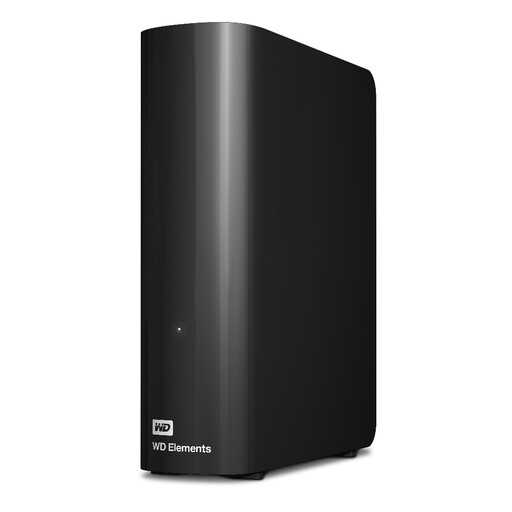
WD Elements Desktop 20TB
For a large local archive kept in one place.
20 TB; USB 3.2 Gen 1 with USB 2.0 compatibility; power supply and USB-A cable listed.
Important files should also be backed up separately.
View on Joybuy
 No image available
Samsung Portable SSD T7 2TB
For frequent file transfers if an external SSD suits your workflow.
2 TB; USB 3.2 Gen 2; manufacturer’s sequential speeds of up to 1,050 MB/s read and 1,000 MB/s write; USB-C and USB-A cables listed.
The stated maximum speeds aren’t guaranteed for every workflow.
View on Joybuy
 No image available
Samsung Portable SSD T9 1TB
For frequent transfers of large project files, provided your computer and cable support the right interface.
1 TB; USB 3.2 Gen 2x2; manufacturer’s sequential speeds of up to 2,000 MB/s for both reading and writing; USB-C to USB-C and USB-C to USB-A cables listed.
Samsung says the T9 needs a USB 3.2 Gen 2x2 host and a compatible cable to reach its maximum speed. Important files should also be backed up separately.
View on Joybuy
Frequently asked questions
Can I use the same external hard drive for Time Machine and my project files?
Yes. Apple says you can create an additional APFS volume for other files alongside an APFS volume reserved for Time Machine. A drive formatted for Windows may need to be reformatted, which permanently erases any existing data.
How can I make sure my files are recoverable without the cloud?
Keep a regularly updated local backup alongside your working files, and check that you can restore files from it. How often you back up depends on how often your projects change.
Is a longer manufacturer’s warranty the same as my rights against the seller?
No. The consumer advice organisation Verbraucherzentrale distinguishes between a voluntary warranty and your statutory rights against the seller. Check the terms of any manufacturer’s warranty separately; it doesn’t replace backing up your files.
Does German data protection law require a specific type of encryption for every external design drive?
No, you can’t infer a blanket requirement for every design drive. According to the Federal Commissioner for Data Protection and Freedom of Information, controllers and processors must take technical and organisational measures appropriate to the risk; encryption is listed as one possible measure. What’s appropriate in each case depends on the data and the risk.


