If you regularly work with large design files and have limited desk space, a compact external SSD is a good place to start. First check that your computer and cable support the speed you need. For a growing archive where fast access is less important, a compact HDD may be a good option. A desktop drive needs room for its enclosure and cables, and possibly a power supply. None of these options replaces a separate backup of important original files.
Which option is right for you?
Designers working on large projects
If you regularly open and transfer large project files, look for a compact design, enough capacity and the right connection. Samsung quotes speeds of up to 2,000 MB/s for the T9 under certain connection conditions; Kingston also quotes speeds of up to 2,000 MB/s for the XS2000.
Designers with a growing project archive
If you mainly keep completed projects, capacity and where you put the drive may matter more than the fastest possible access. Toshiba lists the Canvio Advance as a USB-powered HDD in its EMEA product range, with capacity of up to 4 TB; desktop drives need more space.
Designers who need backups
If you want to be able to recover your work after a drive fails or is lost, you need a separate copy that you can use regularly, rather than relying on a single drive as the only place your files are stored. The Verbraucherzentrale describes a backup as a copy you can use if your original files are lost or damaged.
What should you consider when buying?
Compact external SSD
A good fit if: you regularly work with large files and want a drive that takes up very little space.
Keep in mind: For speeds of up to 2,000 MB/s, Samsung requires USB 3.2 Gen 2x2 on your computer and cable, as well as UASP enabled.
Compact, USB-powered HDD
A good fit if: you need room for lots of completed projects and the fastest access speeds aren't a priority.
Keep in mind: COMPUTER BILD listed read access as a downside of the 4 TB Toshiba Canvio Advance it tested.
Desktop drive
A good fit if: you have room for a large archive to stay on or beside your desk.
Keep in mind: The enclosure and cables take up space; a desktop HDD such as the Seagate Expansion Desktop also needs a power supply.
| What matters |
What to check before buying |
Who is this especially important for? |
| Working speed |
Check the quoted read and write speeds, as well as your computer's and cable's USB capabilities. Samsung says the T9's top speeds require USB 3.2 Gen 2x2 and UASP. |
If I regularly open or copy large files, I want to reduce waiting times and avoid choosing a connection that slows the drive down. Around 24% of consumers put working speed first. |
| Space for a project archive |
Compare the amount of data you already have and expect to add with the capacity of the specific drive. |
If I want to keep lots of older projects, having enough space for my archive matters more than the fastest access. Around 23% of consumers prioritise archive capacity. |
| Limited desk space |
Consider the enclosure's dimensions, cable length and power requirements at the intended location. |
On a small desk, I want to fit the drive and cables without blocking my workspace. Around 23% of consumers put a small footprint first. |
| Recoverable backup |
Decide where to keep your original files and separate backup, and check that you can restore your files. |
If I need to be able to access important designs again after a drive fails, I need an extra copy and a backup routine I can follow regularly. Around 18% of consumers prioritise a recoverable backup. |
| Use with multiple computers |
Check the connections and cables, as well as the file system, for the computers you plan to use. Back up any existing data before reformatting. |
If I want to use the drive with different computers, I need to know that the connection and file system are compatible. Around 12% of consumers prioritise compatibility with the computers they already own. |
Common buying and usage mistakes
-
Assuming an SSD's advertised top speed is the speed you'll get on your computer
Samsung says the T9's top speed requires USB 3.2 Gen 2x2 on the host computer and cable, as well as UASP enabled.
Check that your computer meets these requirements and compare the drive's connection specifications with the ports you actually have available.
-
Confusing storage with backup
If important designs are stored only on one external drive, a failure or loss could leave you without your only copy.
Treat your working files and a separately stored backup as two different things, and check that you can restore your files.
A second, separately stored copy needs extra storage and a backup routine you can follow regularly.
-
Choosing a desktop drive without checking where it will go
A desktop HDD such as the Seagate Expansion Desktop needs room for its power supply and cables; the Toshiba Canvio Advance, by contrast, is powered via USB.
Before you choose, check that the enclosure and cable route will fit where you plan to put it, and that there’s a free power socket if needed.
A desktop setup takes up space for the drive and cables, and possibly for the power supply and socket.
-
Switching a pre-formatted HDD between Mac and Windows without checking first
Toshiba says the Canvio Advance comes pre-formatted as NTFS for Windows and needs reformatting for macOS. Formatting erases any files already on the drive.
Check how you plan to use the drive before copying files to it, and back up any existing data before reformatting.
Key brands at a glance
Samsung
The portable T9 is aimed at people who regularly transfer large work files and have a compatible high-speed connection.
- Samsung quotes speeds of up to 2,000 MB/s for the T9. To reach this top speed, the host computer and cable must support USB 3.2 Gen 2x2, and UASP must be enabled.
- The manufacturer's quoted speed is not guaranteed on every computer.
Kingston
The XS1000 and XS2000 are portable SSDs; the XS2000 needs a compatible connection to reach its quoted top speeds.
- Kingston quotes capacity of up to 2 TB and read speeds of up to 1,050 MB/s for the XS1000, and capacity of up to 4 TB and speeds of up to 2,000 MB/s for the XS2000.
- The quoted top speeds depend on the specifications of the computer you use. The XS2000 data sheet lists a 12-inch cable.
Toshiba
The Canvio Advance is a compact, USB-powered HDD for archives where the fastest possible access isn't a priority.
- Toshiba's EMEA product range includes capacities of up to 4 TB and backup software.
- For the 4 TB model it tested, COMPUTER BILD listed slower read access as a downside. Toshiba says the drive comes pre-formatted as NTFS for Windows; it needs reformatting for macOS.
SanDisk
The Desk Drive is a desktop SSD for a larger archive when desk space is limited.
- SanDisk quotes capacity of up to 8 TB and read speeds of up to 1,000 MB/s.
- These are manufacturer specifications. Check the placement and power requirements for the specific product on offer; these figures are not a direct comparison with a desktop HDD.
Seagate
The Expansion Desktop is a desktop HDD option for a large archive, provided you have room for the drive and its power supply.
- COMPUTER BILD ranked a 16 TB Expansion Desktop Drive first in its 3.5-inch HDD test. Seagate's current data sheet lists a power supply and USB cable as included.
- That test result does not apply to every version. Seagate notes that its data recovery services are not available in every country.
Joybuy products for large files
This selection includes portable SSDs for active work, a compact HDD for archives and a desktop HDD model for larger storage needs.
 No image available
Samsung MU-PG2T0B, 2 TB, USB Type-C
This portable SSD is a good choice if you want to work on or transfer large project files at a small desk.
The listing specifies 2 TB and USB 3.2 Gen 2 (3.1 Gen 2) via USB Type-C. Before buying, check that your computer's ports are compatible with these specifications.
View at Joybuy
 No image available
KIOXIA Exceria Plus G2 Portable SSD, 2 TB
This portable SSD is worth considering if you want to store and transfer large files on a compact drive.
The listing specifies 2 TB, USB 3.2 Gen 2 and sequential speeds of up to 1,050 MB/s read and 1,000 MB/s write. The description mentions USB-C and USB-A cables.
View at Joybuy
 No image available
Samsung Portable SSD T7, 4 TB, Titanium Grey
This portable SSD is a good choice if you need more archive capacity and want the flexibility to position the drive on your desk.
The listing specifies 4 TB, USB 3.2 Gen 2 and sequential speeds of up to 1,050 MB/s read and 1,000 MB/s write. The description mentions USB-C and USB-A cables, as well as USB power.
View at Joybuy
 No image available
WD Elements Portable HDD, 4 TB, USB-C
This portable HDD is better suited to a growing archive if a compact setup matters more than fast access to files you work on regularly.
The listing specifies 4 TB, a 2.5-inch form factor, USB 3.2 Gen 1 and USB power. As an HDD, it offers slower access than an SSD, according to the product description.
View at Joybuy
 No image available
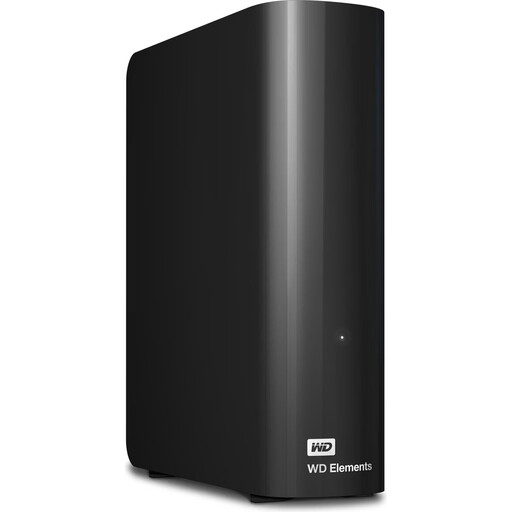
WD Elements Desktop HDD, 24 TB, 3.5-inch
This desktop drive is worth considering if your project archive needs plenty of capacity and you have a permanent space for it on or beside your desk.
The listing specifies 24 TB, USB 3.2 Gen 1 and a 3.5-inch form factor. A power supply and USB cable are included, according to the description; you'll need room for the setup and a power socket.
As an HDD, the drive is slower than an SSD for frequent access, according to the product description.
View at Joybuy
Frequently asked questions
Can I use the same external hard drive with Mac and Windows?
Yes, as long as the connection and file system are suitable for both computers. Apple describes exFAT as an option for sharing drives over 32 GB; formatting erases any files already on the drive. Toshiba says the Canvio Advance comes pre-formatted as NTFS for Windows and needs reformatting for macOS.
How should I disconnect the drive after using it?
For Windows 10 and 11, Microsoft recommends ejecting an external drive using ‘Safely Remove Hardware’ before unplugging it, to help prevent data loss.
Is one external drive enough for a backup?
Not if that drive is also the only place where your files are stored. A backup is an extra copy that lets you restore lost original files; the Verbraucherzentrale describes a backup strategy based on the 3-2-1 rule.
What applies if an online purchase is faulty: a guarantee or your statutory rights?
Your statutory rights against the seller for faulty goods are separate from a voluntary manufacturer's guarantee. EU consumer information states that goods are covered for a minimum of two years from receipt. When you buy online from a retailer, you also generally have a 14-day right to cancel, although exceptions may apply.


