Start by considering whether you can restore your backups and which computers the drive will actually be used with: a fast SSD alone does not make for a reliable backup. A portable HDD may be enough if you mainly have small spreadsheets and rarely move the drive. An SSD can be more practical if it often moves between workstations. For confidential files, access controls and encryption should also factor into your choice, and keep backups separate from the working files.
Who backs up spreadsheets in a studio?
People responsible for studio backups
You want to be able to recover spreadsheets after accidental deletion or a device failure, and decide who creates backups and checks that they can be restored. The German Federal Office for Information Security stresses that backed-up data must also be recoverable.
Teams using several work computers
If files or the backup drive move between workstations, the connections and planned backup process need to work on all the systems involved. Samsung Germany, Kingston Technology and Toshiba Storage, among others, provide guidance on connections, cables and system use.
Teams with confidential data
You want to prevent everyone in the studio from viewing spreadsheets, so you need suitable access controls as well as a backup. When handling personal data, you should also consider safeguards that are appropriate to the risks, as explained by the German Federal Commissioner for Data Protection and Freedom of Information.
What to consider when buying
| Consideration |
What to check before buying |
Who it matters most to |
| Recoverability |
Decide what to back up and how many versions to keep; test restoring a file. |
If I need to recover spreadsheets after accidental deletion or a fault, I need a separate, tested backup. Around 36% of consumers put recoverability first. |
| Confidentiality |
Check how stored files are protected and agree who is responsible for unlocking the drive and managing the keys. |
If not everyone in the studio should be able to read confidential spreadsheets, I look for access controls and clear rules for handling the unlocked drive. Around 29% of consumers prioritise confidentiality. |
| Compatibility |
Check the connections, cables, file system and backup process on the computers involved. |
If I want to use the same drive at several workstations, its connection and backup process need to work with the computers there. Around 21% of consumers put compatibility between workstations first. |
| Capacity |
Consider the current amount of data and how many versions you plan to keep. |
If I need space for older versions or other folders as well as current spreadsheets, I base the capacity on the full backup plan. Around 14% of consumers prioritise capacity planning. |
Common mistakes to avoid
-
The external drive becomes your only copy
External storage can fail too. A backup is only useful if you have an up-to-date copy and can restore the files.
Keep your backup separate from your working files and test restoring a file.
-
A USB-C connection or high MB/s rating does not guarantee faster backups
The maximum speeds quoted by Samsung for the T7 Shield depend on the host device, cable and UASP being suitable. For small spreadsheets, a high transfer-speed rating is no substitute for a backup process that works.
First check the connections and backup process on the computers you actually use. Compare speed claims only under the stated connection conditions.
Paying extra for speed that your computers cannot use, or that makes little difference with small files, may be unnecessary.
-
A password fully protects the drive at all times
The German Federal Commissioner for Data Protection and Freedom of Information points out that full-drive encryption does not protect your data while the device is switched on or unlocked.
Also decide who is allowed to unlock the drive and how it will be stored in your shared studio.
-
A test placement does not replace checking the device version
In 2023, SanDisk reported a firmware issue that could cause unexpected disconnections on affected Extreme Pro Portable SSD V2 drives. This does not mean that every unit is affected.
For this specific product range, check the serial number and the relevant manufacturer information.
On affected devices, interruptions can disrupt the backup process.
Brands and product ranges to consider
These notes relate to the specified product ranges and variants. They are not a general assessment of the brands or a statement about availability.
Samsung
The T7 Shield portable SSD range includes the black 1-TB variant MU-PE1T0S/EU.
- For this variant, Samsung lists USB 3.2 Gen 2 and sequential maximum speeds of 1.050 MB/s read and 1.000 MB/s write.
- According to Samsung, these maximum speeds require a compatible host device and cable, as well as UASP being enabled. The stated IP65 test result is not a guarantee against dust or liquid damage, and does not replace a backup.
Kingston
Kingston offers the portable XS1000 SSD in 1 TB and 2 TB capacities as an option for use across different workstations.
- According to Kingston, the package includes a USB-C-to-USB-A cable and a USB-A-to-USB-C adapter.
- The quoted transfer speeds are maximum figures and, on their own, do not demonstrate a backup advantage for small spreadsheets.
Seagate
Expansion Portable is a USB-powered HDD range; the data sheet also lists the 2-TB variant STKM2000400.
- Seagate lists USB power and an included USB 3.0 cable.
- According to Seagate, the Rescue services mentioned in the data sheet are not available in every country and do not replace an additional backup.
Toshiba
Canvio Basics is a portable, USB-powered HDD range; Toshiba offers the 2-TB variant HDTB520EK3AA.
- Toshiba lists USB 3.2 Gen 1 and out-of-the-box compatibility with Windows.
- For other systems, check the file system and planned backup process in advance.
SanDisk
The Extreme Pro Portable SSD V2 is a portable SSD range where the exact device version is important when choosing a drive.
- In 2023, SanDisk reported a firmware issue that could cause unexpected disconnections on affected devices in this range, and advised checking the serial number. The report does not mean that every unit is affected or that other SanDisk ranges have the same issue.
Joybuy products for spreadsheet backups
This selection includes portable external HDDs and SSDs for storing backup copies. Before use, check the connections and backup process on the computers involved. For confidential files, you should also consider access controls.
 No image available
WD Elements Portable 5TB USB-C
This portable HDD is listed as a storage option for larger backups, and the product details specify file use with Windows and Mac.
This variant is listed with 5 TB capacity, a 2.5-inch form factor and USB-C with USB 3.2 Gen 1.
View at Joybuy
 No image available
WD My Passport External Hard Drive 2 TB
If password protection for shared files is important, the product description lists encryption and automatic backup scheduling.
The specifications list 2 TB, USB 3.0 and 256-bit AES encryption. PCs, Macs and Chromebooks are also mentioned; check that your planned setup works with the computers you use.
View at Joybuy
 No image available
MOVESPEED Portable SSD 1TB, Model YSPSRX20M-1TTG
This portable SSD is an option for keeping backup copies on the move; the description lists Windows, macOS and Android.
Specifications include 1 TB, USB-C and USB 3.2 Gen 2×2. Check that the computers and cables involved are compatible with the connection you plan to use.
View at Joybuy
 No image available
Samsung Portable Solid State Drive T7 2TB
For confidential studio spreadsheets, the product description lists hardware encryption and password protection. You should also decide who is allowed to use the unlocked drive.
This variant is listed with 2 TB and USB 3.2 Gen 2. The package is said to include USB-C-to-C and USB-C-to-A cables.
View at Joybuy
 No image available
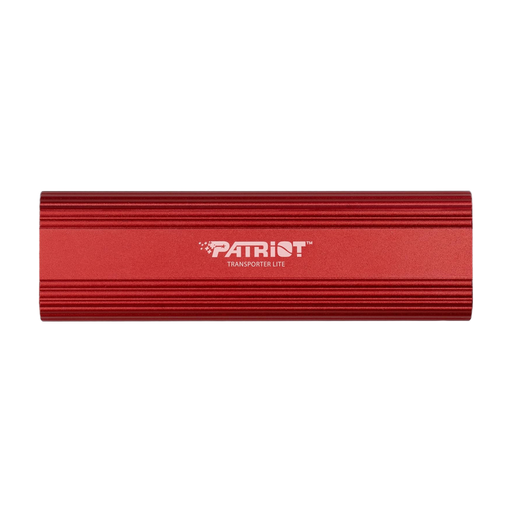
Patriot Transporter Lite 1TB Type-C USB 3.2 Gen 2
This portable SSD is listed for external file storage; the description mentions desktop and laptop use, as well as Windows systems.
Specifications include 1 TB, an aluminium casing and vibration resistance. The description quotes transfer speeds of up to 1.000 MB/s; check that the computers you use support the relevant connections.
View at Joybuy
Frequently asked questions
Is it enough to copy the spreadsheet to an external hard drive now and then?
Not if you need to be able to restore recent changes or earlier versions of the file too. Decide when and which files to back up, keep the backup separate and test restoring a file.
Can I use the same drive for Windows files and a Mac Time Machine backup?
It depends on the specific format and backup process. Apple recommends APFS or APFS (Encrypted) for Time Machine. When setting up a newly selected backup disk, Time Machine may offer to erase and reformat it. Back up any existing files before confirming this.
Is encryption always a legal requirement for studio spreadsheets in Germany?
This does not establish a general requirement for every spreadsheet or a particular drive model. If personal data is processed, those responsible must put in place suitable technical and organisational safeguards that are appropriate to the risks; encryption may be one of them. The German Federal Commissioner for Data Protection and Freedom of Information also highlights the risk of loss or theft when using portable storage devices.
What should I check before returning a faulty drive?
Consider your rights if the device is faulty separately from how you will protect the data stored on it. Your statutory rights are against the seller, while a guarantee is voluntary and subject to its own terms. Before sending the drive back, check which data can still be read and how confidential content can be protected or securely erased.


