For a film archive that usually stays at a fixed workstation, a desktop HDD with ample capacity could be a good fit. If you need to back up files across different computers, a portable, USB-powered HDD is easier to handle. An external SSD may suit you if you regularly copy files or work on the move, provided it has enough space for your raw footage and project versions. Before choosing, add up the size of all your folders, allow room for additional versions and test whether you can actually restore an older file.
Which option is right for you?
Collectors of multiple film versions
If you keep raw footage, editing projects and finished exports, add up the storage needed for all the versions and leave room for future projects. Germany’s Federal Office for Information Security recommends allowing enough storage for backup copies.
Those who keep earlier edits
If you want to recover deleted or changed project files, make sure your backup method saves earlier versions and test that you can restore them. Apple and Microsoft explain how to restore older versions of files.
Those backing up across multiple computers
If you use the drive with different devices or put it away after backing up, check its connections, power supply and file system compatibility with your backup software. Toshiba and Intenso list USB cables for certain portable ranges, while Apple sets out its own requirements for Time Machine volumes.
What should you look for when buying?
Desktop HDD
A good fit if: Your growing archive will usually stay at a fixed workstation with a mains power socket nearby.
Consider: A desktop drive is less convenient to take with you. Choose its capacity based on the size of your raw files and project versions.
Portable HDD
A good fit if: You want to carry backups between compatible computers or put the drive away after backing up.
Consider: USB power and the cable supplied depend on the specific model. Also check that it has enough storage for all your versions.
External SSD
A good fit if: Your workflow involves frequently moving large film files or working directly from a portable drive.
Consider: Compare the available storage with the size of your complete archive. An SSD does not replace version history or a separate backup.
| What you need |
What to check before buying |
Who will find this most important? |
| Space for raw footage and versions |
Add up your folder sizes, allow for additional versions and compare them with the capacity of the specific model. |
I want to keep raw footage, finished films and several project versions without having to delete any later. Around 36% of consumers put space for raw footage and multiple versions first. |
| Restorable project versions |
Check whether the backup method saves versioned copies of your project folders and lets you restore an older file as a test. |
If an edit is overwritten or deleted, I want to be able to recover an earlier version. Around 29% of consumers prioritise restoring older project versions. |
| Connections and backup compatibility |
Check the USB ports, file system and backup software. Apple says a volume formatted for Windows cannot be used directly as a Time Machine destination. |
If I use the drive with several computers, I want to be able to set it up with the connections and backup software I need. Around 21% of consumers prioritise compatibility. |
| Portability and storage |
Check the design, cable and power supply of the specific model, and plan where you’ll keep it. |
I want to take the backup drive with me or store it separately after use, rather than leave it connected to my computer all the time. Around 14% of consumers prioritise portability and storage. |
Common buying and set-up mistakes
-
Allowing space only for the finished film
Raw footage, editing projects and additional versions also need storage. Germany’s Federal Office for Information Security recommends allowing enough space for backup copies.
Before buying, check the size of all the folders you plan to keep and consider which project versions you want to retain.
-
Confusing file mirroring with versioned backups
Mirroring can copy changes to the current folder. That does not necessarily give you access to an earlier edit; Microsoft describes File History as a way to restore saved older versions.
Choose a method that saves versioned copies of your project folders, then test that you can restore an earlier version.
-
Assuming a USB connection guarantees backup compatibility
A compatible plug does not mean the file system will work with your backup software. Apple says a volume formatted for Windows cannot be used directly with Time Machine; reformatting can also erase existing data.
Before your first backup, check your operating system, file system and backup software. Back up any existing files before reformatting a drive.
-
Assuming the same warranty or access protection applies to every model
Features and terms vary by model. For the Seagate One Touch Hub range, the manufacturer’s specification sheet and Joybuy product page list different limited warranty periods for model STLC8000400.
Check the full model number and the terms that apply to the specific version. Access protection is no substitute for a separate backup.
Brands to consider
Toshiba
Toshiba’s Canvio Flex is a range of portable HDDs with models for compatible Mac and Windows devices.
- Toshiba lists models with capacities of up to 4 TB and supplied USB-A and USB-C cables.
- Check that the file system works with your backup method: Apple recommends APFS or APFS (Encrypted) for new Time Machine volumes.
Intenso
The Memory Case range includes portable HDD models that Intenso says are powered via USB-A.
- Intenso lists capacities of up to 5 TB and a supplied USB-A cable; this range does not need a separate power adapter.
- If your computer does not have a suitable USB-A port, check how you’ll connect the drive before buying.
Western Digital
The portable My Passport range includes the 6 TB model WDBR9S0060BBK-WESN, as described by the manufacturer.
- Western Digital confirms that this specific model has a capacity of 6 TB and a portable HDD design.
- Do not assume details for this model number also apply to other My Passport models without checking first.
Seagate
According to Seagate’s specification sheet, the desktop One Touch Hub range combines a hard drive with a USB hub.
- Seagate’s specification sheet lists scheduled backups and file mirroring as features of the range.
- Mirroring alone does not count as an independent backup. Warranty details for STLC8000400 differ between Seagate’s specification sheet and the Joybuy product page; check the terms for the specific model.
Verbatim
Fingerprint Secure is a portable HDD range for anyone who wants access protection while carrying their drive.
- Verbatim advertises fingerprint access and 256-bit AES hardware encryption on its 1 TB model.
- Verbatim also notes on the same product page that a security update is available. Check whether 1 TB is enough for your film archive, too.
Joybuy products for film archives and backups
This selection includes portable HDDs and SSDs for different workstations, as well as a desktop HDD for a fixed archive.
 No image available
WD Elements Portable 2 TB
For a portable archive, provided 2 TB is enough for the raw files and project versions you plan to keep.
2.5-inch HDD with USB-C, USB 3.2 Gen 1 and exFAT; USB-powered.
View at Joybuy
 No image available
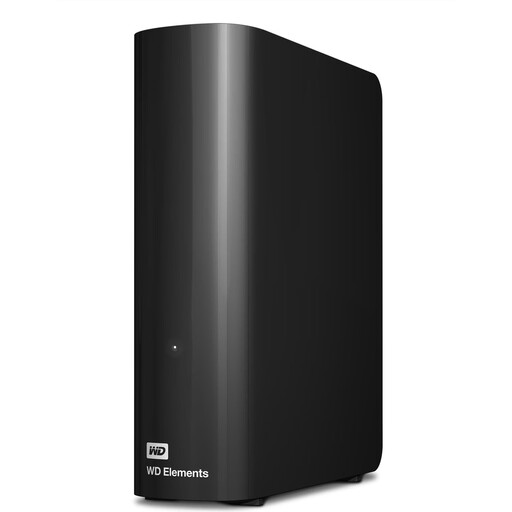
WD Elements Desktop 12 TB
For a larger archive at a fixed workstation with access to mains power.
3.5-inch HDD with USB 3.2 Gen 1, NTFS and a supplied external power adapter. The product description says it needs to be reformatted before use with a Mac; back up any existing data separately first.
View at Joybuy
 No image available
KEXIN External SSD 1 TB
For storing media files on the move, provided 1 TB is enough for your planned archive.
USB-C and a USB-A adapter are listed. The product description gives a transfer speed of up to 500 MB/s.
View at Joybuy
 No image available
Kexin M.2 SATA Portable External SSD 256 GB
For a compact, portable place to store files, provided 256 GB is enough for what you need.
USB 3.1; the product description lists USB-C-to-USB-C and USB-A-to-USB-C cables, plus transfer speeds of up to 500 MB/s.
View at Joybuy
No image available
KEXIN External SSD 512 GB
For storing video and project files on the move, provided 512 GB is enough for the folders you’ve chosen.
USB 3.1 and USB-C are listed. The product name gives a transfer speed of up to 500 MB/s.
View at Joybuy
Frequently asked questions
Will copying the finished film also back up my earlier edits?
No. This only backs up the files you actually copy. To keep earlier versions, your chosen method needs to save versioned copies of the relevant project folders. Microsoft describes File History as a way to restore saved older versions. Afterwards, test that you can restore a file.
Can I use a hard drive formatted for Windows as a Time Machine volume straight away?
Apple says a volume formatted for Windows cannot be used directly as a Time Machine destination. Apple recommends APFS or APFS (Encrypted) for new Time Machine volumes. Back up any existing files before reformatting a drive.
Is one external HDD enough to back up my films?
A single additional hard drive will not protect you against every kind of loss, such as losing both your working device and backup at the same time. Germany’s Federal Office for Information Security recommends backing up regularly, storing backups in another safe location and checking that you can restore your data.
Are a manufacturer’s warranty and your statutory rights the same thing?
No. Germany’s consumer advice centre distinguishes between your statutory rights against the seller if a purchase is faulty and a voluntary warranty, which is subject to its own terms. Check the terms for the specific hard drive model.
Can you put a worn-out external hard drive in household rubbish in Germany?
No. Germany’s Federal Environment Agency explains that electrical waste must be collected separately, for example at recycling centres and suitable take-back points. Erase your personal data before handing in the drive.


