What should you look for when buying?
Start by working out the total size of all your project folders and older versions. Then check compatibility with your computers and decide whether the drive needs to be portable or can stay permanently at your workstation.
| What you need |
What to check before buying |
Who should pay particular attention |
| Space for projects and versions |
Compare the total folder size, the older versions you want to keep and expected growth with the usable capacity. |
If you want to keep complete project folders and multiple versions, the total amount matters more than individual exports. Around 31% of consumers put storage space first. |
| Restorable backups |
Set up a backup routine, try restoring a project folder and disconnect the drive once the backup is complete. |
If you need to find and open older files, testing a restore should be part of your plan. Around 25% of consumers prioritise restorability. |
| Computer and software compatibility |
Check the USB connection, file system and folders included by your backup software. Back up files elsewhere before reformatting. |
If you use both Windows and Mac devices, you’ll need a suitable file system and the right backup settings. Around 19% of consumers prioritise compatibility. |
| Transport between rehearsals and your workstation |
Check the cable, compatible connection and power supply. For a desktop drive, also make room for the device and its power adapter. |
If you take recordings with you after rehearsals to work on them at another computer, choose a form factor suited to transport. Around 13% of consumers prioritise portability. |
| Recording privacy |
For recordings containing personal data, check the legal basis and appropriate safeguards. Consider setting up encryption and secure password storage where necessary. |
If recordings include identifiable people, consider who can access them and what could happen if the drive is lost. Around 12% of consumers prioritise protecting confidential recordings. |
For a Mac backup using Time Machine, Apple recommends a backup volume with at least twice the storage capacity of your Mac. This recommendation applies to that use case; it isn’t a general minimum capacity for every choir backup.
For personal data, Germany’s Federal Commissioner for Data Protection and Freedom of Information says that a legal basis under Article 6 of the GDPR is required. The applicable basis and safeguards depend, among other things, on the content of the recordings and how they’ll be used; a product feature doesn’t replace this assessment.
Joybuy products for choir recordings and project folders
This selection includes portable and desktop external HDDs for backups, from drives you can carry between rehearsals and your workstation to options for storing larger collections at a fixed computer.
 No image available
WD Elements Portable 5TB USB-C
This portable drive is designed for backups you need to carry between the rehearsal venue and your computer.
5 TB; 2.5-inch form factor; USB-C.
Joybuy
No image available
WD Elements Portable 6TB USB-C
This portable drive is an option if you want to back up or carry large project files while you’re out and about.
6 TB; 2.5-inch form factor; USB-C.
Joybuy
 No image available
WD Elements 6TB Desktop External Hard Drive
This desktop HDD suits backups of larger project collections at a fixed workstation, provided an external power supply is available.
6 TB; 3.5-inch form factor; USB 3.0; NTFS; external power adapter required.
Joybuy
 No image available
WD Elements 8TB Desktop External Hard Drive
This desktop drive is designed for particularly large project folders at a fixed workstation; make sure you have access to a power socket.
8 TB; 3.5-inch form factor; USB 3.0; external power adapter required.
Joybuy
 No image available
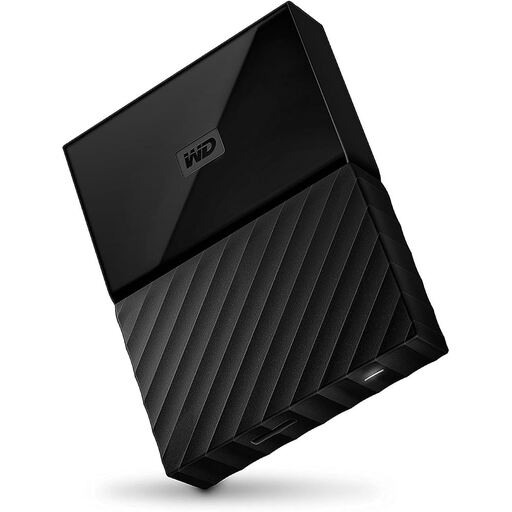
Western Digital My Passport 4TB Black
This portable HDD is an option if you want to carry project files with you and protect access to stored files.
4 TB; 2.5-inch form factor; AES-256 hardware encryption with password protection. Reformatting may be required for the Mac use described.
Joybuy
Frequently asked questions
How can you keep earlier versions of choir projects?
On Windows, File History can restore earlier versions of files. If your project folders aren’t in the libraries it covers, add them to a library or create a new one, then check that you can restore a file. On a Mac, Time Machine can back up automatically.
Does a hard drive set up for Windows need reformatting for Mac?
For the documented Toshiba Canvio Basics variant, Toshiba specifies NTFS and says reformatting is required for the stated Mac use. Apple warns that erasing or reformatting a Mac backup volume will remove existing files, so back them up to another device first.
Should I choose a portable or desktop external HDD?
A portable HDD is a good choice if you need to carry backups between rehearsals and your workstation or store them separately. A desktop HDD is worth considering if you’ll mainly back up large collections at a fixed computer and are happy to use a power adapter.
Can recordings of identifiable choir members be stored on an external drive?
Choosing an external hard drive doesn’t establish whether processing the recordings is lawful in your specific case. Germany’s Federal Commissioner for Data Protection and Freedom of Information notes that personal data requires an applicable legal basis under Article 6 of the GDPR. The relevant basis and safeguards depend, among other things, on who is responsible, the content of the recordings and how they’ll be used; this doesn’t mean that consent is required for every rehearsal.


