What should you look for when choosing one?
First, check how the drive can be connected on your desk. Then compare the space your project folders need with the connection your computer actually provides.
| What matters |
What to check before buying |
Who should pay particular attention? |
| Desk space and connection |
Check the casing dimensions and cable length, any included connectors or adapters, and your computer’s USB standard. |
If there’s little room beside my computer, the cable route and position of the port matter too. Around 33% of consumers put desk space and connectivity first. |
| Capacity and project folders |
Check the size of your existing folders and how much they are likely to grow. Test linked files after copying. |
If you want to store complete CAD projects, including any required references, allow for the space needed by the entire folder. Around 25% of consumers prioritise capacity and project size. |
| Speed when transferring large files |
Compare the USB specifications of the SSD, computer port and cable. Treat manufacturers’ figures as maximum sequential speeds. |
If I regularly copy large files, I want to know that my computer and cable support the SSD’s connection too. Around 25% of consumers put transfer speed first. |
| Portability and backups |
Check protection claims, including any conditions and warranty exclusions, and plan a separate backup that you can restore. |
If you take projects with you or can’t easily replace them, consider protection and a separate copy of your files together. Around 17% of consumers prioritise portability or data backup. |
External SSDs on Joybuy
This selection includes external SSDs for storing CAD projects. Compare capacity, connection specifications and casing features with your computer and the space available on your desk.
 No image available
KEXIN external SSD, 1 TB
For CAD files you want to store on a portable external drive.
The product specifications list USB 3.1 Type-C, an aluminium casing and speeds of up to 500 MB/s.
View on Joybuy
 No image available
KEXIN M.2 SATA external SSD, 256 GB
A portable option if a 256 GB SSD is the right size for the project files you need to store.
The product specifications list USB 3.1 Type-C, speeds of up to 500 MB/s, a weight of 41 g and dimensions of 84.5 × 41.2 × 7.1 mm.
View on Joybuy
No image available
KEXIN external SSD, 512 GB
For CAD files stored externally, provided 512 GB is enough for your complete project folders.
The product specifications list USB 3.1 Type-C, an aluminium casing and speeds of up to 500 MB/s.
View on Joybuy
 No image available
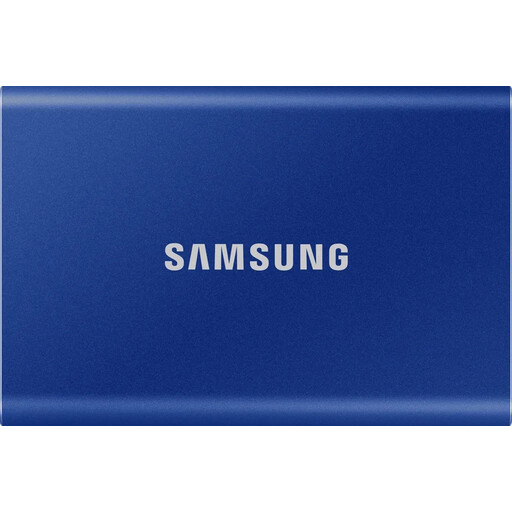
Samsung T7 external SSD, 1 TB, Indigo Blue
An external SSD for CAD projects if 1 TB suits the size of your folders and the listed connection options are compatible with your computer.
The product specifications list USB 3.2 Gen 2, read speeds of up to 1,050 MB/s and write speeds of up to 1,000 MB/s, as well as a weight of 58 g and dimensions of 85 × 57 × 8 mm. USB-C to USB-C and USB-C to USB-A cables are listed.
View on Joybuy
 No image available
Samsung T7 external SSD, 2 TB, Indigo Blue
The 2 TB version may suit larger project folders. Check your actual storage needs, including reference files.
The product specifications list USB 3.2 Gen 2, read speeds of up to 1,050 MB/s and write speeds of up to 1,000 MB/s, hardware encryption, and USB-C to USB-C and USB-C to USB-A cables. The listed dimensions are 8.5 × 5.7 × 0.8 cm and the weight is 72 g.
View on Joybuy
Frequently asked questions
How can I transfer an AutoCAD project without losing external references?
Copy the referenced files too, then open the drawing from its new location. Autodesk explains that absolute Xref paths may be missing after a move. You can reassign the affected paths or, where appropriate, set them as relative paths.
Is an external SSD enough as the only backup for my CAD projects?
No. The Federal Office for Information Security recommends backing up data regularly and points out that the lifespan of a storage device can’t be predicted precisely. Keep a separate backup and check that you can restore the files.
Will a USB-C SSD automatically reach its advertised speed of 2,000 MB/s?
No. Samsung says the T9’s top speed requires a USB 3.2 Gen 2x2-compatible host and suitable cables. The USB Implementers Forum explains that a USB connection operates at the lowest speed supported by the devices in the connection.
What rights do I have if the drive develops a fault?
If you buy as a consumer from a business seller in the EU, you have a statutory guarantee of at least two years from the date you receive the goods. This is separate from any additional manufacturer’s warranty. This information assumes a consumer purchase and doesn’t cover business procurement contracts in general.
Can I put a discarded SSD in my household rubbish?
No. The German Environment Agency recommends collecting waste electrical and electronic equipment separately and taking it, for example, to a recycling centre or an appropriate retailer take-back point. Before handing over or disposing of a device, the Federal Office for Information Security recommends backing up personal data and then securely erasing it.


