Who is an external SSD suitable for?

People who archive clips and projects

If you collect game recordings, raw footage and several versions of your projects, add up the space used by your folders and allow room for more files. Crucial points out that the full stated capacity isn’t available for storage. Germany’s Federal Office for Information Security also recommends checking that backups can be restored.

People who regularly copy large files

If you regularly move large recording or project folders between devices, the connections on your computer and SSD, as well as the cable you use, all matter. Samsung and SanDisk make their advertised maximum speeds conditional on the connection and suitable device requirements.

People who back up PS5 recordings

If you want to copy clips or screenshots from a PS5, you’ll need to distinguish the storage used for recordings from extended USB storage for game data. PlayStation specifies a compatible USB drive formatted as FAT or exFAT for recordings.

What should you check before buying?

Priority What to check when buying Who it matters most to
Space for recordings and project versions Add up the space used by your folders and the versions you plan to keep; consider usable rather than just stated capacity. If I want to keep raw footage, clips and several project versions together, I need enough space for the whole archive. Around 36% of consumers prioritise storage capacity.
Time taken to copy large files Check the connections on your computer, SSD and cable; don’t assume advertised MB/s figures are guaranteed for your own folders. If I regularly move large recording and project folders, the connection between my computer and SSD is important when choosing a drive. Around 29% of consumers are most concerned with copying large files.
Compatibility with your recording device and computer Check the device, connection and file system. For PS5 recordings, use a compatible FAT- or exFAT-formatted drive rather than extended USB storage. If I want to use recordings on a particular PC or console, the drive needs to be compatible with the device and its formatting. Around 21% of consumers focus primarily on device compatibility.
Ability to restore important files Plan to keep a separate copy and test restoring files. If I don’t want important clips or project versions to depend on a single SSD, I need a separate backup that I can check. Around 14% of consumers prioritise the ability to restore files.

Common misconceptions when buying an SSD

  • The advertised top speed is automatically available on your computer

    Maximum speeds depend on the connection. Samsung says the T9 requires a suitable host and cable, while SanDisk points out that backwards compatibility with older connections doesn’t automatically mean USB4 speeds.

    Before choosing, check the connections on your computer, drive and cable, and treat manufacturers’ speed figures as conditional maximums.

  • PS5 recording storage and extended game storage are the same thing

    PlayStation distinguishes between USB drives for screenshots and clips, and drives formatted as extended USB storage for game data.

    Before formatting, decide whether you want to copy recordings or move game data, and back up any existing files first. For PS5 recordings, PlayStation specifies a compatible FAT- or exFAT-formatted drive.

  • A single SSD automatically provides a complete backup

    If your only copy fails or is lost, important project files may be gone. Germany’s Federal Office for Information Security stresses that backups should be stored separately and tested to make sure they can be restored.

    Keep another copy separately and check that you can restore files from it.

    A separate backup needs extra storage space and must be kept up to date.

Key SSD brands to consider

Samsung

The Portable SSD T9 is an option for larger transfers if your computer and cable support USB 3.2 Gen 2x2. Samsung’s German product page also lists a 4 TB version.

  • Samsung quotes read and write speeds of up to 2,000 MB/s for the T9.
  • According to Samsung, these maximum speeds require a suitable host, cable and UASP. They don’t guarantee the speed you’ll get with a particular project folder.

Crucial

According to Crucial, the X9 range includes versions of up to 4 TB. The X10 Pro is another product line, with higher advertised maximum speeds.

  • Crucial quotes read speeds of up to 1,050 MB/s for the X9. For the X10 Pro, the manufacturer quotes read speeds of up to 2,100 MB/s and write speeds of up to 2,000 MB/s.
  • Crucial describes the X10 Pro figures as maximums measured under specific test conditions. Bear in mind, too, that formatting uses some of the X9’s stated capacity.

Kingston

According to Kingston, the XS2000 is available in 2 TB and 4 TB versions. It’s worth considering for frequent large transfers if your device has the right USB 3.2 Gen 2x2 connection.

  • Kingston specifies read and write speeds of up to 2,000 MB/s, as well as a removable protective sleeve.
  • The quoted speed requires USB 3.2 Gen 2x2 and doesn’t guarantee the speed you’ll get with a particular project folder.

SanDisk

The Extreme PRO with USB4 is an option for frequent large transfers on a suitably equipped computer; the version described here has 2 TB of storage.

  • For this version, SanDisk quotes read speeds of up to 3,800 MB/s, write speeds of up to 3,700 MB/s and IP65 protection.
  • These are manufacturer figures. Backwards compatibility with older USB connections doesn’t mean you’ll get USB4 speeds with them.

ADATA

The SE920 is a USB4 option for large transfers. ADATA describes it as having a retractable design with a built-in fan.

  • ADATA advertises read speeds of up to 3,800 MB/s and write speeds of up to 3,700 MB/s.
  • ADATA notes that actual transfer performance depends on the interface, as well as your system’s hardware and software.

Joybuy products for game recordings and project folders

These portable external SSDs offer a range of capacities for game recordings and large project folders. Compare the storage you need with your device’s connections and the specifications for each version.

Samsung Portable SSD T7, 4 TB, USB Type-C 3.2 Gen 2, Titanium Grey

Samsung Portable SSD T7, 4 TB, USB Type-C 3.2 Gen 2, Titanium Grey

The 4 TB version offers plenty of stated capacity for extensive recordings and several project versions.

Capacity: 4 TB. Interface: USB Type-C 3.2 Gen 2.

View at Joybuy

Samsung Portable SSD T7, 2 TB, USB Type-C 3.2 Gen 2, Titanium Grey

Samsung Portable SSD T7, 2 TB, USB Type-C 3.2 Gen 2, Titanium Grey

The 2 TB version is worth considering if your archive, including any files you plan to add, will fit within this capacity.

Capacity: 2 TB. Interface: USB Type-C 3.2 Gen 2.

View at Joybuy

Samsung MU-PG2T0B, 2 TB, USB Type-C 3.2 Gen 2

Samsung MU-PG2T0B, 2 TB, USB Type-C 3.2 Gen 2

This 2 TB version is an option for recordings and project files, provided its available capacity is right for the size of your archive.

Capacity: 2 TB. Interface: USB Type-C 3.2 Gen 2.

View at Joybuy
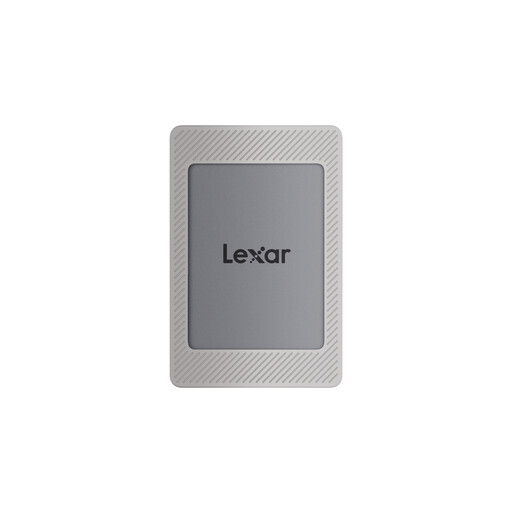
Lexar ES4 Portable SSD, magnetic set, 2 TB

Lexar ES4 Portable SSD, magnetic set, 2 TB

This version is worth considering if 2 TB is right for your archive and you want to use the magnetic attachment.

Capacity: 2 TB. The product specifications list USB 3.2 Gen 2, read speeds of up to 1,050 MB/s and write speeds of up to 1,000 MB/s, as well as compatibility with iPhone 15/16, PC, Mac, tablets, PS5 and PS4. Wireless MagSafe charging is not supported.

View at Joybuy

Samsung Portable SSD T7, 1 TB, USB Type-C 3.2 Gen 2, Grey

Samsung Portable SSD T7, 1 TB, USB Type-C 3.2 Gen 2, Grey

The 1 TB version may suit a smaller archive. Check that your recordings and project files, including any versions you plan to keep, will fit.

Capacity: 1 TB. Interface: USB Type-C 3.2 Gen 2.

View at Joybuy

Frequently asked questions

How do I copy PS5 screenshots and video clips to an external SSD?

PlayStation explains how to copy files from the Media Gallery to a connected USB drive. For this purpose, PlayStation specifies FAT or exFAT and excludes drives formatted as extended USB storage. Compatibility isn’t guaranteed with every device.

Can I play PS5 games directly from the same external SSD?

No. According to PlayStation, you can’t play PS5 games directly from extended USB storage. To play them, you’ll need to move the game data back to the console’s storage or to a suitable M.2 SSD. PS4 games, on the other hand, can be played directly from extended USB storage. Different formatting requirements apply when copying recordings.

How can I make sure I can restore an archive of important recordings and project folders?

Keep a separate backup and regularly check that you can restore files from it. Germany’s Federal Office for Information Security notes that the lifespan of storage media can’t be predicted precisely and recommends testing that files can be restored.

What warranty does Kingston offer for the XS2000?

Kingston offers a five-year limited warranty with technical support for the XS2000. Check the terms for the specific model; you shouldn’t assume the same warranty applies to other SSD ranges.

What product markings should I check when buying in Germany?

When monitoring electrical and electronic products on the market, Germany’s Federal Network Agency checks points including CE marking, product identification and correct manufacturer details. These points alone don’t prove that a particular product listing is compliant.