If you often open and edit large design projects directly from an external drive, an SSD is an obvious choice for active work. A desktop HDD may also suit completed projects or a separate backup, provided you have enough desk space and a power socket. Before buying, check the storage capacity you need, the connection and the file system. Samsung and Kingston make their advertised peak SSD speeds conditional on using compatible connections, while the Federal Office for Information Security recommends making regular backups that you can restore.
Which type of drive is right for you?
Working on active projects
You regularly work with large design files and need an external drive for active projects. Check that your computer and cable support the connection standard specified by the manufacturer, as Samsung Germany and Kingston Technology advise.
Archiving projects
You want to keep completed projects in your home office and value available storage more than frequently working directly from the drive. Seagate Germany lists Expansion Desktop models with capacities of up to 28 TB; available storage depends on the model you choose.
Planning backups
You want to back up important designs separately from your working files and check that you can restore them. The Federal Office for Information Security recommends backing up data regularly and testing whether it can be restored.
What should you consider when buying?
First decide whether the drive will hold active projects, an archive or a separate backup. Then check the capacity, connection and file system to make sure they suit your computer and workflow.
| What matters |
What to check when buying |
Who will find this especially important? |
| Speed when working with large files |
Check the connection standard supported by the drive, computer and cable; allow enough space for current projects. |
If I often open and save large files directly from the drive, I want to choose a connection and cable that suit my computer rather than assume I’ll get the advertised peak speed. Around 36% of consumers would rank speed as their top buying priority. |
| Space for a project archive |
Consider the amount of data you already have and how much it is likely to grow; for desktop drives, check the power supply and exact capacity. |
For a growing archive, I want to know how much space my completed projects need and whether the drive can stay on my desk. Around 29% of consumers would prioritise archive space. |
| A separate backup |
Keep working files and backups separate, set a schedule and test that you can restore your data. |
If I don’t want important designs stored in just one place, I want to keep a separate copy and make sure I can restore it. Around 21% of consumers would put a backup they can verify first. |
| System and file-system compatibility |
Before formatting, check whether you’ll share files between Mac and Windows or store Time Machine backups; back up your files first. |
If I switch between Mac and Windows, I need a suitable format for sharing files; Time Machine has different format requirements. Around 14% of consumers would prioritise compatibility with their system and workflow. |
Apple lists ExFAT as a formatting option for drives over 32 GB that will be used with both Mac and Windows. For new Time Machine backup volumes, Apple recommends APFS or APFS (Encrypted); according to Apple, a Windows-formatted volume is not suitable as a Time Machine destination.
Common buying and usage mistakes
-
Using the external drive as the only place to store important designs
Having more storage does not, on its own, give you a separate backup that you can restore.
Keep an additional copy and test whether you can restore your files from it. The Federal Office for Information Security recommends backing up data regularly.
-
Assuming every USB-C connection will deliver the advertised SSD peak speed
For the Samsung T9, Samsung says the stated maximum requires USB 3.2 Gen 2x2 on both the host and cable, as well as UASP enabled. Kingston also notes that the host interface can limit transfer speeds.
Before you buy, check which USB protocols your computer and cable support, not just the shape of the connector.
-
Comparing archive and working drives on capacity alone
A desktop HDD may suit completed files, but the Seagate Expansion Desktop needs a power supply. An SSD is another option if you often work on projects directly from the drive.
First decide whether you’ll be working on files regularly or mainly storing completed projects.
-
Formatting the drive without checking what you need it for
A format that lets you share files between Mac and Windows is not automatically suitable for Time Machine backups. Formatting can erase files already on the drive.
Decide what the drive will be used for before formatting it, and back up any files stored on it.
Key brands at a glance
Samsung
The Portable SSD T9 is a range of portable SSDs for large projects; Samsung Germany also lists a 4-TB model.
- Samsung states that the T9 offers sequential transfer speeds of up to 2,000 MB/s. Reaching this maximum requires USB 3.2 Gen 2x2 on both the host and cable, as well as UASP enabled.
- Samsung states that the T9 comes with a limited five-year manufacturer’s warranty. The stated speed is not a measured result for any individual user’s computer.
Kingston
Kingston offers the portable XS2000 SSD in capacities of up to 4 TB for large documents and image files.
- Kingston specifies USB 3.2 Gen 2x2 and speeds of up to 2,000 MB/s for reading and writing; a short USB-C to USB-C cable is included.
- Kingston notes that the host interface can limit the transfer speed you achieve.
Seagate
The Expansion Desktop is a range of desktop HDDs for extra archive or backup storage.
- Seagate lists models with capacities of up to 28 TB and USB 3.0.
- According to Seagate, the Expansion Desktop needs a power supply and USB cable to operate. Check the specific offer for the scope and regional availability of any advertised data recovery services.
Crucial
The X10 is a range of SSDs for large files; the manufacturer’s information also lists a 4-TB model.
- Crucial states sequential read speeds of up to 2,100 MB/s. According to the manufacturer, this is the maximum device performance, measured on a high-performance desktop PC.
- The manufacturer’s figure describes maximum sequential performance and is not a guarantee of transfer speeds in every workflow.
Joybuy products for project files and archiving
This selection includes portable SSDs for active project files, as well as external drives for extra storage and backups in your home office.
 No image available
WD Elements Portable 6TB USB-C
An option if you want to store completed projects or large files on an external drive.
Capacity: 6 TB. USB-C.
View at Joybuy
 No image available
WD Elements 8TB Desktop Hard Drive, USB 3.0
This desktop model may suit you if you want to store lots of completed projects in one place at a fixed workstation.
Capacity: 8 TB. USB 3.0. Form factor: 3.5-inch. Requires an external power adaptor to operate. According to the product description, it comes pre-formatted as NTFS; reformatting is required for the Mac use described there.
View at Joybuy
 No image available
Samsung Portable SSD T7 4TB
A portable SSD option if you want to keep project files on an external drive.
Capacity: 4 TB. USB Type-C. USB 3.2 Gen 2.
View at Joybuy
 No image available
Samsung MU-PG2T0B 2 TB USB Type-C
A portable SSD option for active project files if 2 TB is enough for your storage needs.
Capacity: 2 TB. USB Type-C. USB 3.2 Gen 2 (3.1 Gen 2).
View at Joybuy
 No image available
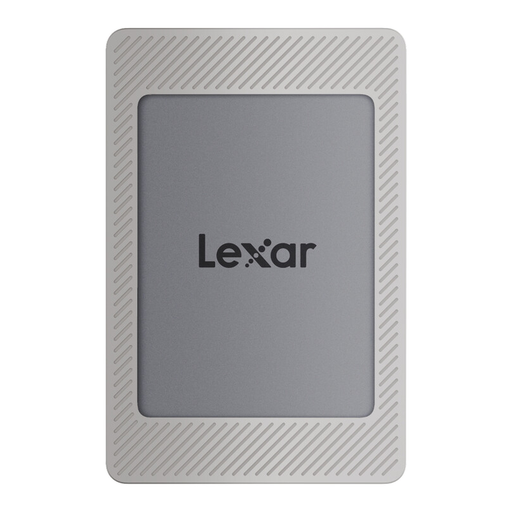
Lexar ES4 Portable SSD with Magnetic Set 2TB
A portable SSD for project files if you’re looking for 2 TB of capacity and the Magnetic Set.
Capacity: 2 TB. USB 3.2 Gen 2. The product description mentions a magnetic holder and notes that wireless MagSafe charging is not supported.
View at Joybuy
Frequently asked questions
Can I use the same external hard drive for project files on Mac and Windows?
Yes. Apple lists ExFAT as a formatting option for drives over 32 GB that you’ll use with both systems. Back up any existing files first, as formatting can erase them.
Can a Windows-formatted drive also be used as my Time Machine destination?
No. According to Apple, a Windows-formatted volume cannot be used for Time Machine backups. Apple recommends APFS or APFS (Encrypted) for new backup volumes; back up your files before reformatting.
Is it enough to move finished designs to a new external drive?
Not if that leaves the only copy there. The Federal Office for Information Security recommends backing up data regularly and checking that you can restore your files.
Is a USB-C connection enough to get the advertised SSD peak speed?
No. The connector shape alone doesn’t confirm that your computer supports the required USB protocol. For the T9’s maximum speed, Samsung specifies USB 3.2 Gen 2x2 on both the host and cable, as well as UASP enabled.
Are a manufacturer’s warranty and statutory consumer rights the same thing?
No. The Verbraucherzentrale distinguishes between your statutory rights against the seller and a voluntary warranty offered by the manufacturer or retailer. Check the specific terms of any warranty separately.


