
Lieferung heute & morgen

Qualitätsgarantie

Willkommens-Angebote freischalten: KOSTENLOSE Lieferung | Bis zu 80 % RABATT | Kostenlose 30-Tage-JoyPlus-Testphase
App herunterladen
As a Joybuy Product Recommendation Officer, I sift through market data to provide you with objective and practical buying advice. This guide will help you find the right storage solution for your iPhone 15 Pro and avoid common pitfalls.
The ability to record 4K ProRes video directly to an external storage device with the iPhone 15 Pro and Pro Max is a game-changing feature for content creators and videographers. However, buying a suitable external SSD for the iPhone 15 Pro can quickly become overwhelming. Many users invest in a drive only to find it's unsuitable for their mobile workflow. Before you make a decision, you should be aware of the most common mistakes.
Common Pitfalls When Buying an External SSD:
To avoid these issues, focus on three core technical features. These will determine if an SSD is truly suitable for direct ProRes recording with the iPhone 15 Pro or Pro Max.
Recording 4K ProRes at 60 frames per second requires a sustained write speed of at least 220 MB/s. However, to ensure a buffer for more demanding formats (like 4K 120fps on the iPhone 16 Pro) and guarantee smooth operation, a high-speed external SSD with significantly higher specs is recommended. Look for drives with a USB 3.2 Gen 2 (up to 10 Gbps) or Gen 2x2 (up to 20 Gbps) interface. These standards ensure the SSD can handle the data stream from the iPhone without bottlenecks.
ProRes files are massive. A single minute of 4K video at 60 fps can take up around 6 GB of space. Since internal storage cannot be upgraded, choosing the right external capacity is crucial. A 1TB portable SSD is a good starting point for most users, allowing for over two hours of recording time. For longer projects or as your primary on-the-go storage, this is a sensible minimum size for an iPhone 15 Pro Max storage expansion.
For mobile filmmakers, gear handling is critical. A magnetic SSD is a purpose-built solution here. These drives attach directly to the back of the iPhone (similar to MagSafe accessories), creating a stable, integrated unit. This eliminates the problem of a dangling drive, protects the USB-C port from strain, and ensures an uninterrupted workflow, especially when shooting on the move.
Based on the criteria above, we have identified several products tailored to specific user needs.
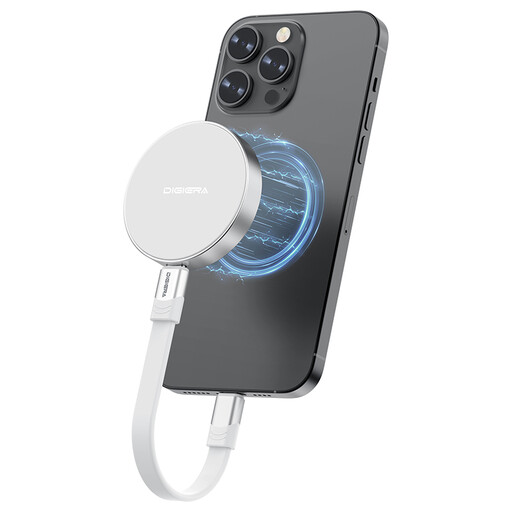
Why This Fits Their Persona: This model is specifically designed for the mobile videography workflow with the iPhone 15/16 Pro. Its magnetic mount solves the "dangling cable" problem, making it ideal for vlogging and dynamic, handheld filming.
The integrated magnetic attachment prevents an unstable connection and cable clutter. Its high write speed of up to 1800 MB/s (according to the manufacturer) ensures no frames are dropped, even when recording 4K ProRes at high frame rates.
Direct magnetic attachment for a seamless workflow; extremely high transfer rates for demanding video files; lightweight and compact design (46 g).
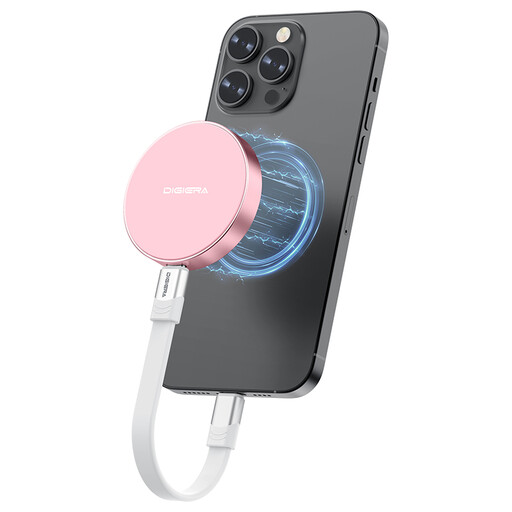
Why This Fits Their Persona: This user needs a single, ultra-fast drive for multiple devices—not just an iPhone, but also a MacBook, iPad Pro, or PS5. The read speed of up to 2000 MB/s (according to the manufacturer) is ideal for quick backups and transferring large amounts of data between different systems.
It bypasses the compatibility pitfall with a universal USB-C interface that works across a wide range of devices. Its high performance ensures it serves not just the iPhone but acts as a versatile tool for all data-intensive tasks.
Extreme transfer speeds for rapid backups; broad compatibility with laptops, consoles (PS5), and tablets; shock-resistant aluminum alloy casing.
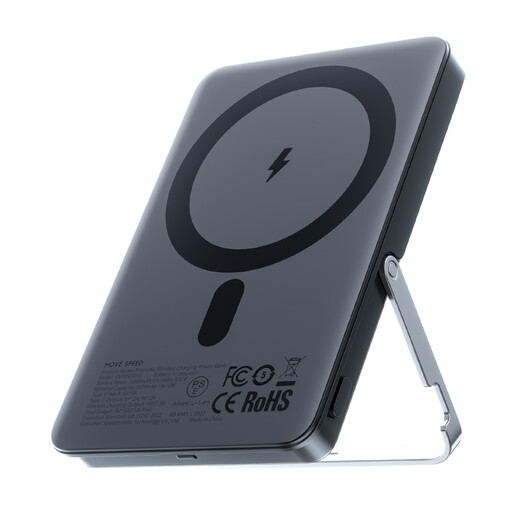
Why This Fits Their Persona: While not a storage device, this accessory solves a critical problem for mobile creators: battery life. ProRes recording is power-intensive. This magnetic power bank with an integrated stand delivers power and offers a hands-free viewing option, complementing the mobile setup.
It indirectly addresses the problem of impractical handling by combining two functions (power and a stand) into one slim, magnetic accessory, thereby reducing gear. It's a practical addition for any mobile creative.
Magnetic attachment for wireless charging during recording; integrated, adjustable stand for hands-free use; slim and lightweight design.
We have compiled a complete, up-to-date list of products that fully meet these strict selection criteria.
Do I need to format an external SSD for my iPhone 15 Pro? Typically, SSDs designed for direct recording with the iPhone come pre-formatted with a compatible file system (usually exFAT or APFS). It is advisable to check the product specifications. If necessary, reformatting can be easily done via a Mac or a Windows PC (with the appropriate software).
What cable do I need to connect an external SSD to the iPhone 15 Pro? You will need a USB-C cable that supports the data transfer rate of your SSD. The iPhone 15 Pro's USB-C port supports speeds of up to 10 Gbps (equivalent to USB 3.2 Gen 2). For direct recording from the iPhone, a cable with this rating is sufficient, even if the SSD itself supports a faster standard like USB 3.2 Gen 2x2.
Does using an external SSD significantly affect my iPhone's battery life? Yes, recording ProRes video while simultaneously powering an external SSD will drain the iPhone's battery noticeably faster. For longer recording sessions, using a magnetic power bank at the same time is a very practical solution to extend battery life without disrupting your workflow with extra cables.